






SpyX: Monitoring App review
 Analysis by Appsdrops
I look at parental-control apps less as a way to watch every move and more as a way to make a few clear family rules easier to follow. SpyX: Monitoring App is aimed at parents who want location awareness alongside tools for managing app and website access and receiving keyword alerts. That combination makes it more involved than a simple screen-time timer, but it also calls for a thoughtful conversation with a child about what is being monitored and why.
What free access means here
SpyX is a free parenting app developed by SPYX.COM. That makes it possible to consider without weighing a listed purchase price against the features. I would treat “free” as a starting point for deciding whether the approach suits your household, rather than assume it guarantees that every capability or future use will always be cost-free.
The app has a 4.9 average from around 740 ratings, with more than 250 written reviews. Those figures suggest a positive reception, but they are not a substitute for checking whether its controls fit your needs or how your family feels about monitoring. It has over 50,000 installs, is rated for Everyone, and its current version is 2.2.3. It was released on January 27, 2026, and requires Android 7.0 or later.
For a parent comparing options, the practical value question is not simply “Is it free?” It is whether having location tracking, alerts, and blocking tools in one parenting app is useful enough to justify setting it up and maintaining it. If you only want to agree on bedtime phone rules, a conversation and the controls already built into a device may be simpler. If you need several kinds of oversight in one place, SpyX is more relevant to explore.
What the feature mix can help with
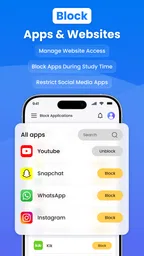
The app brings together three distinct jobs: checking a child’s location, setting alerts for selected keywords, and blocking apps or websites. Each addresses a different concern, so the strongest use case is a household that has a specific reason for wanting more than one of these tools. A parent who mainly needs help limiting access to distracting sites may care less about location tracking; a parent focused on a child’s route home may not need broad blocking.
That distinction matters because bundling tools can make an app feel comprehensive even when a family only needs one part of it. I would decide which problem comes first before installing anything. If the priority is keeping certain online destinations off-limits, write down those boundaries before configuring blocks. If the priority is knowing a child has reached a planned destination, agree on what location checks are for and when they are appropriate.
The most useful approach is to treat monitoring as a shared safety plan, not a hidden substitute for trust. Keyword alerts can prompt a parent to check in, but an alert is not the same as context. A word can appear in a harmless conversation, a joke, or a school assignment. I would use any alert as a reason to ask a calm question, not as proof that a child has done something wrong.
Everyday routines where it may fit
Imagine a teenager taking the bus home after an after-school activity. Location tracking may give a parent a way to check progress without repeatedly texting, while a clear family agreement can prevent that check from turning into constant surveillance. If the route or schedule changes, a direct message is still the better way to resolve uncertainty; a map signal alone cannot explain why someone is delayed.
Another realistic use is setting boundaries around a younger child’s browsing. A parent might block a particular website and then explain the rule in plain language, rather than relying on the block to teach judgment by itself. The same idea applies to app restrictions: a block can support a household rule, but it works best when the child understands the reason and knows how to ask for an exception.
A less obvious workflow is to start with one tool, not all of them. For example, a family could begin with a narrowly defined blocking rule, see whether it causes problems with ordinary school or family use, and then decide whether alerts or location checks solve a separate need. This makes it easier to identify which setting is helping and which is creating friction. Turning on every form of monitoring at once can make it difficult to tell whether a child is responding to a sensible boundary or simply feeling watched.
Tradeoffs worth considering before setup
Location tracking is most helpful when it answers a clear, occasional question, such as whether a child has arrived somewhere agreed upon. It is less appealing if the goal is to follow every movement without discussion. I would set expectations in advance: who can check, what situations justify checking, and when a child should contact a parent directly. Those boundaries make the feature easier to explain and less likely to undermine trust.
Keyword alerts also require restraint. They can draw attention to a conversation that deserves a check-in, but broad or poorly chosen terms could create unnecessary interruptions. A practical tip is to review the purpose of each alert before relying on it: is it meant to flag a genuine safety concern, or is it simply monitoring everyday language? The narrower and more clearly explained the purpose, the easier it is to respond proportionately.
Blocking has its own edge cases. A website or app that a parent sees as entertainment might also be used for schoolwork, communication, or a legitimate interest. Before adding a restriction, consider when and why the child needs access, and make room for a conversation if a block interferes with something ordinary. A tool that is too strict can lead to workarounds rather than better habits.
There is also a setup and upkeep cost in time, even when an app is free. A parent needs to decide what to monitor, explain the rules, and revisit them as a child becomes more independent. Families who want a one-time setting that never needs discussion may find this kind of app less satisfying than a basic device-level limit. I would not choose it simply because it offers several controls; more controls only help when someone is prepared to use them thoughtfully.
How it compares with simpler alternatives
Compared with using only the standard controls on a phone, SpyX’s appeal is its combination of location, keyword alerts, and blocking in a parenting-focused app. Built-in tools may be enough when the main goal is reducing screen time or applying a straightforward restriction. They can be the better choice for parents who prefer fewer monitoring layers or want to keep the setup as simple as possible.
Compared with a location-only tool, SpyX is broader: its value is not limited to checking where a child is. That breadth is useful for parents addressing both online access and physical whereabouts, but it can be unnecessary for someone who only wants arrival reassurance. Likewise, a dedicated web filter may be a better fit for a family that cares almost entirely about browsing boundaries and does not want location monitoring involved.
The right comparison is therefore not “Which app has the most features?” but “Which tool matches the rule we are trying to support?” SpyX makes the most sense when at least two of its functions serve real, separate needs in the same household. If only one feature matters, a narrower option may be easier to understand and maintain.
Who is likely to get value from it
I would consider SpyX for parents who want a single place to combine location awareness with online boundaries, especially when those tools can be introduced openly and used for specific purposes. It may also suit families who want keyword alerts as a prompt for discussion rather than as an automatic judgment. The free price makes it reasonable to evaluate as an option, while the app’s high average rating offers some reassurance that other users have responded well.
I would skip it if your child is old enough that location checks would feel intrusive and there is no meaningful safety reason to use them, or if your household has already settled on simpler controls that work. It is also not the right answer for a parent seeking a replacement for conversation, digital-literacy guidance, or direct support when a child is in trouble. Monitoring can help a parent notice a concern; it cannot, on its own, build the trust needed to discuss one.
Before installing, I would talk through the intended rules, choose one or two concrete goals, and decide what would count as a reason to change the setup. That gives both parent and child a way to judge whether the app is helping instead of letting monitoring expand by default. It also makes it easier to remove a restriction that is causing more problems than it solves.
My verdict
SpyX: Monitoring App is worth considering if you genuinely need a mix of location tracking, keyword alerts, and app or website blocking, and you are willing to use those tools transparently. Its free access makes it an approachable option to assess, and its broad feature mix is more compelling than a single-purpose tool for families with several distinct concerns.
For a household that only needs a basic screen-time boundary, or for a child who would reasonably expect more privacy, I would choose a simpler alternative or rely on a direct family agreement instead. My recommendation is conditional: try SpyX when its specific controls support clear, shared rules, not just because more monitoring is available. That is where its value is most convincing.
What we like
- Offers a clear dashboard for reviewing collected activity.
- May help parents start conversations about online safety.
- Supports remote monitoring after initial setup.
- Can bring several activity categories into one interface.
- Provides alerts that may draw attention to selected changes.
What could be better
- Monitoring requires access to sensitive personal information.
- Some features may depend on the target device and operating system.
- Setup may require physical access to the device being monitored.
- Paid plans can make ongoing use costly.
- Monitoring someone without consent can violate privacy or laws.





