





Spotify: Music & Podcasts review
 Analysis by Appsdrops
I can see why Spotify feels useful almost immediately: it puts familiar music, new listening, and podcasts in one place, then gives you several ways to decide what to play next. The first few sessions are easy to fill with searches for artists and albums you already know. The more interesting test comes later, when the novelty wears off and the app has to keep earning a place in your routine. In my view, it does that best for people who listen often and enjoy a mix of deliberate choices and recommendations.
From a quick start to a listening habit
Spotify: Music & Podcasts is a free music and audio app from Spotify AB. It has been available since May 10, 2016, and its current version is 1.134.2, with Android 6.0 as the minimum operating system. Its Teen age rating is worth keeping in mind if you are choosing an audio app for a younger listener.
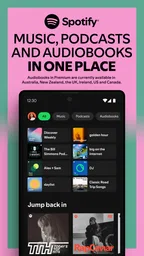
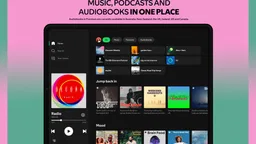
The first-week appeal is straightforward: search for a song, artist, or podcast, then use playlists and discovery tools to branch out. Lyrics add a useful layer when I want to follow along rather than treat music as background. That combination makes the app approachable for both focused listening and casual sessions, such as putting something on while cooking or settling in for a commute.
Spotify has a 3.9 average from around 46,000 ratings, alongside more than 100 million installs. Those numbers suggest a widely used service with a range of experiences, not a guarantee that every listener will like its recommendations or interface. I would treat the rating as context and decide based on how well the app fits your habits.
One practical way to get more from the first few sessions is to use search with a purpose. Rather than judging the app by whatever it recommends on day one, look up a few artists, albums, or podcast topics you genuinely return to. Then pay attention to whether the suggestions become useful. Recommendation quality is personal, and your own listening choices are a better test than a quick browse through a generic discovery page.
Why it can keep paying off month after month
The lasting value is less about having a large app on your phone and more about reducing the small decisions around listening. If I already know what I want, search gets me there. If I do not, a playlist or discovery option can supply a starting point. Podcasts also make the app useful at times when I want spoken audio instead of another album, so it can serve different parts of the day without requiring a switch to a separate audio app.
A realistic routine might look like this: I choose music for a morning walk, move to a podcast during a household task, and later search for a particular song rather than letting a playlist decide. The value comes from those changes in intent. Spotify is most convincing when it handles both the planned session and the “play something for now” moment, not when it is judged only as a library of tracks.
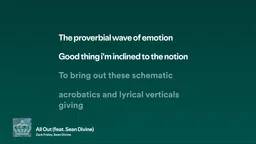
Lyrics are a small but meaningful part of that mix. They help when a song is unfamiliar, when I want to sing along, or when I am trying to catch a line I have missed. I would not choose the app solely for lyrics, but their presence makes a listening session more interactive without requiring a separate search outside the player.
It is also useful to treat playlists as tools rather than permanent possessions. I might keep one for a particular mood or activity, then return to search when I want a specific album. That balance avoids a common trap: expecting a recommendation system to understand every occasion. A playlist can be a convenient default, while direct selection remains better when the mood is precise.
Keeping the app useful without making it a chore
Spotify does not need constant tending to be usable, but a little intentionality can improve the experience. When a recommendation misses, I would move on and choose something that fits rather than spend a long session trying to correct every suggestion. When a playlist stops matching an activity, replace it with a better fit instead of treating it as the only route to music. The point is to make listening easier, not to turn the app into a project.
A good maintenance habit is to separate “what I want now” from “what I want to explore.” Search works well for the first; discovery and playlists are better for the second. This distinction also makes it easier to judge the recommendations fairly. A suggestion that is wrong for a focused work session might still be an interesting find when I am browsing with no particular destination.
For podcasts, I would make the same distinction. If I have a specific show or subject in mind, search first. If I am open to trying something new, browse. That simple workflow saves time and prevents a recommendation feed from becoming the only view of what the app can do. It also helps when music and spoken audio serve different routines: one for a short, energetic break, another for a longer task.
The free price makes it easy to try without committing money up front. Still, “free” should not be confused with “automatically ideal for every listener.” If your main requirement is uninterrupted control over a carefully selected collection, check how the current listening experience fits that expectation before building a routine around it. The app’s value depends on whether its way of getting to audio feels convenient to you.
Where familiarity can turn into fatigue
Any recommendation-led listening habit can begin to feel repetitive. If I rely on the same playlists or accept every suggestion, the app may seem less like a discovery tool and more like a loop. The fix is not necessarily to abandon it: deliberately search for a different artist, album, or podcast topic, or choose something outside the usual mood. But listeners who dislike algorithmic discovery may prefer a service or personal collection built around direct control.
There is also a difference between having many ways to listen and always finding the right thing quickly. A broad choice can be convenient, but it can also make browsing feel like work when I only have a few minutes. In that situation, a saved routine or a specific search is more useful than scanning recommendations. If you regularly spend longer choosing than listening, the app is not solving the problem that matters most to you.
Another possible source of fatigue is mixing music and podcasts in one listening environment. For some people that is precisely the appeal; for others, the two formats belong in separate apps and separate routines. Spotify’s combined approach is convenient when I want one place for audio, but it is not automatically better than a dedicated podcast app or a music service whose interface better matches a listener’s preferences.
The app is not the right choice for someone who wants no discovery prompts, never uses podcasts or lyrics, and already has a music workflow they enjoy. It may also be a poor fit if the way playlists and recommendations shape browsing feels intrusive or simply gets in the way. I would not switch from a setup that already makes listening effortless just because Spotify is popular.
How it fits beside other audio options
Compared with using a collection of individually chosen albums, Spotify is better suited to people who want discovery and quick access alongside familiar listening. Compared with a dedicated podcast app, its advantage is having spoken audio and music together; its trade-off is that a podcast-first listener may prefer an interface organized around shows and episodes. These are differences in emphasis, not a universal ranking. The best option is the one that makes your usual listening feel natural.
For a listener who mainly wants to replay a small set of albums, a personal library may feel calmer and more predictable. For someone who likes to move from known tracks to new playlists and then to a podcast, Spotify’s breadth is more compelling. I would make the decision by mapping a normal week: note when you listen, what you reach for, and whether you want the app to suggest things or simply follow instructions.
Does it deserve lasting space?
My verdict is that Spotify earns a lasting place for frequent listeners who move between music, playlists, lyrics, discovery, and podcasts. Its strongest recurring value is convenience: it can support a planned listen, an exploratory session, and a change of format within one app. The experience is not maintenance-free in the sense of always guessing perfectly, but it does not require heavy upkeep if I use search when I know what I want and treat recommendations as optional prompts.
I would give it a fair trial across ordinary situations rather than deciding after one impressive playlist or one frustrating suggestion. Try it during a commute, a quiet task, and a moment when you want to find something new. If those different uses feel easier in one place, the app has a practical reason to stay installed. If you mostly want a tightly controlled collection or a podcast-focused setup, another option may suit you better.
Spotify is free, widely adopted, and built for people who want music and spoken audio to share a home. That is a useful combination, but the real test is whether it keeps helping after the first burst of exploration. For me, it is worth keeping when its discovery tools save time rather than dictate taste. If you use it with that distinction in mind, its playlists, lyrics, and podcast access can keep serving everyday needs without turning listening into another thing to manage.
What we like
- Spotify Connect makes it easy to move playback between compatible devices.
- Collaborative playlists let friends build a shared music collection.
- The queue can be reordered to shape what plays next.
- Lyrics are available for many tracks during playback.
- Sleep Timer can stop audio automatically after a set time.
What could be better
- Some tracks have lyrics that are missing or out of sync.
- The free plan includes ads between listening sessions.
- Offline downloads require a Premium subscription.
- Podcast availability and features vary by country.
- Recommendations can feel repetitive if listening habits stay unchanged.





