




SongTrail: Offline Music review
 Analysis by Appsdrops
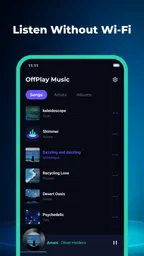
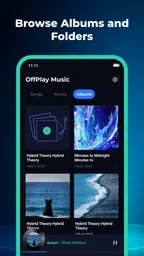
I’m drawn to offline music players when I want to listen to tracks already on my phone without building my day around a connection or a streaming subscription. SongTrail: Offline Music is aimed at that straightforward job: playing local songs, keeping them arranged in playlists, and making playback easier to manage from the lock screen. That focus is appealing, but it also means the experience depends on a basic first step going smoothly: the music you expect to hear needs to be available to the app on your device.
My impression is that this is best approached as a practical library player, not as a replacement for a streaming service. If you already keep audio files locally and want a simple way to listen and sort them, it may fit neatly into your routine. If you expect a catalogue of music to browse, recommendations, or a way to obtain tracks inside the app, this is probably not the right kind of music app for you.
When the music you expect does not appear
The most frustrating moment with a local music player is often not pressing play; it is opening the library and finding that a familiar song is missing. With SongTrail, I would first check whether the track is actually stored on the device rather than merely appearing in another app’s online library. A downloaded item in a streaming service is not necessarily the same thing as an ordinary local audio file that another player can use.
I’d also check that the missing track is in a place the phone’s music library can recognize. If you recently moved or added files, give the library a moment to reflect the change, then reopen the player and check again. The useful habit here is to test with one known local song before spending time arranging a large collection. If that track appears and plays, you have a much clearer starting point for sorting out the rest.
SongTrail’s purpose is narrow in a helpful way: it is an offline music player for local listening, rather than a streaming catalogue. That distinction matters when troubleshooting. If the file is absent, unavailable, or not recognized by the device, changing playlists inside the player will not solve the underlying problem. I’d confirm the track works from the device’s usual file or music library first, then return to SongTrail.
A little checking before building playlists
Before making several playlists, I’d play a few different tracks from the collection. Try one song you know is stored locally and another from a different folder or album. This simple check can reveal whether the issue is limited to a particular file or whether the library itself needs attention. It also avoids the annoyance of organizing a playlist around songs that do not actually play as expected.
If a song does not appear, resist the temptation to repeatedly recreate the same playlist or make duplicate entries. First verify that the file is present and usable on the phone. Then revisit the app. That order keeps the troubleshooting focused: confirm the music, confirm the library, and only then adjust how you have organized it.
Making lock-screen controls part of the routine
Lock-screen controls are most useful once playback is already working. I’d start a track in SongTrail, lock the phone, and check whether the controls let me pause or move through music without unlocking. This is a good quick test at home, where it is easy to return to the app if something feels off, rather than discovering a snag halfway through a walk.
For everyday use, I would treat the lock screen as a convenience, not as the only way to manage playback. If controls do not respond, unlock the phone and see whether the player itself is still running normally. If the song has stopped entirely, that is different from a control that simply is not behaving as expected. Separating those cases saves time: one points toward playback, the other toward the way the phone is presenting the controls.
Playlist organization that stays useful
Playlists are most valuable when they reduce small decisions later. Rather than creating a long list that tries to cover every mood, I’d make a few that match clear situations: a set for a commute, familiar tracks for household chores, or calm music for winding down. That makes it easier to choose something quickly when you are away from a connection or do not want to browse the whole library.
There is a trade-off, though. A playlist only helps if its tracks are available locally and still suit the moment you made it for. When adding music, I’d keep the list focused and occasionally check that the songs still play. That is especially sensible if you regularly move files around on the phone. A tidy collection can make an offline player feel effortless; a library that changes constantly can make playlist upkeep feel like a chore.
When the phone, not the player, may be the issue
Offline playback removes the need for a live music connection, but it does not remove every phone-related cause of trouble. A file may be incomplete, stored somewhere unexpected, or simply not available as a local track. Similarly, a phone’s lock-screen behavior can differ from the playback screen inside an app. If audio stops or controls appear inconsistent, I would test the same local track again and compare what happens with the phone locked and unlocked before blaming the playlist.
It is also worth keeping the app and the music library in perspective. SongTrail can organize and play local songs, but it cannot make a missing file appear on the device. If the track is not accessible elsewhere on the phone, the sensible fix is to locate or restore the file first. If it works elsewhere but not here, then checking the app again is a reasonable next step.
For a practical commute, I’d prepare the music at home: confirm the chosen tracks are local, put them in a short playlist, start playback, and test the lock-screen controls before leaving. If the train passes through a dead zone, the important work is already done. This routine is less about clever settings and more about avoiding a predictable frustration: discovering that a track was never available offline when you wanted it.
Who will appreciate its focused approach
SongTrail may suit someone who has a personal collection on their phone and wants direct access without mixing that listening with streaming recommendations or online browsing. It is also a reasonable option for people who prefer playlists they assemble themselves and want playback controls available while the phone is locked. The app is free, carries an Everyone age rating, and is published by APPINNOVA TECHNOLOGY PTE. LTD.
It is less compelling for a listener whose music mostly lives in streaming apps, or who wants discovery tools and a large searchable catalogue. In that situation, a streaming service is the more natural choice. A phone’s built-in music player may also be enough if it already handles local songs and playlists comfortably; switching only makes sense if SongTrail’s particular combination of local playback and lock-screen controls fills a gap for you.
The app has an average rating of 3.8 from around 70 ratings, with just under 10 written reviews, and has passed 100,000 installs. I see that as a modest sign of interest, not a reason on its own to expect a perfect fit. The current version is 1.0.3, and it requires Android 8.0 or later. Those details are worth checking against your phone before trying it, especially if you use an older device.
My practical verdict
SongTrail: Offline Music makes the most sense when you already have local tracks and want a simple listening routine built around them. Its strongest appeal is the clear pairing of personal playlists with lock-screen playback, rather than a promise to replace every music service. I’d give it a try if your main frustration is getting to your own stored songs quickly, but I would not choose it expecting online discovery or a source of new music.
My recommendation is to begin with a small test: play a local song, make one useful playlist, lock the phone, and see whether the controls fit how you listen. If those basics work, you can gradually move more of your routine over. If the tracks are missing or playback is unreliable, check the files and the phone’s music library before rebuilding your setup. That measured approach gives SongTrail a fair chance while making it clear whether the app—or simply the state of your local collection—is the real obstacle.
What we like
- Keeps music available when you are offline.
- Useful for listening during travel or in areas with weak reception.
- A straightforward choice for listeners who prefer offline playback.
- Does not rely on a continuous mobile data connection.
- Can help avoid streaming data usage while listening.
What could be better
- You need to add music files before listening offline.
- Available features may depend on the files stored on your device.
- Downloaded or stored music uses device storage.
- Your music library may not sync across devices automatically.
- It may not include a built-in catalog of streaming tracks.





