

Solid Starts: Baby Food App review
 Analysis by Appsdrops
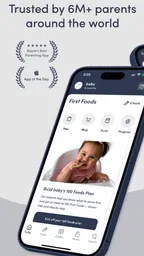
When a baby starts eating solids, the hard part is often not finding a recipe; it is deciding what to offer, how to prepare it, and whether a food is suitable for this stage. Solid Starts: Baby Food App is built around that practical moment. I find its food-focused approach more useful than a general parenting app when I want to look up an ingredient and think through how it might fit into a baby’s meals.
It is a free parenting app from Solid Starts, with optional in-app purchases. The app has a 4.8 average from around 26,000 ratings and more than a million installs, which suggests many families have found it worth trying. Those figures are a helpful signal, not a substitute for judging whether its guidance suits your child or your preferred approach to starting solids.
Food guidance you can actually use at mealtime
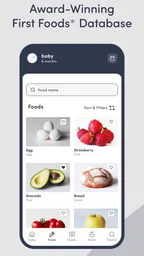
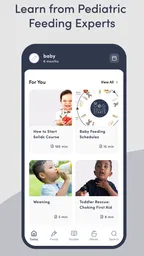
The main draw is its database of foods for introducing real food to babies, including a baby-led-weaning perspective. Instead of treating solids as a vague milestone, the app gives caregivers a place to investigate specific foods. That matters when you are standing in the kitchen with a ripe pear, a piece of toast, or a family meal and need to make a decision before serving it.
In my view, the best use is as a planning and reference tool, not as a complete feeding plan. I would check a food before shopping or preparing dinner, then use the information to make a choice that fits the baby’s readiness and the family’s routine. A searchable food resource can also help grandparents or another caregiver get on the same page, as long as everyone understands that the app does not replace individualized medical advice.
The approach is especially appealing if you want your baby to encounter ordinary family foods rather than rely only on a narrow set of baby-specific products. It can prompt useful questions: Is this ingredient a sensible one to introduce today? How does it fit with what the baby has already tried? Can it be part of the adult meal with an adjustment for the baby? Those questions make the database more valuable than a list of recipes alone.
Where it fits among parenting resources
Compared with searching the web for each ingredient, a dedicated database gives you a more focused starting point and keeps the task centered on feeding. Compared with a basic meal-planning app, its emphasis is not simply on choosing dishes for the household; it is about introducing foods to a baby. And compared with broad parenting apps, it has a clearer purpose rather than asking you to navigate unrelated trackers and advice.
That focus is also a limitation. If what you need most is a weekly menu, grocery organization, bottle tracking, or a place to record every part of your baby’s day, this is not the tool I would choose as your only app. Families who prefer spoon-feeding or want a very structured feeding schedule may also find a more tailored resource easier to follow. The app makes most sense when its food lookup role matches the questions you actually have.
Trust starts with knowing what the app is for
Solid Starts was released on May 3, 2021, and the current version is 6.10.0. It is rated for Everyone, and it requires Android 8.0 or later. Those details help answer basic compatibility and audience questions, but they do not tell me how to assess every recommendation. I would treat the app as an educational companion and bring concerns about allergies, swallowing, growth, or a medical condition to a qualified clinician.
Trust in a feeding app is not only about whether its interface feels polished. It is also about whether I can tell what a piece of guidance is intended to help with and whether I remain the person making the decision. Here, the clearest reason to open the app is to learn about a particular food, not to hand over judgment about a baby’s health. That distinction is important: a food reference can inform a caregiver without being a diagnosis or a guarantee that an individual child will tolerate something.
I would also avoid using any single app entry as a reason to rush a new food or ignore a baby’s cues. Read the information carefully, consider the child in front of you, and pause if the situation is outside routine food introduction. That cautious habit is useful with any digital parenting resource, and particularly so when advice concerns eating and safety.
Purchases and the choice to keep it simple
The app is free to download, with in-app purchases ranging from $1.99 to $149.99 per item. That is a wide span, so I would look at the specific offer and its terms in the app store before paying rather than assume every useful part requires a purchase—or that every paid option is necessary. A parent who only wants occasional food lookups may have different needs from someone who expects to use the app regularly.
For a cautious first try, I would begin with the free experience and test it against a real task: look up an ingredient already on the family menu, then decide whether the result is clear and useful enough to return to. If you are considering a purchase, ask what recurring problem it solves for you. Paying makes more sense when the app becomes part of your routine than when you are buying out of anxiety about feeding.
I would not infer privacy practices, account controls, or device permissions from the app’s subject matter or its price structure. Those are matters to inspect directly in the app’s settings and in the relevant store disclosures before sharing personal details or enabling access. As a general rule, I would provide only information that is needed for the function I want to use, and revisit choices if the app asks for something that does not seem relevant to food research.
Everyday ways to use it without letting it take over
One realistic routine is to check a food while planning dinner, then make a separate serving decision for the baby rather than improvising at the table. Another is to use a quiet moment before grocery shopping to choose a few ingredients the family already eats, instead of making the app a source of pressure to buy special products. This keeps the experience grounded in meals you can actually prepare.
A less obvious benefit of that workflow is consistency between caregivers. If one parent researches a food in advance and shares the reasoning with the other caregiver, they can agree on what to serve and what to watch for, rather than making a rushed decision separately. The app can support that conversation, but I would still make sure the person feeding the baby understands the plan rather than relying on a screenshot without context.
It can also help you keep variety in view. When a baby accepts a familiar food, it is tempting to repeat it because it is easy. Looking up another ingredient already in the kitchen can create a low-effort way to explore something new. The trade-off is that a database may encourage browsing for its own sake; I would use it to answer a question, then close it and focus on the meal and the baby’s response.
Where I would be careful, and who may prefer another option
No food database can account for every child’s development, medical history, or eating behavior. If your baby has a known allergy, feeding difficulty, or specific clinical guidance, I would follow the care team’s advice rather than treating a general app entry as permission to experiment. The same caution applies if you are seeking emergency guidance: a reference app is not the right substitute for urgent professional help.
There is also a practical friction common to reference tools: the information is most useful when you already know the food you want to check. If you are looking for a complete, ready-made plan that tells you exactly what to serve at every meal, a structured meal planner or direct guidance from a pediatric professional may suit you better. If you dislike using your phone at the table, do the research ahead of time and keep the meal itself screen-free.
For families who want to introduce a broad range of ordinary foods and appreciate a baby-led-weaning lens, I think Solid Starts is a focused and approachable resource. It is free to begin, but purchases are available, so check the individual offer before committing. I would recommend it as a companion for informed decisions—not as a replacement for caregiver judgment, a clinician, or a feeding approach that better matches your family.
My cautious verdict is positive: the app has a clear job, and that clarity is its strength. Its 6.10.0 release and broad reach make it an established option to consider, but the right test is personal usefulness. Try it with a food you genuinely plan to serve, assess whether the guidance helps you make a calmer, better-informed choice, and keep your own preferences and your baby’s needs in charge.
What we like
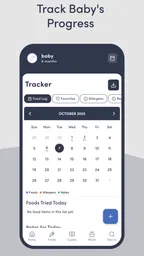
- Personalized food tracking helps caregivers monitor what a baby has tried.
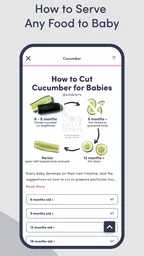
- Food profiles offer age-based serving guidance for introducing solids.
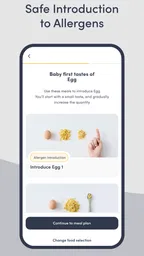
- Allergen tracking makes it easier to record possible reactions.
- Search tools help families find foods and preparation ideas quickly.
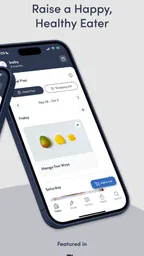
- Meal planning can reduce the effort of deciding what to serve.
What could be better
- Some useful features may require a paid subscription.
- The large food catalog can feel overwhelming to new users.
- Food guidance is not a substitute for advice from a pediatrician.
- Logging every meal may take extra time during busy feeding routines.
- Recommendations may not reflect every family's cultural food practices.





