


SoFi Stadium review
 Analysis by Appsdrops
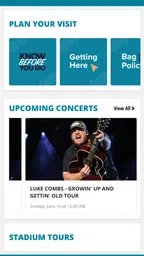
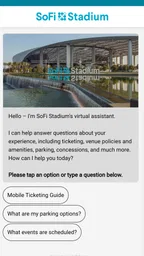
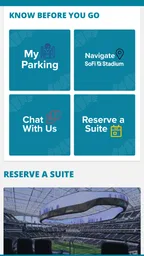
Planning a concert or event at SoFi Stadium is easier when the information you need is close at hand. SoFi Stadium is the venue’s companion app for events and concerts, giving fans a dedicated place to begin organizing their visit. I like the idea of having an app focused on the stadium itself: instead of treating the venue as a small detail in a much broader events service, it puts the destination at the center of the experience.
From event plans to a stadium visit
The app is listed in the Events category and is developed by SoFi Stadium and Hollywood Park. Its purpose is clear from the outset: support the experience around events and concerts at SoFi Stadium. That makes it most relevant once you already have a reason to visit, whether you are preparing for a live show or another event hosted there.
My preferred way to think about an event app is as part of a real-world workflow. First, I decide what I am attending. Then I look for useful venue information, make practical plans, and use whatever guidance is available as the day unfolds. A stadium-focused app can help connect those stages, though the usefulness of each handoff depends on the information and tools available for the particular event.
That focus also sets expectations. This is not presented as a general-purpose ticket marketplace or a city guide; it is the SoFi Stadium events app. If your plans involve the venue, that narrow scope is a strength. If you are looking for recommendations across many venues or a broad calendar of local activities, a dedicated stadium app may not be the main tool you need.
Starting with the event
The first step is simple: open the app with a stadium event in mind. The app’s name and purpose make it easy to understand why it belongs in your planning routine. Rather than beginning with unrelated entertainment listings, you can approach it as a venue-specific resource and look for the details that help turn an event plan into an actual visit.
That distinction matters because going to a large venue involves more than choosing a show. You may need to coordinate with other people, keep track of plans, and understand what to expect when you arrive. A dedicated app can serve as a convenient point of reference during that preparation, particularly when you want to keep stadium-related information separate from messages, calendars, and other apps.
I also appreciate that the intended audience is broad. The content rating is Everyone, so the app is positioned for general audiences rather than a narrowly defined age group. That fits a venue serving varied crowds and makes the app an approachable starting point for families, groups of friends, and individual fans alike.
Following the planning flow
Once you know which event brings you to the stadium, the next part of the workflow is checking the app for relevant event and venue information. The best experience in this kind of app is a direct one: identify the event, find the guidance that applies to it, and carry that guidance into your plans. Keeping those steps together can reduce the need to repeatedly switch between sources while you are getting ready.
From there, I would use the app as a companion rather than assume it can make every decision for me. Event planning still involves personal choices: when to leave, who is coming along, and how to coordinate the day. The app’s role is to support the stadium side of those decisions. That is a useful division of labor, especially when the venue is the central destination and the rest of the group’s plans are handled elsewhere.
On event day, the natural next step is to return to the app when you need a stadium-related reference. The value of that habit is practical: it gives the app a defined place in the sequence instead of making it something you install and forget. If the information you need is easy to locate, the app can help bridge the gap between planning at home and arriving at the venue.
After the event, the same venue-centered approach can be useful when planning another visit. You already know where to look for stadium-related information, so the app can become a familiar part of preparing for future concerts and events. It is not a dramatic promise, just a sensible role for a focused companion app.
Where the handoffs happen
A real-world visit passes through several handoffs: from the event you chose to the venue, from your own plans to your group’s plans, and from preparation to arrival. The app sits primarily in the venue portion of that chain. It can help keep the stadium in view while other tools and people handle the rest, which is often more realistic than expecting one app to manage an entire outing.
The handoff between an event plan and venue preparation is where a stadium-specific app can feel especially appropriate. You start with the event, move into stadium-focused information, and then use that information as you organize your visit. For groups, the app can also provide a shared reference point in conversation: rather than everyone searching independently, you can direct attention to the same venue resource.
There is still a human side to coordination. Friends may have different arrival plans, and family members may need to agree on timing or meeting arrangements. An app can support those discussions, but it does not replace them. I see that as a reasonable boundary: a venue app should help with the stadium context, while people remain responsible for agreeing on the details of their own outing.
The transition from the app to the physical venue is another important handoff. A useful companion should make it easier to move from reading information to acting on it. That means finding the relevant detail without excessive hunting and being able to return to it when plans change. In practice, the smoother that transition feels, the more likely I am to keep the app available for the next event.
What the experience is best suited to
SoFi Stadium makes the most sense for people who already expect to attend something at the venue. Its identity is specific, which helps set a clear purpose: use it as a stadium-focused companion for events and concerts, not as an all-purpose entertainment hub. That focus can make the app easier to understand before you even begin planning.
The app is free, so trying it does not require a purchase. It has more than ten thousand installs and an average rating of 3.9, based on 44 ratings. Those figures offer a little context about its presence and reception, but they do not tell the whole story of how it will fit an individual event. I would judge it by how effectively it helps with the stadium-related parts of my own plans.
It was released on September 7, 2023, and the current version is 26.8.5866. The minimum operating system is version 10. For anyone deciding whether to add it before a visit, the practical takeaway is to check that their device meets that requirement and then treat the app as one part of their event preparation.
Where the flow can lose momentum
The main challenge for any venue app is not its name or its purpose; it is how smoothly it supports the steps people actually take. A focused app works best when the route from opening it to finding the information you need feels straightforward. If you have to hunt around or keep switching to other sources, the flow can lose momentum, especially when you are already coordinating a group or getting ready to leave.
Another possible source of friction is expecting a single app to cover every part of a visit. Stadium-related guidance and personal logistics are different jobs. You may still rely on conversations, your calendar, or other planning habits for the latter. I find that a clear understanding of the app’s role makes it more useful: let it support the venue portion, and use other methods for decisions that belong to your group.
Timing can also change what matters most. During early planning, you may want to orient yourself around the event. As the visit approaches, you may care more about practical details. Once you are on your way, you need a quick reference rather than a long research session. A good workflow keeps those changing needs in mind, and the app is most valuable when it remains easy to return to at each stage.
These are not reasons to dismiss a stadium companion. They are reminders to use it with realistic expectations. Its venue-specific focus is useful when the destination is SoFi Stadium, while the complete outing still depends on your own preparation and coordination. That balance is common with event apps: they can reduce some planning friction without taking over every part of the experience.
A practical place in your event routine
Overall, SoFi Stadium is a straightforward option to consider before attending a concert or event at the venue. I like that its purpose is easy to grasp and that it can occupy a clear place in the journey from deciding to go, through preparing for the visit, and on to arriving at the stadium. The strongest reason to use it is simply relevance: if your plans involve this venue, a dedicated companion is more naturally suited to your needs than a general app with no stadium focus.
My recommendation is to approach it as a planning aid, not as a complete substitute for personal organization. Start with the event, check the stadium-focused resource, share useful details with your group, and keep your other planning methods for the parts that are personal to you. When those handoffs feel clear, the app can make the preparation process more orderly and give you a familiar place to return to for future visits.
For fans looking for a SoFi Stadium events and concerts app, this is a relevant, free companion with a defined audience and purpose. Its success in your routine will come down to how smoothly it supports the information you need at each stage. If you attend events there, it is a sensible app to try before your next visit and keep in your event-planning toolkit.
What we like
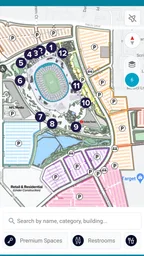
- Clear venue maps help visitors find seating sections and amenities.
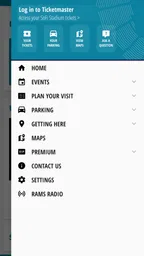
- The SoFi Stadium app offers mobile ticket access.
- Event information helps visitors plan their arrival.
- Stadium navigation tools can make finding facilities easier.
- Digital services reduce the need to carry printed information.
What could be better
- App features may vary depending on the event.
- Some stadium services require an internet connection.
- Mobile tickets can be inconvenient if your phone battery runs low.
- Finding your way around may still be difficult in crowded areas.
- The app may not cover every visitor question or need.





