


Smart Printer: Mobile Print review
 Analysis by Appsdrops
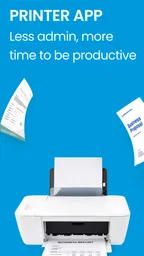
Printing from a phone can be surprisingly awkward: a document is ready, but getting it from the screen to a paper printer often means figuring out how the two devices will connect. Smart Printer: Mobile Print focuses on that everyday snag. Its central promise is straightforward: connect a mobile device to a compatible Wi-Fi printer and print, without turning a simple task into a technical project. I like that clear purpose. Rather than presenting itself as an all-purpose office suite, it puts printer access front and center.
Connecting a phone to a Wi-Fi printer
The defining capability is broad printer support. Smart Printer: Mobile Print says it works with more than a thousand Wi-Fi printer models, a reach that makes the app worth considering if you are unsure whether your printer will cooperate with a mobile device. That breadth is the point: the app aims to make wireless printing feel like a practical option across many printer setups, not a feature reserved for one particular brand.
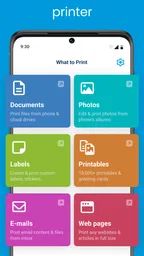
In use, the appeal is easy to understand. A phone is often where a file, image, or other item is already available, so being able to send it to a nearby printer can save the extra step of moving it to a computer first. The app is built around that connection-and-print flow. Its short pitch is refreshingly direct: connect to a smart printer and print. For people who only need to get something onto paper, that simplicity matters more than a long list of secondary tools.
The app sits in the tools category and is developed by Astraler. It is free to install, with optional in-app purchases listed from $1.99 to $99.99 per item. It is rated for Everyone, and the current version is 4.2.2. Those details help set expectations, but the real question for any mobile printing app is whether it can make the printer you already own accessible from the device you already use.
What broad compatibility changes
Printer compatibility is not an abstract spec when you are standing beside a printer with a phone in hand. It determines whether mobile printing is convenient at all. Support for a large range of Wi-Fi models gives Smart Printer: Mobile Print a useful starting point for households, students, and small workspaces with different printer brands or older setups. It does not mean every printer will behave identically, but it makes the app’s central idea relevant to more people.
I see the practical benefit as reduced friction. If the document is already on your phone, a wireless connection can spare you from emailing it to yourself, transferring it by cable, or opening a laptop just to print one page. Those workarounds are manageable, but they can feel excessive for a quick task. A dedicated mobile printing app makes the phone a more direct part of the process.
How it fits into an ordinary printing task
The intended routine is easy to picture: you have something on your phone that you want on paper, you connect with a Wi-Fi printer, and you send it to print. The app’s emphasis on a simple connection is a good match for occasional printing, when you do not want to spend time learning a complicated workflow. It treats the printer as a nearby tool, rather than making you plan around a desktop computer.
That can be especially handy for a family sharing a printer. One person may need to print a school document, another may want a paper copy of a useful file, and someone else may need a page for a household task. If everyone can work from a phone, the printer becomes easier to use without first moving files between devices. The convenience is modest but real: fewer steps between deciding to print and sending the job.
It is also a sensible fit for people who keep most of their everyday material on mobile. Phones are where many users read, save, and share files, so printing from that same device feels natural. The app’s focus is not on changing what printing is; it is on making the connection between phone and printer more accessible. That narrow purpose gives the product a clear identity.
Where the experience depends on your setup
Wireless printing still depends on the printer and the surrounding setup. The app’s broad compatibility claim is encouraging, but the specific model you use remains important. A supported Wi-Fi printer is the natural match, while a printer that cannot join a wireless network is not the kind of setup this app’s main promise is aimed at. Before relying on mobile printing for something urgent, it is sensible to try the connection with your own printer and see how it fits your routine.
There is also a difference between having a printing app and needing one every day. If you rarely print, the convenience may be occasional rather than transformative. For a person who already has a smooth process through a computer, adding another route might not change much. The value is strongest when the phone is the source of the material and the existing route to the printer feels like needless effort.
The free download makes it easy to explore the basic proposition, while the presence of optional purchases is worth keeping in mind. The app is not presented as entirely without paid options, so anyone who prefers to avoid purchases should pay attention to what is offered inside the app. That is a practical consideration rather than a reason to dismiss it: the main decision is whether its mobile-to-printer connection solves a problem you actually have.
Best suited to quick, phone-first printing
Smart Printer: Mobile Print is most compelling for users who want to print occasionally without involving a computer. Students who receive or store material on a phone, families sharing a Wi-Fi printer, and people who handle everyday paperwork on mobile can all understand the appeal. It may also suit a small workspace where a printer is shared but the person sending a job is not always sitting at a desk.
Its support for more than a thousand Wi-Fi printer models gives it a wider potential audience than an app built around a single printer range. That does not remove the need to check whether your own model is a good fit, but it does make the app worth a look for people with a mixed or unfamiliar printer setup. The main benefit remains simple: the phone can act as the starting point for a print job.
By contrast, users who do nearly all their printing from a computer may not notice much difference. Likewise, someone who prints only once in a while may find that existing habits are already good enough. I would think of this app as a convenience tool, not a reason to change an otherwise reliable setup. Its strongest case is the small but common moment when a file is on your phone and paper would be more useful.
A focused tool with a clear purpose
The app has a solid audience behind it, with an average rating of 4.2 from 62,000 ratings, and it has been installed more than a million times. Those figures suggest that mobile printer access is a familiar need, while the app’s straightforward pitch makes it easy to see why people try it. They do not replace checking compatibility with your own printer, but they offer useful context when deciding whether the app deserves a place on your phone.
Its strongest advantage is making Wi-Fi printer access feel more approachable from a mobile device. I appreciate the narrow focus: connect and print, rather than burying the central task under a broad promise to do everything. For a quick household or study print job, that can be exactly the kind of utility people want. For a computer-first user, the benefit will be less pronounced, and the optional in-app purchases are another detail to consider before making it part of a regular workflow.
Overall, Smart Printer: Mobile Print is worth considering if you want a simpler route from phone to printer and your setup uses a compatible Wi-Fi model. It is not a universal answer for every printing situation, but its core idea is useful and easy to grasp. If your documents already live on your phone and you find yourself reaching for a computer just to print them, this app may make that everyday task feel a little more direct.
What we like
- Prints documents and photos directly from a compatible phone.
- Supports common file types such as PDFs and image files.
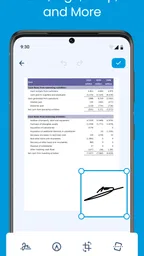
- Offers a convenient way to preview print jobs before sending them.
- Can connect to printers over a local Wi-Fi network.
- Useful for printing without transferring files to a computer.
What could be better
- Printer compatibility may vary by model and manufacturer.
- Some features may require a paid upgrade or subscription.
- A stable Wi-Fi connection is needed for wireless printing.
- Large files can take longer to process and print.
- Print quality depends on the connected printer and its settings.





