

Smart Home Manager review
 Analysis by Appsdrops
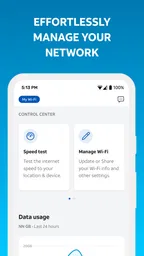
When everyone at home relies on the same Wi-Fi, a small network change can quickly become a household problem: one person is trying to work, another is streaming, and a visitor needs the password. Smart Home Manager is AT&T’s network-management app for AT&T Internet customers, and its appeal is straightforward: it gives the person responsible for the connection a phone-based place to personalize the Wi-Fi network. I see it as a practical companion to an AT&T home connection, not a general-purpose Wi-Fi tool that will suit every household.
One connection, several people relying on it
The app makes most sense in a shared-use situation. A household member can use it when a network adjustment is needed without starting from a desktop browser or looking for the router’s controls. That can be handy when the person paying for or managing the internet service is also the one other people turn to when something changes at home.
For example, imagine a guest arrives while someone is on a video call and another person is watching a film. Rather than treating the router as a mysterious box that only one technically confident person can handle, the account holder can open the app and manage the Wi-Fi setup from a phone. The useful part is less about making the internet faster by magic and more about having a clear, accessible route to network settings.
That distinction matters. This is a productivity app for managing an AT&T internet connection, not a streaming service, a general router dashboard, or a replacement for troubleshooting every device in the home. Its value depends on whether you already use AT&T Internet and want a convenient way to personalize your network. If your service comes from another provider, this is not the right tool to manage that connection.
What the app is good for in daily use
I would think of it as a control point for the person who looks after the household network. The phone is often already nearby when a Wi-Fi question comes up, so using an app can be more convenient than finding a router label, logging into a separate interface, or searching through old setup notes. That is especially useful for people who do not want routine network management to become a technical project.
There is also a modest coordination benefit: when one person has a reliable place to handle network personalization, the household is less likely to make changes in several places and then forget what was changed. I would still recommend telling other regular users when a change might affect their devices. A quick heads-up can prevent someone from interpreting a planned adjustment as an unexplained connection problem.
The app’s purpose is intentionally narrower than that of a full smart-home platform. It concerns the Wi-Fi network for AT&T customers; it should not be treated as a single control center for every connected appliance, phone, or account in the household. Keeping that boundary in mind helps set fair expectations before installing it.
Getting started and keeping account boundaries clear
Before relying on the app, I would first confirm that the household internet service is AT&T and that the person setting it up can access the relevant account. The app is designed around AT&T Internet customers, so it is not a neutral utility that can simply take over any existing router. If several adults share responsibility for the bill or network, it is worth agreeing who will handle changes and who should be contacted if the connection needs attention.
This is a useful boundary to establish in a shared home: the person holding the phone is not automatically the right person to make every network decision. A partner, roommate, or family member may use the Wi-Fi every day without being the service account holder. Decide in advance whether one person will manage settings or whether the people with appropriate account access will coordinate with one another. That avoids confusion over who changed something and why.
For a household with guests, I would avoid treating the app as a substitute for explaining how visitors should join the network. Make any needed arrangements through the options actually available in your account, and do not assume that an app’s general network-management role implies guest controls or a particular sharing method. That practical caution is especially helpful when visitors need access briefly and the household wants to keep its regular setup predictable.
The app is free, and it is published by AT&T Services, Inc. It has an average rating of 4.4 from around 89,000 ratings, with more than 5 million installs. Those figures suggest that it is used by a substantial group of customers, but I would not use popularity as a substitute for checking whether it fits your service and account situation. The strongest reason to install it is the direct relationship between the app and an AT&T home connection.
Making changes without surprising the household
A little coordination goes a long way when multiple people depend on one network. I would make changes at a time when the household can tolerate a brief interruption or a device needing to reconnect, rather than during an important call or online appointment. Even when a change is routine, choosing a quiet moment makes it easier to tell whether a device is responding normally afterward.
It also helps to keep a simple record outside the app of what the household agreed to change and when. That does not need to become a technical log; a shared note or a quick message can be enough. If a family member later reports a connection issue, you can distinguish a recent network adjustment from a problem that was already happening. This is a practical habit, not a claim that the app provides a history or household-notification feature.
For shared homes, the account boundary deserves particular care. If a roommate moves out or the household changes who manages the service, review access through the normal AT&T account process rather than assuming the app alone resolves every account question. The app is most helpful when its user understands that network management and account ownership are related but not identical responsibilities.
Compared with the usual alternatives, the main difference is convenience for an AT&T customer who wants to manage the home Wi-Fi from a phone. A router’s own interface may be a better fit for someone who prefers a provider-neutral setup or whose equipment offers the controls they need independently. A web account may also suit people who prefer to handle service matters on a larger screen. I would choose this app when phone access to the AT&T network is the point, not simply because it is another app to install.
Age, trust, and who should use it
The app has an Everyone age rating, which makes it broadly suitable from a content perspective. That does not mean every person in a household should be given account access. Network settings can affect everyone’s use of the connection, so I would keep management with a responsible adult or another trusted person who understands the household’s expectations. The age label is about content suitability, not a recommendation to share account credentials with children.
For a family, a sensible approach is to explain who manages the network and how to ask for changes. A teenager may be comfortable with technology and still not need access to the service account. Similarly, a visiting relative may need the Wi-Fi but should not be assumed to need the app. Separating ordinary network use from administrative responsibility is a simple way to preserve trust without inventing family-control features that the app is not being presented as offering.
I would also be cautious about installing it on a shared device that many people can unlock. If the app is tied to the account holder’s access, use the household’s normal device and account-security habits rather than leaving sensitive access open for convenience. In a home where several adults share one phone or one account login, agree on who can make changes before a problem arises.
On Android, the listed minimum operating-system requirement is version 7.0, and the current version is 2.2610.506. The app was released on August 21, 2017, and it remains a focused option for customers who want a mobile way to personalize their Wi-Fi. I would check that the device and account are suitable before making it part of the household’s routine, especially if an older phone is being used as a shared control device.
Where it may frustrate, and when I would skip it
The biggest limitation is also the clearest boundary: this app is for AT&T Internet customers. If your home uses another provider, installing it will not turn it into a universal network manager. Even for an AT&T household, someone looking for an advanced diagnostic suite or a single dashboard for unrelated smart-home devices may find that a router-specific tool or another service is a better match for that goal.
There is also a social friction that no network app can remove. If multiple people make changes without telling one another, the household can still end up confused about why a device behaves differently. The app can make management more accessible, but it cannot decide who has authority, settle disagreements about network use, or replace a clear conversation between account holders and other residents.
I would skip it if you rarely need to adjust your Wi-Fi, are satisfied with the provider’s existing way of managing the connection, or would rather keep service administration on a computer. I would also avoid expecting it to solve weak coverage in every room by itself. A management app can help with network personalization; it cannot guarantee that every physical layout, device, or connection issue will be fixed through a phone.
For an AT&T customer who routinely fields Wi-Fi questions at home, the app is a sensible convenience. For someone who wants provider-independent controls, deeper equipment-specific tools, or a universal smart-home hub, it is the wrong category of solution. That is the trade-off I would weigh before installing: a focused connection to the AT&T household network versus the broader flexibility of alternatives built around particular routers or other providers.
My household verdict
Overall, Smart Home Manager is most useful when one trusted person needs an approachable way to personalize the Wi-Fi network used by an AT&T household. It can reduce the effort involved in routine network administration and give the responsible person a convenient place to start when a shared connection needs attention. I like the clear purpose, provided expectations stay equally clear: it is for AT&T Internet customers, and it is not a substitute for household coordination or a general tool for every connected device.
If you manage the internet at home and want to handle Wi-Fi from your phone, I think it is worth trying. If you are a family member or roommate who only needs a connection, ask the account holder how changes are handled rather than assuming you need administrative access. And if the household uses another provider or wants controls beyond AT&T network personalization, choose a tool designed for that setup instead. That makes this a useful, focused productivity app for the right home, rather than a universal recommendation.
What we like
- A single dashboard makes it easier to check connected devices.
- The app helps identify devices using your home network.
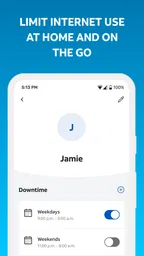
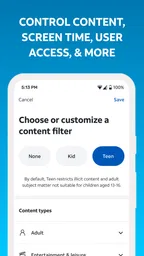
- Parental controls can help manage internet access for family members.
- Wi-Fi troubleshooting tools may resolve common connection issues.
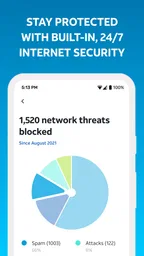
- Network security insights help spot unfamiliar connected devices.
What could be better
- Some features may require a compatible internet service plan.
- Device identification may be inaccurate for unfamiliar hardware.
- Parental controls may offer fewer options than dedicated apps.
- Troubleshooting steps may not fix problems caused by your provider.
- The app has limited value without supported home networking equipment.





