





SiriusXM: Music, Sports & News review
 Analysis by Appsdrops
I see SiriusXM as a radio-first listening app for people who want someone else to do the programming. Its appeal is less about building the perfect playlist and more about choosing a channel, host, or subject and letting the listening unfold. That makes it a useful change of pace from music services centered on searching, albums, and recommendations, but it also means the experience will not suit everyone. If you enjoy live-feeling radio, sports talk, and personality-led listening, SiriusXM has a clear purpose; if you mainly want precise control over every track, a conventional on-demand music app may fit better.
Where the radio format earns its place
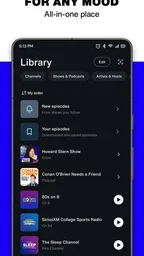
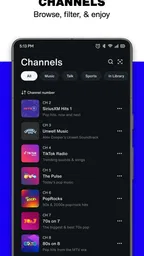
The strongest part of the app is the mix of listening modes it brings together. Music sits alongside sports radio and podcasts, so I can move from a music channel to discussion without treating those as entirely separate services. The music is curated around recognizable tastes and personalities rather than asking me to assemble every listening session myself. That is especially welcome when I want company in the background but do not have the energy to make a queue.
In practice, this format works best when I start with a mood or topic rather than a particular song. A commute, a kitchen cleanup, or a stretch of desk work can all be easier with a channel already in motion. Sports listeners get a different kind of value: talk and commentary can make a game or a developing story feel more immediate than a playlist can. Podcasts add another option when I would rather follow a longer conversation than dip in and out of music.
The app’s real strength is reducing the work of choosing what to hear. A curated channel can be more satisfying than a personalized mix when I am tired of making decisions, and radio has a natural sense of sequence that shuffle-based listening sometimes lacks. I also like that the same app can cover different parts of the day: music when I need a steady backdrop, sports discussion when I want context, and a podcast when I am ready to focus.
This is not the same promise as an unlimited jukebox. In a typical on-demand music app, I can search for a specific track and shape a session around it. SiriusXM is more compelling when I want to be guided. That distinction matters: listeners who treat music as a set of individual selections may find the radio approach restrictive, while listeners who value discovery and presenters may find it more human and less repetitive than choosing from a personal library.
How to make a session work for you
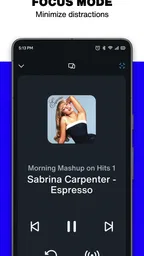
A practical way to approach the app is to choose a channel or subject before you begin a task, then give it enough time to establish its rhythm. Switching constantly can make any curated service feel less coherent. For a commute, I would pick a familiar music style or a sports topic and let it run; for focused work, I would choose something that will not tempt me to keep checking the screen. This small habit makes the app feel like radio rather than a search box with audio attached.
It is also worth treating music, talk, and podcasts as different listening jobs. Music channels are handy when I want continuity without managing tracks. Sports radio is better when the value comes from commentary and discussion, not simply sound in the background. Podcasts make more sense when I have time to follow an extended idea. Choosing by purpose helps avoid the common frustration of expecting every section to behave like the same kind of player.
For someone deciding between SiriusXM and a standard streaming service, the key question is whether curation or control matters more. A conventional service is usually the more natural choice if I want a particular song, a carefully ordered album, or a playlist I have built myself. SiriusXM is the stronger pick when I want to hand over the decisions and hear programming shaped around channels, hosts, and topics. Neither approach is universally better; the useful difference is how much direction I want to keep.
The trade-off: less direct control
The same radio-first design that makes the app easy to leave running can frustrate listeners who expect every audio service to offer the same level of track-by-track choice. If I arrive with one exact song in mind, a curated channel may not be the shortest route to it. The app’s value depends on being open to what is selected and how it is presented. That is a genuine limitation, not just a matter of taste, because it changes how quickly the service answers a very specific listening request.
There is also a difference between casual listening and following a conversation closely. Sports radio can be engaging, but talk-heavy audio is not always ideal when I need uninterrupted concentration or when I cannot keep up with the discussion. A podcast can solve that in some situations because I can choose a longer-form listen, but it still asks for more attention than background music. I would not choose the app as my only audio option if my day depends on carefully selecting individual tracks or controlling every part of playback.
Cost deserves a little attention before making it a regular habit. SiriusXM is free to install, but it offers in-app purchases ranging from $0.99 to $99.99 per item. I would check the purchase details in the app store before committing to anything and decide whether the particular listening access I want is worth it. The headline of a free download should not be confused with a promise that every kind of listening is included at no cost.
For readers asking whether they can simply try it without paying, the answer is that the app itself is free to install, while in-app purchases are available. That makes a cautious first look reasonable, but I would not assume that every channel or listening option is free. If you already know you only want a particular paid experience, check its terms before building your routine around it. That is a more useful approach than downloading first and discovering that your preferred way to listen has a separate cost.
Who will get the most from it
I would recommend SiriusXM to people who enjoy radio as a format: listeners who like hosts, channel identities, and the feeling that a program is already underway. It is also a sensible choice for sports fans who want talk alongside their music listening, and for anyone who prefers curated options to assembling a playlist from scratch. The app is particularly appealing when I want an easy, varied soundtrack for ordinary routines and do not need to control every transition.
It is less suitable for listeners who mostly want to search for a specific song, play albums in order, or build highly customized playlists. Those needs point toward an on-demand service. It may also be a poor fit if I dislike presenters, interruptions, or the idea of following a channel’s programming choices. The best question to ask is not whether SiriusXM has enough audio in general, but whether its guided, radio-led style matches the way I actually listen.
For a realistic everyday example, imagine a drive that starts with music, gets interrupted by a traffic update or a change in mood, and ends with an interest in sports discussion. The app’s range makes that sort of shift more natural than opening a separate tool for each kind of listening. On a quiet workday, I might instead leave a music channel on and avoid spending time choosing tracks. But if I need one exact song for a short moment, I would reach for a service built around direct search rather than expect a radio channel to behave like a personal queue.
New users should also consider the age guidance: SiriusXM is rated Teen. That is useful context for families deciding whether the app belongs on a shared device, though the most important practical step is still to make listening choices that suit the person using it. As a music and audio app developed by SiriusXM, it carries a clear identity around radio-style programming rather than trying to be an all-purpose media library.
A substantial, established listening option
The app has been available since December 21, 2010, and its current version is 2611.2.1. Its scale is substantial: it has more than 10 million installs, around 1.1 million ratings, and a 4.5 average. Those figures suggest that many listeners have found a use for the service, but they do not settle whether its format is right for me. The more meaningful test is whether I enjoy being guided by channels and programming rather than directing every listening choice myself.
On a practical level, the app supports Android 7.0 and later, which helps readers check whether an older device is likely to meet the minimum system requirement. I would still think about the device I listen on most and whether the app’s radio-oriented experience fits that setting. A phone used during a commute or around the house is a natural match for continuous audio; someone who mainly listens while carefully managing a music library may not gain as much from it.
My overall view is positive, with a firm qualification: SiriusXM is best when I let it be radio. Its range of music, sports talk, and podcasts gives it more character than a single-purpose station player, and its curated approach can make everyday listening feel effortless. But it is not the app I would choose for maximum control over individual songs, and the available in-app purchases are worth checking before I make it part of a paid routine. If guided listening sounds appealing, I think it is worth trying; if exact selection is the priority, a traditional on-demand music app is the better match.
What we like
- Personalized stations make it easy to discover music and shows.
- On-demand programs let you catch up on missed broadcasts.
- A wide range of genres and talk formats suits varied tastes.
- Car integration supports listening during commutes.
- Some plans allow streaming on multiple devices.
What could be better
- A paid subscription is generally required after any trial.
- Content availability can vary by subscription plan.
- Live streaming depends on a stable internet connection.
- The large catalog may take time to navigate.
- Some content includes ads or sponsored messages.





