


Shokz review
 Analysis by Appsdrops
I see Shokz as a companion app for people who already own Shokz headphones, rather than a music player or a general-purpose audio tool. Its job is to help you get started and make the headphones easier to manage. That narrower purpose can be useful: instead of adding another library or streaming service, it focuses on the relationship between your phone and your Shokz device. But it also sets expectations. If you want an app that transforms how you listen to music, this is probably not the one; if you want a simpler route into using compatible headphones, it makes more sense.
Start with the headphones, not the app
The first useful habit is to treat setup as a short, deliberate routine. Have the headphones nearby, make sure they are ready to connect, and open the app when you can give the process your attention. That sounds basic, but it avoids the common frustration of tapping through setup while walking out the door and then not knowing whether a problem comes from the phone, the headphones, or a rushed connection attempt.
As a Music & Audio app from Shokz, it is centered on helping users get going with the company’s headphones. I would approach it as a setup and support companion, not as a replacement for the phone’s Bluetooth controls or the app where I actually choose music. The distinction matters: the headphones remain the listening device, while the app is there to make the initial experience and any supported interaction less awkward.
For a first-time owner, I would begin by following the app’s setup flow before making assumptions about what the headphones can do. Once they are connected, try a familiar listening routine: play something from your usual audio app, pause it, resume it, and check that the sound is coming from the intended device. This simple test helps separate connection success from the separate question of whether the headphones suit your day-to-day listening.
That baseline is especially helpful if you switch between a phone and another device. Rather than immediately changing several things at once, I would test one connection at a time and make a note of what works reliably. If audio does not appear where expected, check the active output on the phone before repeating setup. This is a practical troubleshooting habit, not a special feature: it reduces needless re-pairing and helps identify whether the issue is the app, the phone’s audio routing, or the headphones.
Build a repeatable setup routine
After the first successful connection, keep the routine simple. Open the app when you need to work with the headphones, then use your regular audio app for listening. If everything behaves normally, there is little reason to revisit setup every day. In my view, that is the best way to use a focused companion app: let it handle the headphone-related part, and avoid turning it into an extra step in every listening session.
A realistic example is getting ready for a morning walk. I would check that the headphones connect before leaving, start music or a podcast in the app I normally use, and confirm the sound once before setting off. If I am in a hurry, I would not begin by exploring every menu. A reliable, familiar sequence is more valuable than trying to discover every possible control when I have no time to troubleshoot.
This also makes the app easier to judge fairly. If the headphones are already paired and working well, the companion app may not need to be open throughout the day. That is not a drawback by itself; it simply means the app’s value is concentrated around setup and headphone management rather than continuous listening.
Check the basics before changing settings
The most useful setting-related advice I can offer is to change only what you can clearly identify and then test the result. Headphone companion apps can tempt users to tap through menus just because they are there, but random adjustments make it harder to tell what improved or caused a problem. With Shokz, I would first confirm the connection and basic playback, then inspect the available controls at a calm moment and decide whether any of them solve a real need.
Keep your phone’s own audio controls in the picture. Volume, output selection, and playback behavior can involve the phone as well as the headphones, so a setting that appears to be an app issue may actually be handled elsewhere. If a podcast is too quiet, for instance, check the phone’s output and the player’s own controls before assuming the companion app needs attention. This small distinction can save time, especially when several audio apps are installed.
For new owners, I would also make a point of learning what the app is responsible for and what remains part of normal phone use. That mental map is more useful than repeatedly opening the app to hunt for a control. If you can connect the headphones, start your chosen audio, and identify where to check the phone’s output, you already have a practical foundation for ordinary use.
The app is free to download, though it includes in-app purchases listed at around fifty cents to just under a dollar per item. I would not treat that as a reason to expect every capability to be free or assume a purchase is necessary. Before buying anything, read the item’s description carefully and decide whether it addresses a task you actually have. For a straightforward setup need, paying for an optional item without a clear purpose would not be my first move.
Use habits to make everyday use quicker
Experienced users often get more from a simple tool by making their actions repeatable, not by relying on hidden tricks. I would keep the headphones paired in the normal way, use the same audio app for a given routine, and check the output only when something changes. If I am switching from a call to a podcast, I would verify that playback has returned to the headphones rather than immediately resetting the connection. That order is quick and avoids fixing a problem that may not exist.
Another useful pattern is to test a new phone or a changed audio setup at home, not during a commute. Connect the headphones, play a short piece of audio, pause it, and resume. Then try the same with the app you actually depend on. This gives you a clear baseline before you need the headphones in a noisy or time-sensitive situation. It is a small investment of attention that can prevent a rushed troubleshooting session later.
If you share a household or routinely borrow a second device, be especially methodical when changing what the headphones connect to. Keep track of which device is active, and check its audio output before assuming the app needs to be reset. I would avoid making several changes across multiple devices at once; doing so can make a simple connection mix-up feel like a larger fault.
These habits are where I see the strongest practical value. The app is not necessarily something I would open constantly, but it can be part of a clean setup routine: use it to get oriented with the headphones, keep phone-level audio checks in mind, and return to it when headphone-related help is needed. For a person who likes a predictable setup, that is more useful than a crowded dashboard full of controls they rarely touch.
Where the companion approach has limits
The main limitation is also the app’s defining trade-off: its usefulness depends on owning and using Shokz headphones. Someone looking for a universal audio manager, a streaming catalog, or a way to control unrelated brands should choose a broader tool—or simply rely on the phone’s built-in Bluetooth and audio settings. This app is not a general solution for every listening device.
It is also worth keeping expectations modest. A companion app can help with getting started, but it does not automatically make every connection issue disappear. Phone settings, the audio app, and the headphones all play a part in the experience. When something goes wrong, a measured check of those pieces is more sensible than repeatedly reinstalling or changing settings without a plan.
The app’s public reception suggests a useful but not universally loved experience: it has an average rating of 3.8 from around fourteen thousand ratings, with roughly sixteen hundred written reviews. More than a million installs show that many people have tried it, but popularity alone does not tell me whether it will suit a particular owner. I would judge it by the concrete question that matters to you: does it make your Shokz setup clearer or easier?
Its age rating is Everyone, and the app has been available since December 2, 2021. Version 6.1.9 is the current release. Those details help frame it as an established companion rather than a brand-new experiment, but they do not change the basic decision: it is most relevant when you want assistance with Shokz headphones, and less compelling when you already manage them comfortably through your phone.
Who should keep it—and who can skip it
I would recommend trying it if you have just bought Shokz headphones, want help getting started, or prefer having a manufacturer-specific place to begin when you need to manage the listening setup. It is particularly sensible for someone who is not comfortable tracing whether an audio issue belongs to the phone or the headphones. A guided starting point can make that first experience less intimidating.
I would be less enthusiastic about recommending it to someone who expects frequent new listening features, a music library, or a universal controller for every accessory. If your headphones already connect reliably and you never need to revisit their setup, you may have little reason to open the app often. In that case, the phone’s standard audio and Bluetooth controls may be enough for your routine.
There is also a middle ground: install it for initial setup and keep it available for occasional headphone-related tasks, without making it part of every listening session. That is probably the most balanced approach. It acknowledges the app’s focused role while avoiding the expectation that a companion utility must become a daily destination.
A practical verdict for Shokz owners
Shokz makes the most sense when I view it as a tool for establishing a dependable relationship between the phone and the headphones. Its strongest use is not replacing my favorite audio apps, but helping me start with the headphones and giving me a focused place to turn when I need headphone-specific guidance. A steady setup routine, a quick check of the phone’s output, and a habit of changing one thing at a time are more valuable than chasing complicated workflows.
My recommendation is straightforward: try it if you own Shokz headphones and want a more guided start, then keep using it if it genuinely helps with your setup. Skip it if you want a broad audio control center or your current phone-based routine already works perfectly. For the right owner, it is a practical companion; for everyone else, its narrow focus is a reason not to add another app.
What we like
- Open-ear design keeps you aware of nearby sounds.
- Lightweight fit is comfortable during long workouts.
- Physical buttons are easy to use while exercising.
- Multipoint pairing lets you connect two devices.
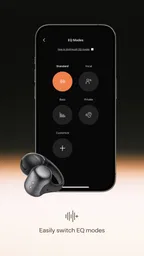
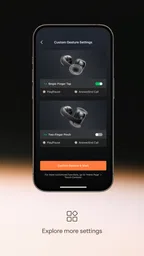
- The Shokz app offers sound settings and device controls.
What could be better
- Sound can leak in quiet spaces.
- Bass is less powerful than with sealed headphones.
- Wind noise can affect outdoor listening.
- Some models lack onboard storage for offline music.
- Model compatibility varies across Shokz features.





