
شناسایی شماره ناشناس انلاین review
 Analysis by Appsdrops
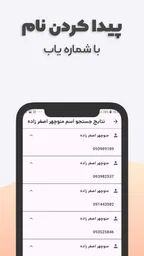
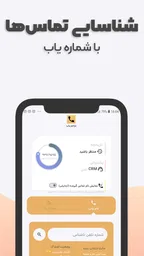
Unknown calls can interrupt a conversation, a quiet evening, or a busy workday. An app that aims to identify an unfamiliar number can therefore be useful—but its value depends not just on what it promises, but on how comfortably different people can use it. Online unknown-number identification is the central idea behind شناسایی شماره ناشناس انلاین, an event-category app whose Persian store description presents it as a professional caller finder that displays names for unknown numbers. I find that focused purpose easy to understand, while the app’s real-world usefulness will depend on whether its interface and results fit the person and situation at hand.
Understanding the app at a glance
The app is developed by Developers group and is free to download. It has a 4.1 average rating from around 9,800 ratings, with more than 500,000 installs. Its store summary emphasizes identifying unknown numbers online, so the clearest reason to consider it is straightforward: you want help making sense of an unfamiliar incoming call rather than treating every unknown number as a mystery.
Readability and navigation
For an app centered on caller identification, clarity matters from the first screen. A person should be able to understand what the app is for, recognize the information it presents, and move through its main tasks without having to decode technical language. The app’s stated purpose is easy to grasp: it aims to identify an unknown caller and show a name associated with a number. That direct promise gives new users a simple starting point.
The app’s name and short description are in Persian, which is an important consideration for anyone choosing it. If you read Persian comfortably, the wording provides a clear indication of its purpose. If you do not, the language itself may make setup or routine navigation less intuitive, even when the general caller-identification idea is familiar. I would treat language fit as part of usability, rather than assuming that a simple function automatically makes an app accessible to everyone.
Readable presentation also means more than large-looking text or a clean screen. Caller information needs to be easy to distinguish at a glance, particularly when someone is deciding whether to answer quickly. A useful interface should make the number, any identified name, and the next available action clear without crowding them together. The app’s purpose makes that kind of legibility especially relevant, but users should judge the actual on-screen experience on their own device and in their preferred language.
Clear, understandable caller information is more helpful than identification alone. A name that appears without enough context may not answer the practical question a person has: whether the call is familiar, worth returning, or best left unanswered. For that reason, I would approach any displayed identification as useful context, not as an unquestionable guarantee. This is a sensible habit with any caller-identification tool, especially when a call concerns something important.
Motor and sensory considerations
People interact with phones in different ways. Some have limited dexterity, use a device one-handed, rely on assistive input, or need extra time to select a control. Others may be sensitive to visual clutter or find it difficult to process multiple alerts. A caller-identification app is most comfortable when its central task does not demand unnecessary precision or rapid interaction, particularly when someone is already handling another activity.
Because the app focuses on unknown-number identification, the most inclusive experience would make its primary information easy to locate and its controls easy to distinguish. Users with reduced vision may benefit from text that remains readable without relying on subtle color differences. Users with limited motor control may prefer generous tap targets and a straightforward route to the information they need. These are practical standards to keep in mind when trying the app, not claims about particular accessibility features.
Sensory context matters too. An incoming call can already create pressure, and a busy interface or confusing message could add to it. People who are deaf or hard of hearing may use call information differently from people who rely on sound, while someone in a noisy place may appreciate being able to inspect a screen rather than depend on an audible cue. How well the app supports those situations depends on the experience on the device, so I would look for visual clarity and predictable behavior during ordinary use.
It is also worth remembering that a caller’s displayed name is not the same thing as a complete explanation of why they called. For people who need more context before responding, the app can be considered one input among several. Taking a moment to read what is shown, rather than feeling pushed into an immediate decision, makes the tool more practical for users with a wide range of needs.
Using it in different situations
The appeal of online unknown-number identification changes with the setting. At home, someone may have time to examine a call calmly. At work, a phone may be shared with competing tasks, and the user may need to decide quickly whether an unfamiliar number deserves attention. In either case, the app’s core purpose is easy to relate to: identifying a number can provide a clue when the caller is not already saved in a contact list.
People also move between quiet rooms, public spaces, and places where looking at a screen is inconvenient. A tool that is useful in one setting may feel awkward in another, especially if the user has only one hand free or is managing a conversation face to face. I would judge the app by whether its essential information is easy to reach when needed, rather than expecting it to solve every interruption or make every call safe to answer.
For older adults, people who are less comfortable with smartphones, or anyone helping a family member manage unfamiliar calls, the simplest explanation is often the most useful: this app is intended to help identify unknown numbers online. That focused purpose may make it easier to decide whether to try than a broad utility app with many unrelated functions. The language of the interface remains relevant, though, so a person should feel comfortable reading and interpreting the screens before relying on them.
The app is free, carries an Everyone content rating, and was released on December 22, 2021. Its current version is 3.1.12-GP, and it supports Android 7.0 and later. Those details can help people decide whether it fits their device and household, but they do not replace a personal check of readability, navigation, and comfort. A rating intended for everyone is not, by itself, evidence that every person will find the experience equally accessible.
Where access can still be difficult
No caller-identification concept removes every obstacle. Language can be the first barrier for users who do not read Persian, since labels and instructions are central to finding one’s way around an app. A person may understand the general idea from the app’s description yet still need to assess whether the actual interface is comfortable to use. That gap between understanding the purpose and navigating the product is worth considering before depending on it.
There is also the ordinary uncertainty involved in interpreting an unfamiliar caller. An identification result can help someone make a more informed decision, but it should not become the sole basis for sharing personal information or returning a sensitive call. If a call claims to come from an organization, a careful user can take time to verify the caller through a familiar, trusted route. This advice does not diminish the app’s purpose; it keeps the role of caller identification in proportion.
People with different visual, motor, or cognitive needs may also have different thresholds for what feels usable. One person may find an information-focused screen simple, while another may need larger text, clearer separation between controls, or more time to understand a result. There is no single experience that works identically for everyone. I recommend trying the app in the conditions in which you expect to use it and checking whether you can find and interpret the important information without strain.
Connectivity and the circumstances of an incoming call can influence how convenient an online identification approach feels. Someone who is moving between locations or dealing with a poor connection may have a different experience from someone using the app in a stable setting. The practical point is to avoid treating the app as a substitute for judgment or as the only way to decide what to do about a call. It is best understood as a tool for adding context to an otherwise unfamiliar number.
A more inclusive way to assess it
When testing an app like this, I would start with a few everyday questions: Can I read the key information comfortably? Can I understand the labels in the language I use? Can I reach the relevant screen without rushed or precise movements? Does the presentation make sense when I am distracted, in a noisy place, or helping someone else? These checks focus on real use rather than promises and can help each person decide whether the app suits their routine.
It can also help to consider who else may use the phone. A family member who depends on clear, plain-language guidance may need a slower introduction than an experienced smartphone user. Someone with low vision may want to test the app’s text on their own device settings. A person with limited dexterity may want to see whether basic interactions feel manageable. These are individual assessments, not assumptions about what any particular user can or cannot do.
Accessible use starts with letting people understand and control the information they see. In a caller-identification app, that means being able to inspect a result at a comfortable pace and decide independently what action to take. The app’s defined purpose gives it a potentially useful role, but the quality of that role depends on how well it fits a person’s language, device, abilities, and surroundings.
My inclusive verdict
شناسایی شماره ناشناس انلاین has a clear, practical focus: identifying unfamiliar numbers online and displaying a name. I like that the central idea is easy to explain, and its free availability makes it straightforward for interested Android users to consider. The app has a 4.1 average based on around 9,800 ratings, and its reach suggests that many people have tried it. Those points provide context, but the deciding question for an individual remains whether the interface is understandable and comfortable for them.
My recommendation is measured. If you want an app whose stated purpose is online unknown-number identification, and Persian is a workable language for you, it may be worth exploring. Before relying on it, check that the information is readable on your screen, the navigation makes sense, and the experience suits the way you use your phone. For users who need particular visual, motor, or language accommodations, that personal check is especially important.
Overall, I see this as a focused caller-identification option rather than a universal solution to unwanted or unfamiliar calls. It can add useful context, but inclusive usefulness comes from more than identifying a number: people need to understand what they see, interact at their own pace, and retain control over their decisions. If those conditions work for you, شناسایی شماره ناشناس انلاین may be a practical addition to your phone. If they do not, the app’s core idea alone may not make it a comfortable fit.
What we like
- Identifies many callers without requiring you to answer first.
- A quick search can help check unfamiliar numbers before calling back.
- Caller labels make it easier to spot likely businesses or spam.
- Useful when screening repeated calls from unknown numbers.
- The lookup feature can be handy for verifying a number shared by others.
What could be better
- Results may be incomplete or outdated for newly assigned numbers.
- Caller identification can mistakenly label legitimate callers as spam.
- Some features may require an internet connection to return results.
- Access to contacts or call details may raise privacy concerns.
- Number lookups may be limited or restricted in the free version.





