




SEE's Michelangelo's Sistine review
 Analysis by Appsdrops
I would treat SEE’s Michelangelo’s Sistine as a focused companion for a visit to the Sistine exhibition, not as a general art-history app or a substitute for a museum guide. Its purpose is to help visitors follow the exhibition through audio, which can make a walk through a famous, densely detailed body of work feel more considered. The important practical question is whether that listening format suits the way you want to experience the exhibition—and how much you are comfortable relying on a dedicated app while you do it.
What the app is for, and where trust comes in
This is a free events app made by Venkata Reddy G, with the Sistine exhibition as its specific focus. It has an average rating of 3.5 from 109 ratings, and more than 50,000 installs. Those figures suggest that people have found it, but they are not a guarantee that it will match every visitor’s expectations. I would judge it by the job it is meant to do: accompany the exhibition with audio, rather than provide a broad catalogue of Michelangelo’s work.
That narrow scope is a real advantage if you are going to SEE’s Michelangelo’s Sistine Exhibition and want an audio-led way to engage with it. It also sets a limit. If you are looking for a general reference library, a collection of unrelated art tours, or a tool for planning events across a city, this is unlikely to be the right choice. It is best approached as a companion to one particular exhibition experience.
I find that distinction useful for trust, too. A focused app can be easier to assess than one that promises to do everything, but its narrow purpose does not tell me how it handles personal information or what permissions it requests. I would not assume either that it collects little or that it collects a lot. Before using it, I would check the permission prompts on my device and decide whether each request makes sense for listening to an exhibition guide.
Use it as a listening companion, not a replacement for looking
Audio can add context to an artwork, but it can also pull your attention away from the thing you came to see. With a subject as visually intricate as the Sistine exhibition, I would avoid trying to listen continuously while moving through every part of the display. A more comfortable rhythm is to pause, look first, then listen to a relevant segment and return your attention to the artwork. That keeps the guide in a supporting role instead of turning the visit into a race to finish audio.
This is also where the app differs from the usual alternatives in the events category. A general event-discovery app helps you find what is happening; a printed handout offers a quick reference without headphones; and a human guide can respond to a group’s questions and pace. This app’s role is more specific: it offers an audio-based companion for a particular exhibition. If you prefer listening at your own pace, that may suit you better than a group tour. If you need conversation, live answers, or a visual route you can scan at a glance, another format may work better.
Check the practical fit before you arrive
The app is free, and it is rated for Everyone. Its current version is 3.1.1, and it requires Android 7.0 or later. It was released on July 23, 2022. Those details make it easier to decide whether an Android device is compatible, but they do not answer every visit-day question. I would install it before leaving home rather than waiting until I am at the exhibition, then open it once to see how its audio experience is presented and whether the controls feel comfortable.
That small preparation matters because audio is awkward to troubleshoot when you are already standing in a busy exhibition space. I would bring headphones if I expect to listen, make sure my phone has enough charge for the visit, and keep the volume at a level that lets me remain aware of people nearby. These are general listening precautions, not claims about special functions in the app. They reduce avoidable friction without assuming the app has offline playback, a particular navigation system, or any other feature that has not been established.
If you are visiting with someone else, agree in advance whether you will each listen individually or take turns. One person trying to share a phone speaker can make the experience less clear and distract other visitors; passing a phone back and forth can also interrupt attention. For a shared visit, I would use the audio as a prompt for conversation: listen separately when appropriate, then compare what caught your eye. If the app’s controls or your venue’s conditions make that inconvenient, a printed guide or simply talking through the artwork may be more enjoyable.
What I would check about privacy and control
For a venue companion, the sensitive moments are often ordinary ones: installing the app, accepting a permission prompt, connecting to a network, or deciding whether to keep it after the visit. I would read the wording of any permission request rather than tapping through automatically. If a prompt appears to ask for access unrelated to the task I want to perform, I would pause and consider whether I can continue without granting it. A permission prompt is a choice to evaluate, not proof by itself of how data is used.
I would also look at the privacy information presented in the app store and on the device before making assumptions about collection or sharing. I cannot responsibly turn the app’s exhibition purpose into a claim about its data practices. The same caution applies to account controls: I would check whether the app asks me to sign in and what options it visibly offers, rather than assuming an account is required or that a particular deletion control exists. If you prefer not to create accounts for one-off visits, that is a sensible point to verify before you arrive.
For a cautious first use, I would keep the setup minimal. Install the app from the app store, inspect its visible prompts, and grant only the access you are comfortable with. Then test the audio in a quiet moment and decide whether it adds enough context to justify using it during the visit. If you do not want to use a personal phone, or you would rather avoid installing an exhibition-specific app altogether, a printed guide or another venue-provided option is a reasonable alternative.
How to get more out of a short exhibition visit
On a rushed visit, I would not make the goal “listen to everything.” Instead, I would choose a few moments to slow down. First, give yourself time to take in the visual scene without audio. Then use the guide when you want added context, and pause it if you need to look closely or move with the flow of visitors. That approach is especially useful when you are with someone whose pace differs from yours: the app can support individual attention without dictating how long everyone must stay at each point.
For a return visit, I would use a different strategy. Rather than repeating the same listening pattern, I would pay attention to details I missed the first time and use the audio selectively as a reminder or source of context. This is a practical way to avoid turning a second visit into a replay of the first. It also respects the app’s evident focus: helping with this exhibition, not replacing the visitor’s own looking or supplying an all-purpose study course.
Families may appreciate that the app’s age classification is Everyone, but that label does not tell a parent whether the pace, language, or listening style will hold a particular child’s interest. I would decide based on the child and the visit, not the age label alone. Younger visitors may prefer shorter stretches of listening and more time to look freely. If the audio becomes a distraction, stopping it is better than treating the guide as something that must be completed.
Who should choose it—and who should skip it
I would recommend trying SEE’s Michelangelo’s Sistine if you are attending the exhibition, enjoy audio interpretation, and are comfortable using your phone as part of a gallery visit. It may be particularly useful if you like to explore at your own pace and want spoken context alongside the artworks. Since it is free, the main cost is not financial; it is the time and attention involved in installing and using a dedicated companion.
I would skip it if you want a broad art app, rely on a guide who can answer questions in real time, or prefer to keep your phone put away while viewing art. It may also be a poor fit if you are uneasy about installing a one-purpose app before checking its visible permissions and privacy information. In those cases, a human-led visit, a printed guide, or an unstructured walk through the exhibition could feel more comfortable.
My verdict is cautious but positive: this is a clearly focused audio companion for one exhibition, and that focus can make it useful when the listening format fits your visit. I would not treat its popularity or age classification as proof of privacy, quality, or suitability for every visitor. I would check the app’s prompts, test it before arriving, and use the audio selectively. If those choices leave you comfortable, it can add a layer of context without taking over the experience; if not, the exhibition can still be enjoyed through other forms of guidance—or simply by looking.
What we like
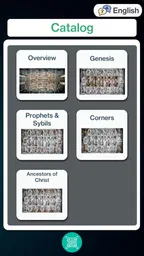
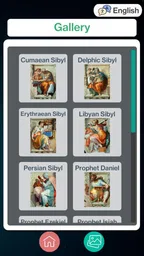
- Offers a detailed virtual look at Michelangelo’s Sistine Chapel frescoes.
- Lets users explore the artwork without traveling to the Vatican.
- Useful for learning about Renaissance art and its religious themes.
- Makes the chapel’s ceiling easier to examine than in person.
- Provides a focused experience for fans of Michelangelo.
What could be better
- A screen cannot match the scale of the chapel in person.
- Small displays may make fine artistic details hard to inspect.
- The experience may feel limited for users seeking interactive activities.
- Art descriptions may not satisfy readers looking for in-depth scholarship.
- Viewing quality can depend on device resolution and performance.





