


Secure VPN-Safer Internet review
 Analysis by Appsdrops
In a shared household, a VPN is easy to overlook until someone needs to use public Wi-Fi, wants a more private connection, or asks why a familiar app is behaving differently. Secure VPN-Safer Internet is a straightforward tools app from Secure Signal Inc., and I’d consider it for people who want a simple VPN option on an Android device without turning setup into a technical project. Its appeal is convenience; the important household question is whether everyone understands when it is on and what a VPN can—and cannot—do.
One device, several people, different expectations
Imagine a family member taking a tablet to a café and connecting to its Wi-Fi, while someone else later uses that same tablet at home. A VPN can provide an encrypted route for the connection, which is useful on networks you do not control. But it does not make every online activity anonymous, prevent every scam, or replace careful account security. I’d explain that distinction before making the app part of a shared-device routine.
That distinction matters because household members may have different reasons for using the same device. One person may mainly want a quick connection on public Wi-Fi; another may assume that switching on a VPN protects them from malicious downloads or unsafe links. I would treat Secure VPN as one privacy layer, not as a general-purpose security guarantee. Keeping that expectation realistic is more helpful than simply telling everyone to leave it running.
The app sits in the VPN and privacy tools category, and its basic proposition is easy to understand: use a VPN connection when you want an additional layer between your device and the network you are using. In practical terms, it is most relevant when you are away from your trusted home connection. If your household already uses a VPN through a router, work device, or another service, it is worth deciding whether a second VPN on the phone is actually needed rather than stacking tools by habit.
Make the first setup a deliberate choice
On a shared device, I would install and open the app with the person who will use it most, rather than silently configuring it for everyone. That gives you a chance to explain what a VPN connection changes and to agree on when it should be used. Android may ask you to approve a VPN connection when an app begins routing traffic; that system-level prompt is a meaningful decision, not just another screen to tap through automatically.
Secure VPN is free to install, though it offers in-app purchases ranging from $1.99 to $59.99 per item. I would check the purchase details in the app before selecting anything, especially on a device where several people share access to the same payment setup. Free access can be a reasonable way to see whether the app fits your routine, but the presence of optional purchases means it is sensible to distinguish “try the VPN” from “agree to a paid item.”
A useful setup habit is to decide who is allowed to change the connection settings. On a personal phone, that may simply be the owner. On a family tablet, it could be the adult who manages the device, with other users told how to recognize that the VPN is active and how to ask for help if a connection stops working. This is not a special family-control feature; it is just clear device housekeeping that prevents confusion.
I would also test the apps the household actually relies on after connecting. A VPN can affect how some services route or interpret traffic, so if a banking app, school portal, or video call behaves unexpectedly, first compare the same task with the VPN disconnected. That simple check helps identify whether the VPN is involved before anyone starts changing account settings or reinstalling apps.
Coordinate without turning privacy into guesswork
The main coordination challenge is not the button itself; it is knowing what another person has changed. If one household member enables a VPN and the next person does not realize it, they may blame the Wi-Fi, an app update, or an account problem when something loads differently. A small shared rule—such as mentioning when the VPN is switched on for a particular task—can spare a surprising amount of troubleshooting.
For a family trip, I would agree in advance that the person carrying the shared tablet checks the VPN before using an unfamiliar public network, then checks again if a service stops working. At home, there may be no reason to keep changing settings just because the device changes hands. This is a practical workflow rather than a claim that the app automatically coordinates household users; the app should not be mistaken for a shared-account manager.
That boundary is important for account privacy, too. A VPN connection does not merge or separate the accounts signed in to a browser, email app, or social service. If several people use one device, separate operating-system profiles where available, individual app accounts, and signing out of personal services remain the more direct ways to keep accounts distinct. The VPN addresses network routing, not who can open a saved inbox.
Compared with manually configuring a VPN through Android settings, a dedicated app can be easier for a less technical user to approach. Compared with a VPN already supplied by an employer or a household network setup, it may be an unnecessary extra layer or may not meet the organization’s requirements. I would use the option that matches the actual task: a work-managed connection for work instructions, a router-level solution when the whole home network needs one, and a phone app when an individual device needs a convenient VPN choice on the go.
Age suitability and trust need context
The app is rated for Everyone, which makes it broadly suitable from a content-rating perspective. That does not mean every child should be expected to manage a VPN independently. Younger users may not understand why a connection changes, while older children can usually follow a simple explanation: it can help protect the connection on networks they do not control, but it does not make risky links or oversharing safe.
I would keep the explanation calm and specific. If a child asks whether the VPN hides everything they do, I would say no: websites and services may still identify an account after sign-in, and the VPN does not replace family conversations about privacy or sensible browsing. This is especially important on shared devices, where the bigger risk may be leaving an adult account open rather than choosing the wrong network connection.
Trust also involves understanding who makes the tool. Secure Signal Inc. is the developer, and the app has accumulated a 4.7 average from around 2.4 million ratings, with roughly 63,000 written reviews. It has more than 100 million installs. Those figures show that many people have tried it, but popularity is not proof that a VPN fits every household’s privacy needs. I would still judge it by how clearly it works for your routine and whether its terms and purchase choices make sense to you.
For a child’s first phone, I would not present the VPN as a substitute for device supervision or age-appropriate settings. For a teenager who travels between school, home, and public spaces, it may be a useful tool to learn about network privacy—provided an adult explains the limits and agrees on when it should be used. If the household needs detailed parental controls, account-level oversight, or managed-device policies, this app should not be chosen on the assumption that it supplies those functions.
Everyday trade-offs and who should look elsewhere
Secure VPN is currently at version 4.4.5 and requires Android 6.0 or later. That makes the operating-system requirement relevant when you are deciding whether an older household phone or tablet can run it. The app is free to download, but the optional purchases are worth discussing before a child or guest uses the device, particularly if purchases can be made through a shared store account.
My practical recommendation is to try it on one device first, then test a familiar routine: connect on a public network, open the services you normally use, and note whether anything needs an extra step. If the connection creates friction for a task that matters—such as a work login or a family video call—disconnect and compare before assuming the device or network is broken. This is a better test than leaving a VPN switched on indefinitely without knowing how it affects the household’s everyday apps.
I would skip this app if you need a VPN with specific, documented workplace requirements, centrally managed family settings, or a feature set you can verify against a formal policy. I would also look elsewhere if you are unwilling to review in-app purchase options or if the household expects a VPN to block harmful content and manage children’s accounts. Those are different jobs, and choosing a tool for the wrong job usually leads to frustration.
On the other hand, Secure VPN is a reasonable candidate for an Android user who wants an approachable VPN app for occasional use away from trusted networks. Its broad adoption and strong average rating may make it worth trying, but I would still base the decision on your own connection tests and household boundaries. Android is the platform covered by its stated minimum operating-system requirement, so iPhone users should check the relevant app store for availability and compatibility rather than assume the same details apply.
My household verdict
I see Secure VPN-Safer Internet as a practical, optional privacy tool—not a complete household safety system. It can fit a shared-device routine when one person takes responsibility for setup, everyone understands what the VPN is for, and the family has a simple way to troubleshoot connection changes. Secure Signal Inc.’s app is free to start, carries an Everyone content rating, and has a substantial user base, but those points do not remove the need to make an informed choice about purchases and expectations.
For a household that mainly wants a convenient VPN for public Wi-Fi, I would give it a measured try on a compatible Android device and keep the use case narrow. For families seeking parental controls, work-managed access, or a guarantee of total anonymity, I would choose a tool designed for that specific need instead. The best outcome is not simply having a VPN installed; it is having everyone know when it helps, when it does not, and who is responsible for changing its settings.
What we like
- Simple one-tap connection makes it easy to get started.
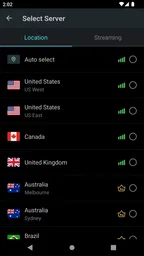
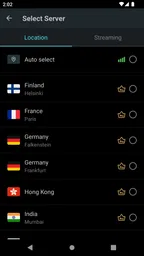
- A choice of server locations helps tailor connections to your needs.
- The app can protect traffic on public Wi-Fi networks.
- A free option lets users try the service before paying.
- The interface is straightforward for VPN beginners.
What could be better
- Free access may come with usage limits.
- Connection speeds can vary by server and network conditions.
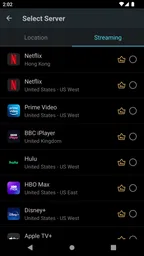
- Some server locations may require a paid plan.
- A VPN does not make all online activity anonymous.
- Always-on VPN use can increase battery consumption.





