
Sched review
 Analysis by Appsdrops
I would install Sched when I need to make sense of a particular event, not because I expect another everyday app to become part of my routine. Its purpose is focused: it gives attendees a place to view the schedule for events that use Sched. That focus can be genuinely useful during a busy day, when a programme is easier to consult on a phone than to search through emails or printed pages. The trade-off is just as important: its lasting value depends on whether the events I attend use it.
Useful from the first event, if the organiser uses it
Sched is an events app from Sched LLC, and I find it easiest to think of it as a companion to an event rather than a general-purpose discovery service. It is free, rated for Everyone, and has an average rating of 4.0 from around 1,700 ratings. Those details give a new user some context, but the practical question comes first: does the event you plan to attend publish its schedule through Sched?
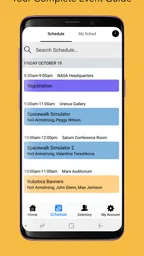
If it does, the app can make the first day less awkward. Instead of juggling a programme and a set of messages, I can use one event-focused place to check what is happening. That matters when a session ends late, a conversation runs over, or I need to decide what to attend next. The benefit is not that an app makes an event better by itself; it is that it can reduce the small bits of friction involved in keeping track of the programme.
Before relying on it, I would confirm that the event is available in the app and that the schedule looks current. This is a simple but worthwhile habit: an event app is only useful if it reflects the event you are actually attending. If the organiser directs attendees to another tool, a printed programme, or a separate event page, that may be the more dependable source for that occasion.
How I would use it on a busy day
Imagine arriving at a conference with several sessions happening at once. I would check the schedule before choosing a room, then revisit it during a break rather than trying to plan every hour in advance. That approach leaves room for an interesting conversation or a change of plans without turning the day into a rigid checklist. For anyone attending with a colleague, comparing the programme beforehand can also help each person choose different sessions and share useful takeaways later.
A less obvious advantage of a dedicated event schedule is that it can help with the transitions between sessions, not just the sessions themselves. I would use a quiet moment after a talk to check what comes next and decide whether it is worth moving across the venue or taking a break. That makes the app most valuable as a quick reference, not something to stare at continuously.
I would still keep a fallback for details that matter immediately. If I need to know where to go, whether a session has changed, or what an organiser has just announced, I would check the event’s own communication as well. The schedule is a planning aid; treating it as the only source of live information would be a poor bet whenever an event is changing quickly.
Where recurring value comes from
Sched is more likely to earn a place on my phone for a stretch of time than to become a permanent daily habit. Its value can return each time I attend an event that uses it, but there is no reason to open it routinely between events. That is not a defect so much as a consequence of its narrow job: an event companion should be helpful when needed and easy to ignore when it is not.
That pattern suits people who attend recurring meetups, professional gatherings, festivals, or other organised events that publish their schedules through Sched. For them, keeping the app installed may save a small amount of setup each time another relevant event comes around. For someone who attends a single event and rarely goes to similar ones, installing it for the occasion and removing it afterward may be the more sensible choice.
Sched has 100,000-plus installs and 290 reviews, so it has reached a substantial audience, but I would not take popularity as a guarantee that every organiser or event will use it. The practical test is local and immediate: check the instructions for your event, then decide whether the app adds anything beyond the programme you already have. This also explains why its value can vary sharply from one attendee to another.
Compared with a general calendar, Sched is better suited to consulting an event programme than to managing an entire personal schedule. A calendar is usually the better choice for reminders and appointments across many parts of life. Compared with a paper programme, the app may be easier to revisit while moving around, while paper can be more convenient when a phone battery is low or you want to see a broad overview at once. I would use whichever format makes the event easier to navigate, rather than insisting on one tool for every situation.
Low upkeep, with a few sensible checks
The app’s maintenance burden seems modest in the way a focused event tool’s should be: install it when it serves a clear purpose, keep it available for the event, and reconsider it afterward. The current version is 1.63.0, and it runs on iOS 8.0 or later. For an attendee deciding whether to keep an older device in play, that minimum requirement is useful to know; it does not, by itself, promise how the app will feel on every device or with every event.
My main upkeep recommendation is not technical. I would verify the event and schedule before leaving home, then check again when I arrive. Doing so reduces the risk of opening the app in a hurry only to discover I have selected the wrong event or am relying on an old plan. If the schedule is important to the day, I would also note any essential session details somewhere dependable rather than assuming I will always have the app ready at the exact moment I need it.
That small preparation is especially helpful for people attending a large event or choosing between overlapping sessions. It turns a quick glance at the programme into a decision made in advance, without requiring a complicated system. On the other hand, if your event has a clear printed agenda and no reason to consult it repeatedly, the app may add little enough that downloading it is unnecessary.
When the routine starts to wear thin
The most likely source of fatigue is simply that Sched is tied to event attendance. When there is no relevant event on the horizon, the app has little reason to compete for attention. I would not judge it by whether it keeps me engaged during quiet weeks; I would judge it by whether it makes the events that use it easier to follow.
There is also a risk of expecting too much from a schedule tool. A programme can help me choose what to attend, but it cannot decide what I will enjoy, prevent two appealing sessions from overlapping, or replace the organiser’s own updates. When choices are tight, I would use the schedule to make a practical plan, then accept that I may need to change it. The app is most helpful when it supports those decisions without becoming another source of pressure to do everything.
Another limitation is dependency on adoption. If an organiser does not use Sched, the app is not a substitute for that event’s chosen method of sharing information. Even when an event does use it, attendees who prefer a single calendar, paper notes, or a broad programme view may find their usual method more comfortable. That is why I would not recommend installing it just because it belongs to the events category; I would install it when a specific event makes it relevant.
Who should keep it, and who can skip it
I would recommend Sched to someone whose event organiser points attendees to it and who expects to check the programme more than once. It is a particularly sensible fit if you are deciding between concurrent sessions, need to revisit the schedule during the day, or want to plan with another attendee. The app’s simple role is its strongest point: it keeps the focus on the event rather than asking me to build a broader planning habit around it.
I would skip it if the event does not use Sched, if you already have an equally convenient and reliable programme, or if you rarely attend organised events. I would also avoid treating it as a universal events guide. Its usefulness is tied to the specific schedules available through it, so it cannot replace checking how your particular organiser shares updates.
For a first-time user, the practical decision is straightforward: follow the event’s instructions, confirm that its schedule is available, and use the app as a companion rather than the sole authority on changes. That workflow answers the key questions before the day begins—whether it applies to your event, whether it is worth keeping installed, and what to do if plans shift. It also keeps the app from becoming another download that sits unused without a clear job.
A focused tool, not a lasting daily habit
Sched is a useful, low-commitment choice when an event depends on it. I like the idea of having a dedicated place to consult a programme, especially when the day involves several decisions and I would otherwise keep switching between scraps of information. At the same time, I would not expect it to provide much value outside those event windows, and I would keep the organiser’s own updates in view whenever timing or venue details matter.
Sched LLC’s app is free, and its general-audience rating makes it an uncomplicated option to consider for attendees of any age. It was released on May 3, 2018, and its focused purpose remains the key to deciding whether it deserves space on your phone. My verdict is positive but conditional: keep it for events whose schedules it actually helps you follow, then let it go if that usefulness does not recur. That is a better measure of long-term value than expecting an event companion to become part of every ordinary day.
What we like
- Simple scheduling tools make it easy to plan tasks and appointments.
- A clear calendar view helps users see upcoming commitments at a glance.
- Recurring events reduce the effort needed to enter regular activities.
- Reminders can help users stay on top of scheduled plans.
- The app suits people who prefer a dedicated scheduling tool.
What could be better
- Some features may require a paid plan.
- Users may need time to adjust to the app's scheduling workflow.
- The usefulness depends on consistently keeping the schedule updated.
- Calendar integrations may be limited compared with larger platforms.
- Notifications can become distracting when too many reminders are set.





