Scanner Radio - Police Scanner review
 Analysis by Appsdrops
I find Scanner Radio most useful when I want a clearer sense of what is happening nearby, rather than another stream of headlines. It brings live public-safety and other radio broadcasts into a phone app, so I can listen to activity such as police, fire, weather, and air-traffic communications. That makes it a very different kind of news app: the information arrives as spoken radio, not as a polished article or a short notification.
That difference shapes who will get the most from it. If you like following events as they unfold, or want to hear local radio traffic during a developing incident, it can be compelling. If you need a quiet, concise summary, or cannot comfortably listen to audio, a conventional news app may be a better fit. My overall impression is that the experience can be valuable, but it depends heavily on the broadcast you choose and the listening situation you are in.
Following a broadcast without getting lost
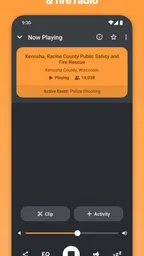
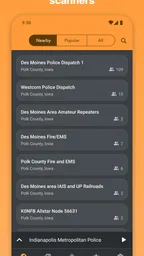
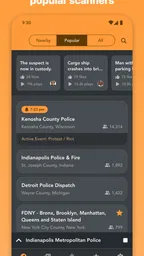
Scanner Radio is a free news and magazines app from GordonEdwards.net LLC. Its central idea is straightforward: choose a radio feed and listen. I appreciate that the core activity is easy to understand, especially for someone who has never used a scanner app. The interface is organized around finding broadcasts rather than reading long stories, so the main decision is which feed is relevant to you.
The app has been available since April 25, 2010, and its current version is 8.30. Its average rating is 4.8 from around 506,000 ratings, with about 67,000 reviews, and it has over 10 million installs. Those figures suggest a large, established audience, but they do not guarantee that every feed will be useful in every place. Local availability and the nature of the activity being broadcast matter more than popularity when deciding whether it suits your needs.
When I approach a scanner feed, I treat it as a source to monitor, not as a complete news report. Radio exchanges can be brief, use unfamiliar terminology, or refer to places without explaining the wider story. A practical habit is to listen for a little while before drawing conclusions, then check a trusted local news source if the event affects a decision you need to make. Listening is not the same as receiving a verified, plain-language update.
That distinction is especially important for anyone who is new to public-safety radio. A conversation may start midway through an incident, and a short transmission can make sense only to people who know the local area or procedures. I would not rely on a scanner feed as my only source for evacuation instructions, weather warnings, or emergency advice. For those, I would use official alerts and local authorities, with the app as additional context rather than a substitute.
Making the audio easier to use
Audio-first design offers a real convenience: I can listen while doing a simple task that does not demand my eyes. At home, for example, I might keep a relevant broadcast playing while tidying or preparing dinner, then pause what I am doing if an exchange sounds important. This is different from scrolling a live news feed, which asks me to keep looking down at the screen.
It is also a trade-off. Radio chatter can be uneven in pace, and a listener may miss a crucial detail while distracted. Unlike a written report, an audio exchange is not automatically easy to skim for a street name or replay mentally. I get more from it when I can give it attention, especially during a fast-moving event. If I need exact details, I prefer to cross-check them in a written source rather than trust my memory of a brief transmission.
For someone with low vision, listening may be more comfortable than reading small text, provided the selected broadcast is audible and understandable. But the app’s audio focus does not by itself make every part of the experience accessible: choosing a feed and navigating the interface still involve interacting with the phone. I would test those steps on the device and with the settings I already rely on, rather than assume that an audio app removes all access barriers.
Listening in different sensory and motor contexts
Sound can make the app useful in situations where reading is inconvenient, but it can also be a poor match for people who are deaf or hard of hearing, or for anyone who cannot play audio privately. A scanner broadcast may be hard to follow in a noisy room, on public transport, or around other people. Headphones can help with privacy, but they are not suitable in every setting, and I would avoid using them in a way that makes me unaware of nearby hazards.
There is another limitation that is easy to underestimate: radio speech is not always conversational. Call signs, clipped phrasing, background noise, and unfamiliar local references can all make a transmission difficult to understand even for someone with good hearing. If spoken information is tiring for you, or you need a clear transcript, a standard news article or official text alert is likely to be more accessible and efficient.
Motor access depends on how comfortable you are with the phone controls involved in finding and starting a feed. I would choose a broadcast before beginning an activity that needs both hands, rather than trying to browse while walking, driving, cooking with sharp tools, or working. That simple workflow reduces the need for repeated screen interaction and keeps attention where it belongs. The app is best used when listening is safe and the phone can be handled without rushing.
For a person with limited dexterity, the basic listening idea may be less demanding than constantly scrolling through articles, but browsing still requires deliberate selection. I would check whether the device’s own accessibility and audio controls make those actions manageable. It is sensible to try the app in a calm setting first, when there is time to learn the navigation without the pressure of an unfolding emergency.
When the context makes it useful
A realistic use case is hearing sirens nearby and wanting more context while staying indoors. I could open the app, select a relevant local broadcast if one is available, and listen for indications of what kind of response is underway. That may satisfy curiosity or help me understand why an area is busy, but I would not treat a scanner conversation as confirmation that my home is safe or that I should take a particular action.
It can also suit people who follow local incidents as a hobby, or who want to hear how public-safety communications sound in real time. Weather radio and air-traffic broadcasts add variety beyond police and fire activity, though the usefulness of each depends on what the listener wants to follow. Compared with a typical news app, Scanner Radio offers immediacy and the texture of live audio; a news app is usually better for background, clear summaries, and stories that have been checked and organized for readers.
For a commute, the app may be tempting as something to keep on in the background, but I would not browse or handle the phone while driving. Even hands-free listening can compete with concentration, particularly when a broadcast becomes busy or confusing. I would save it for a stationary moment, or choose a different source if the goal is simply to receive a short traffic or weather update without sustained attention.
Its situational value also depends on whether you are comfortable with open-ended information. A live feed may be quiet, repetitive, or difficult to interpret, and it may not answer the question you started with. If you want to know whether a school is closed, whether a road is officially blocked, or what steps authorities recommend, a direct official announcement is more useful. The scanner is better for listening to activity than for getting a definitive answer.
Costs, expectations, and where it falls short
The app is free to download, with in-app purchases ranging from $2.99 to $49.99 per item. I would begin with the free experience and decide whether the listening workflow is genuinely useful before considering any purchase. A price range alone does not tell me which optional item is worthwhile for a particular listener, so I would check the purchase details inside the app and compare them with how often I expect to use it.
Scanner Radio is rated for Everyone, which makes it broadly approachable as a general-interest app. Still, the subject matter can involve emergencies and distressing events, and live radio is not always as calm or contextual as edited reporting. I would be selective about when to listen, especially with children nearby or if urgent incident audio is upsetting. An age rating is not a promise that every broadcast will feel suitable for every household.
The biggest practical friction is not a complicated feature set; it is the nature of the material. There may be long gaps, local jargon, incomplete exchanges, or enough background noise to make a feed hard to follow. The app cannot turn that into a neatly structured article. People who prefer predictable reading, searchable summaries, or a quiet interface with no spoken content will probably be happier with a standard news reader or official alert service.
There is also a responsibility in how I interpret and share what I hear. An incomplete radio exchange can sound alarming without the context that would clarify it. I avoid repeating unconfirmed details as fact, and I do not use a broadcast to identify people or infer private circumstances. For public information, the best next step is to look for confirmation from a responsible local source.
Who I would recommend it to
I would recommend Scanner Radio to someone curious about live public-safety and related broadcasts, comfortable listening to spoken audio, and willing to treat it as context rather than authority. It is particularly appealing if you want a direct, real-time listening experience instead of another feed of headlines. The large user base and strong average rating make it a well-established choice in this niche, while the free entry point makes it easy to see whether that style works for you.
I would steer a different user toward conventional news or alert tools if they need short, verified explanations, accessible text, dependable emergency instructions, or information they can quickly scan in a noisy environment. It is also not my first pick for hands-busy or safety-critical situations where attention must remain elsewhere. The right choice depends less on how interesting live radio sounds and more on whether you can listen carefully, interpret it cautiously, and use it in a safe setting.
My inclusive verdict is positive but qualified: Scanner Radio opens a distinctive window onto live broadcasts, yet its audio-led format will not work equally well for every ability or context. I see it as a worthwhile companion for attentive listeners who want extra local context, not as a replacement for accessible written reporting or official emergency guidance. Try it in a calm moment, find out whether the available broadcasts are clear and relevant to you, and keep a trusted text-based source close for anything that requires a definite answer.
What we like
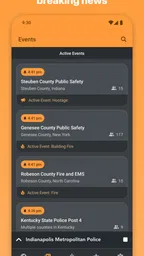
- Browse thousands of live public safety and weather radio feeds.
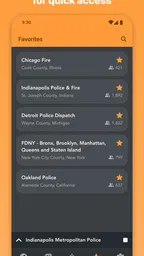
- Save favorite feeds for quicker access.
- Listen to feeds from locations around the world.
- Set alerts for feeds with unusually high listener activity.
- Background playback lets audio continue while using other apps.
What could be better
- Feed availability and audio quality depend on volunteer broadcasters.
- Some channels may be offline or temporarily unavailable.
- The number of feeds varies by location.
- Listening can use substantial mobile data.
- Ads may interrupt the experience unless removed through a paid option.





