
SBE Events review
 Analysis by Appsdrops
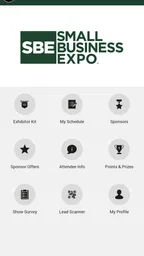
When I’m attending an event, I want to spend less time hunting through scattered messages and more time knowing where to be next. SBE Events is a focused companion for events produced by The Show Producers, built around attendee connections, event schedules, and information about the events themselves. I see its value less as an all-purpose social network and more as a place to check when I need the event’s own details in one app.
A focused companion for event days
As an Events app, SBE Events is aimed at people who are already taking part in an event, rather than people browsing a broad calendar to decide what to attend. That distinction matters: it makes the app most useful when there is a specific event to follow and less useful as a general-purpose planner.
The app’s practical promise is straightforward: attendees can connect with one another, consult the agenda, and learn about the events. Those jobs fit together naturally. I can use event information to get oriented, the agenda to decide what deserves my time, and attendee connections to make the gathering more valuable than simply sitting through sessions.
The best case is a busy day with several agenda items and conversations competing for attention. Instead of relying only on a printed program or searching through old messages, I would treat the app as my event-day reference point. I would check the schedule before leaving for a session, then revisit it when plans change or I want to see what comes next.
What it feels like to use
SBE Events is a free app from The Show Producers. It has an average rating of 4.9 from around 274 ratings, with 23 written reviews, and has passed 10,000 installs. Those figures suggest a focused app that has found an audience among event attendees, though popularity alone cannot tell me whether it suits every event or every attendee.
Its usefulness depends on the event context. If the event you are attending is represented in the app, it can give you a more direct route to its agenda and attendee community than a general social platform. If you are not attending one of those events, there is little reason to keep it open just for the sake of having another networking app.
That narrow scope is a genuine strength. Event information is easier to act on when it is tied to the gathering you are actually attending, rather than mixed into a feed full of unrelated posts. The trade-off is that the app’s value is likely to rise and fall with your participation: it matters most around an event and may have little everyday use outside that window.
Making the agenda useful, not just visible
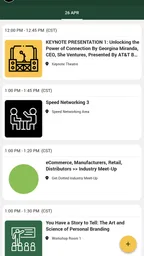
A schedule is only helpful if I use it to make decisions. Before the event, I would review the agenda and identify the sessions or activities I most want to catch. On the day, I would check it again rather than assuming my first plan will survive every conversation, delay, or change in energy.
One useful habit is to leave breathing room between agenda items. An event schedule can make a day look neatly packed, but moving between sessions and talking with people takes time. I would use the agenda to set priorities, not as a promise that I can attend everything. This is especially useful if the program offers more than one appealing option at a particular time.
Another practical approach is to check the next item before a session ends. That small step can help avoid the familiar scramble of looking for the right room or deciding what to do while everyone else is already moving. I would also keep a simple personal note of the sessions I want to remember; the app’s event agenda can guide attendance, while a separate note can capture my own takeaways.
For someone attending with colleagues, the agenda can also be a coordination tool. Each person can decide which parts matter to them, then compare plans before the day gets busy. That is more realistic than expecting a single group to attend every item together. The app helps with the event’s schedule, while the group still needs to agree on its own priorities.
Connecting with people without forcing it
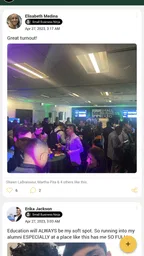
The attendee-connection aspect is most useful when I approach it with a specific purpose. Rather than treating networking as collecting as many contacts as possible, I would use the event setting to identify people I genuinely want to speak with and make an introduction when a relevant session or shared interest gives us an easy opening.
There is a useful trade-off here. An event-focused place to connect can make conversations feel more relevant than a broad social feed, because everyone is there in the same event context. But an app cannot do the social work for you: I still need to start conversations, follow up thoughtfully, and decide which introductions are worth pursuing.
If I am attending alone, this feature could be particularly helpful as a starting point for finding other attendees to approach. I would still avoid assuming that every attendee is actively checking the app or available to talk. The best use is as one route into the event community, alongside conversations that happen naturally during sessions and breaks.
For a more reserved attendee, the app can support preparation. I could look for a reason to speak to someone connected to a session I plan to attend, then use that shared context to begin a conversation. This is less awkward than opening with a generic networking pitch, and it keeps the interaction grounded in the event itself.
How it compares with familiar alternatives
The usual alternatives are a printed agenda, event emails, a general messaging group, and a broad professional social network. Each can work, but they scatter information across different places. A printed program is easy to glance at but cannot serve as an attendee-connection space. Email may contain useful announcements, yet finding the right message during a crowded day can be inconvenient. A general group chat is conversational, but schedule details can disappear in the stream.
SBE Events makes the most sense when you want an event-specific destination for the agenda and attendee connections. I would not replace every other tool with it automatically: people may still use email for logistics or a separate calendar for personal planning. Instead, I would make the app the first place I check for the event’s own material, then use other tools only where they add something distinct.
Compared with a broad event-discovery app, this is a more targeted choice. It is not the option I would choose to browse gatherings across a city or manage unrelated appointments. Its appeal is the closer link between one event’s program and the people attending it. That focus is helpful for participants and limiting for anyone seeking a wider event directory.
What the version and release history tell me
SBE Events was released on May 29, 2021, and its current version is 39.4. That tells me the app has continued through many version numbers since its initial release, which is a meaningful sign of ongoing iteration at the product level. It does not, by itself, reveal which features changed or how those changes affect a particular attendee’s experience.
For an existing user, the sensible expectation is that the app is a maintained event companion rather than a one-off download frozen at launch. I would still judge each update by what I notice in actual use: whether the agenda remains easy to consult, whether event details are current, and whether attendee connections feel relevant. A version number is context, not proof that a specific workflow has improved.
The minimum operating system is 8.0, and the content rating is Everyone. That makes the age classification broad, while device compatibility still depends on the operating system available on the phone. The app is free, so trying it for an event does not require an upfront purchase; I would install it when I know it is relevant rather than expecting it to replace my everyday calendar.
Where it may fall short for you
The biggest limitation is also the clearest boundary: SBE Events is built around its event context. If the event you care about is not represented, or if you only want a personal schedule organizer, a standard calendar app may be a better fit. Likewise, someone looking for a full professional networking platform may prefer a broader service for maintaining contacts beyond the event.
There is also a practical dependence on attendee participation. Connection features are more worthwhile when other people at the event use them and are open to making contact. If you prefer to keep your event participation entirely offline, the agenda and event information may still be useful, but the social side will matter less.
I would not rely on any single event app as my only source of important logistics. For a time-sensitive plan, I would check the event’s latest communication as well as the in-app agenda, especially if a session choice affects travel or a meeting with someone else. That is not a reason to avoid the app; it is a sensible way to handle any event schedule that can change.
Who I would recommend it to
I would recommend SBE Events to someone attending an event produced by The Show Producers who wants a practical place to orient themselves, check the program, and make relevant attendee connections. It is especially suited to people who like to plan a few priorities but remain flexible once the event is underway.
Consider a realistic day: you arrive with a rough idea of the sessions you want to attend, discover that a conversation is running long, and need to decide what is still worth catching. I would open the agenda, reassess the next available option, and use the attendee side of the app later to continue a conversation with someone I met. That is a modest workflow, but it reflects the app’s most useful role: helping the event feel easier to navigate without pretending to manage every part of it.
I would skip it if you want an all-purpose event finder, a substitute for your personal calendar, or a networking service that remains central after the gathering ends. In those cases, a calendar or a broader social platform is likely to serve you better. If you are attending the right event, though, the focused combination of schedule, event context, and attendee connections is a sensible reason to install it.
My overall take
SBE Events is most convincing as a companion for a specific event, not as an app you need open every day. I like that its core purpose is clear: it brings the event program and attendee community into the same setting. Its value will depend on whether your event is available and whether you want to use an app to support both planning and introductions.
For an attendee who wants to arrive prepared, keep track of what is happening, and make a few meaningful connections, I think it is worth trying. I would use it alongside, rather than instead of, ordinary planning tools, and I would keep my expectations focused on the event itself. That balance makes its strengths easier to appreciate and its limits easier to live with.
What we like
- Event details are organized in one convenient place
- Schedules make it easier to plan each day
- Attendees can access event updates on the go
- Useful for keeping track of sessions and activities
- A mobile option for staying connected to an event
What could be better
- Features may vary between events
- Some content may require an event login
- The app is less useful outside event dates
- Updates depend on organizers providing current information
- Navigation may take time to learn at first





