

Rocket Money - Bills & Budgets review
 Analysis by Appsdrops
I think of Rocket Money as a practical choice for people who want their finances to feel less scattered, especially when subscriptions and recurring bills are easy to lose track of. It is a finance app from Rocket Money - Bills & Budgets, and its focus is refreshingly everyday: see where money goes, plan spending, and take action on recurring costs. That makes it more useful as a regular check-in tool than as a substitute for detailed accounting or investment software.
Start with what you want to manage
Before choosing a money app, I’d ask what actually causes friction in your routine. If you forget which services renew, struggle to keep spending within a plan, or want a clearer view of expenses, this app’s combination of subscription management, bill-lowering help, expense tracking, and budgeting is relevant. If your main need is tax preparation, investment analysis, or meticulous bookkeeping, I’d look for a more specialized tool instead.
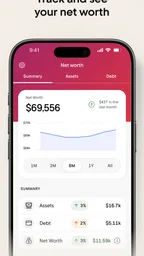
There is a useful distinction between seeing a charge and doing something about it. Many people can find transactions in a bank app, but still have to identify which recurring charges matter, remember renewal dates, and decide what to cut. Rocket Money is aimed at bringing those money-management jobs together. In my view, that makes it particularly appealing to someone who wants a manageable overview rather than a spreadsheet they have to maintain by hand.
The app is free to download, with in-app purchases ranging from $0.99 to $59.99 per item. I’d treat that range as a reason to check the current purchase terms in the app before committing to a paid option, not as a promise that every useful feature is included at no cost. If you only want to explore the basics, starting free is a sensible way to see whether its approach suits you.
Why recurring costs are the strongest reason to try it
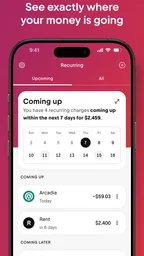
Subscription cleanup is the clearest use case. A person might notice that several small monthly charges have accumulated across entertainment, storage, and services they barely use. Rather than relying on memory, they can use the app as a place to review recurring spending and decide what deserves to stay. The important benefit is not simply spotting a charge; it is making a deliberate decision while the charge is in front of you.
A practical habit is to review subscriptions at the same time as a monthly budget check. I’d separate each recurring cost into three groups: keep, investigate, and cancel. “Investigate” matters because an unfamiliar charge may be a shared household service or a plan billed under a different name. It’s better to verify the account and who uses it before acting than to cancel something another person depends on.
That workflow also helps prevent a common false start: cancelling a service without changing the behavior that made it seem necessary. If you are paying for overlapping services, choose which one you actually use before removing the other. If you need a service only during a particular season, make a note to revisit it later. The app can help bring recurring expenses into view, but the value comes from pairing that visibility with a decision you will stick to.
Budgets work best as a routine, not a verdict
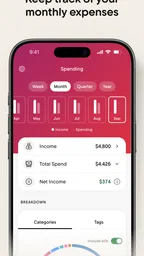
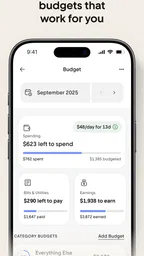
Expense tracking and budgets make the app more than a subscription cleaner. I find a budget most useful when it answers a narrow question, such as whether eating out is crowding out groceries or whether a cluster of small purchases is pushing a flexible category over its limit. A plan built around a few categories you genuinely want to manage is more likely to help than one that tries to judge every purchase.
For a realistic example, imagine checking your spending near the end of a busy week and noticing that several convenience purchases have added up. Instead of treating that as a failure, you can use the pattern to adjust the next week: set aside a little more for meals on hectic days, or plan an easier option at home. This is where tracking can influence what you do next, rather than merely documenting what already happened.
My tip is to avoid changing a budget every time a single unusual expense appears. A one-off purchase and a recurring habit are different problems. Give categories enough time to show a pattern, then revise the plan based on what is normal for you. That keeps a budget from becoming an unrealistic set of limits you abandon after an expensive day.
Bill help is useful, but keep your own standards
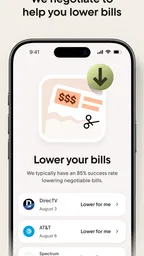
The promise of help lowering bills can be attractive if recurring costs feel difficult to negotiate. I’d still approach any bill-related action as a decision that needs your attention: understand what service is involved, what change is being proposed, and whether the outcome works for your household. Convenience should not replace checking the terms of a service you rely on.
This is especially relevant for shared accounts. If a bill covers several people, make sure a change will not disrupt someone else’s access or alter a plan in a way the household did not expect. Rocket Money can put bill management into the same financial routine as tracking and budgeting, but the user still needs to judge whether a proposed saving is worth any trade-off.
I also would not assume that every bill can be reduced or that every negotiation will produce the same result. The useful mindset is to treat bill assistance as an opportunity to review recurring costs, not guaranteed savings. If you are comfortable handling providers yourself or have unusual service arrangements, a direct conversation with the provider may be the clearer route.
What it does better than a basic bank view
A standard banking app is often the most convenient place to check a balance and recent transactions. Rocket Money’s appeal is the broader organization around subscriptions, budgets, and expenses. That can save effort for someone who otherwise moves between a bank screen, reminders, and a homemade budget. In contrast, a spreadsheet may offer more freedom to design categories and formulas, but it depends on you keeping the information current.
These are different trade-offs, not a universal ranking. If you like carefully controlling every entry and building your own reports, a spreadsheet or dedicated bookkeeping tool may feel more transparent. If you want a guided overview and help noticing recurring spending, a finance app like this is more approachable. I would choose based on whether you prefer to maintain the system yourself or have a single app organize common money tasks.
Rocket Money has an average rating of 4.5 from around 142,000 ratings, and it has been installed over 10 million times. Those figures suggest that it has reached a broad audience, but they do not tell me whether its workflow matches your personal finances. I’d use popularity as context, then judge the app by whether it makes your own recurring costs and spending easier to act on.
Where another approach may fit better
If you already have a reliable budgeting system and only need to check your account balance, adding another app could create more upkeep than value. People who prefer to keep financial details in one place may be happier with their bank’s own tools, while someone who wants complete customization may prefer a spreadsheet. Rocket Money makes the most sense when its combination of tasks replaces scattered reminders or repeated manual reviews.
It may also be a poor fit if you expect a budget to make decisions for you. Tracking can show patterns, but you still need to decide what matters, which expenses are flexible, and how to respond to a change in income. Likewise, subscription visibility is only useful if you review it and follow through. If you do not want to connect your financial routine to another app or spend time checking categories, a simpler method may be preferable.
For people who manage money jointly, agree on a shared routine before relying on any one person’s view. Decide who checks recurring charges, how you will handle services used by the household, and whether budget categories should be individual or shared. This small conversation can prevent a useful review from turning into an unexpected cancellation or disagreement about spending.
What to consider before moving your routine
Switching to a new finance app is not just a download; it means deciding where you will look when reviewing expenses and how often you will do it. I’d start with one narrow goal, such as identifying unused subscriptions, rather than trying to rebuild an entire financial system at once. After that first review, decide whether the budget and expense-tracking tools are useful enough to become part of a recurring routine.
Keep any existing reminders or budget notes until you have confirmed that the new routine covers the same jobs. That is a low-friction way to avoid missing a renewal or losing a category you already track. Once you trust your new process, remove duplicate reminders one by one. This gradual approach is less exciting than switching everything immediately, but it is safer and makes it easier to see whether the app is genuinely saving you effort.
The app is rated for Everyone and is currently version 17.2.0, with a minimum operating-system requirement of version 9. It was released on July 14, 2016, so it is an established product rather than a brand-new budgeting experiment. Those details help with basic compatibility and context; they do not remove the need to check that your device and preferred way of managing money suit the app.
My recommendation
I’d recommend Rocket Money to someone who wants a more deliberate way to review subscriptions, recurring bills, and everyday spending without building a system from scratch. Its strongest case is the connection between identifying costs and deciding what to do next. The free starting point makes it reasonable to explore, while the range of in-app purchases is worth reviewing carefully before paying for anything.
I would skip it if you want highly customized accounting, prefer to avoid adding another finance app, or already have a simple routine that works. For everyone else, I’d try it with a focused first task: review recurring charges, mark anything uncertain for follow-up, and then set a realistic budget around the spending you can actually influence. If that process helps you make clearer choices with less hunting around, the app is doing its job.
My bottom line: Rocket Money is most compelling as a practical organizer for recurring costs and everyday budgeting, not as an all-purpose financial adviser. I like it for people who want a nudge toward better money habits and are willing to review what it surfaces. If you value that kind of hands-on clarity, it is worth considering; if you need exhaustive control or almost no maintenance, a bank tool or spreadsheet may be a better fit.
What we like
- The free plan lets users track spending and create budgets.
- Recurring transactions are easy to spot in the spending view.
- Custom categories help organize purchases around personal priorities.
- Alerts can make upcoming bills easier to remember.
- The interface presents key financial details in a clear layout.
What could be better
- Some features require a paid Premium subscription.
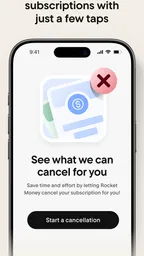
- Subscription cancellation support may not be available for every service.
- Bank connection availability depends on your financial institution.
- Automatic transaction categories may need occasional corrections.
- The app requires access to sensitive financial information.





