



Ringtones for Android Phone review
 Analysis by Appsdrops
I judge a ringtone app less by how many sounds it advertises than by how much control it gives me over what I actually hear and choose. Ringtones for Android Phone is a free music-and-audio app from QR Code Scanner, aimed at people who want to browse ringtone and wallpaper options in one place. Its appeal is straightforward, but I would approach it as a convenient source of material to explore—not as a reason to skip checking the choices the app presents on your own device.
What I’d want to know before browsing
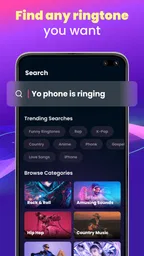
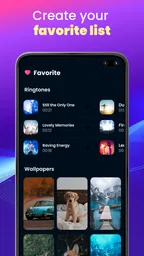
The app’s central idea is easy to understand: find a sound or wallpaper that suits your phone, then decide whether it is worth using. That can be useful if the standard ringtone feels stale or if you want a different sound for calls without searching across unrelated apps. The category is music and audio, although the wallpaper element means the experience is not limited to listening.
There is a substantial audience for it: the app has over 50 million installs and an average rating of 4.8 from around 302,000 ratings. Those figures suggest that many people have found it worth trying, but they do not tell me whether its catalog matches my taste or how comfortable I will be with its on-device prompts. I treat popularity as a reason to investigate, not as a substitute for my own judgment.
The app is marked for Everyone and is free to install. It also offers in-app purchases, with items priced from $0.99 to $66.99. That wide range is worth keeping in mind before tapping through any purchase screen: free access does not mean every possible item or option is necessarily free. I would read the price and purchase confirmation carefully, especially if a child uses the phone.
Its release date is October 28, 2022, and the current version is 1.5.5. The minimum operating system is Android 8.0, so an older phone may not be compatible. I would check that requirement first rather than spending time looking for the app on a device that cannot run it.
Trust starts with choices you can see
When I try a sound-and-wallpaper app, I pay attention to the moments when it asks me to do something: grant access, open a system setting, save an item, or confirm a purchase. Those moments are more useful for judging my comfort than a polished catalog screen. I would pause at each prompt, read what the phone says, and allow only what makes sense for the action I am taking.
I would not assume that a ringtone app needs broad access to everything on a phone just because it offers audio. If Android asks for permission, I would consider the specific task I am trying to complete and whether the requested access appears necessary for it. If the explanation is unclear, I would decline for now and see whether I can continue browsing. That is a practical way to keep control without guessing about the app’s data practices.
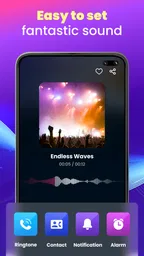
Likewise, I would distinguish between looking at a ringtone and making it the phone’s active sound. Choosing a track in an app is not the same as changing a system setting. Before confirming any action that changes how calls or notifications sound, I would check which sound is being assigned and whether the choice applies broadly or to a particular use. A deliberate final check can prevent an amusing download from becoming an annoying daily interruption.
I can’t responsibly treat the app’s name, popularity, or category as proof of how it handles personal information. My advice is to use the privacy information and permission controls visible on your device and in the app store, and to make decisions based on what they actually show. If you are especially privacy-conscious, avoid granting access that is not needed for the task you want to perform.
A careful way to try a new sound
My preferred workflow is to browse first, shortlist a few sounds, and listen before changing anything on the phone. That separates discovery from commitment. A ringtone that sounds fun for a few seconds may be too sharp or repetitive after a full day of calls, so I would test it at a comfortable volume and think about where I usually receive calls—at home, in a quiet office, or while commuting.
One useful trick is to judge a candidate in context rather than by its preview alone. A low, subtle tone may work well in a quiet room but disappear outdoors; a bright, distinctive one may be easy to notice but disruptive in a shared space. If I am choosing a sound for work, I would favor something recognizable without being startling. For a personal phone that is often on silent, the difference may matter less.
I would also keep the first change reversible. Before replacing a familiar sound, I would note what it was or make sure I know how to choose another option through the phone’s sound settings. That way, if the new pick becomes irritating, I can switch back without having to search through the app again. This is especially helpful when experimenting with several sounds over a short period.
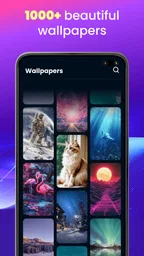
Wallpapers call for a different kind of judgment. A picture that looks appealing in a preview can make icons or text harder to see once applied. I would check the image against the actual home screen, paying attention to contrast behind app labels and whether the important part of the image is covered by interface elements. If readability suffers, the wallpaper is not a good fit even if the image itself is attractive.
These small checks matter because the app’s two kinds of content affect the phone in different ways: a ringtone is something I hear repeatedly, while a wallpaper is something I see whenever I use the screen. I would avoid changing both at once if I want to know which choice I like. Trying one change at a time makes it easier to undo the part that does not work.
Where it fits among other options
Compared with the ringtone tools already built into Android, a dedicated catalog can be more appealing when I want to browse beyond the phone’s standard selection. The built-in settings are usually the more direct route if I already have an audio file or simply want to choose a basic system tone. I would use this app when discovery is the point, and the system settings when I want a short, familiar path to a specific change.
Compared with searching the web for individual audio files, an app-based catalog may feel more convenient because the browsing happens in one place. The trade-off is that I am relying on the app’s own presentation and purchase flow rather than choosing files from a source I have already assessed. I would not download a sound simply because it appears prominently; I would check whether it suits the phone and whether any payment or permission prompt is clear.
For people who care most about exact control over audio, a locally stored file and Android’s own sound settings may be a better fit. That route can be less fun if you do not already have a sound ready, but it avoids browsing a large catalog when all you want is one particular tone. Conversely, someone who enjoys trying different styles may find the discovery approach more pleasant than manually sourcing each sound.
The developer is QR Code Scanner, a name that does not itself explain the app’s ringtone and wallpaper focus. I would not draw conclusions from that name alone. I would base trust on the actual permission prompts, purchase confirmations, and privacy choices presented while using it, and I would stop if any request feels unrelated to what I am trying to do.
Who may enjoy it, and who may not
I can see this being useful for someone who has grown tired of the default ringtone, likes browsing alternatives, and is comfortable reviewing prompts before making changes. It may also suit a person who wants to consider wallpaper options during the same session rather than switching between separate discovery tools. The free starting point makes it easy to explore, provided the user keeps the in-app purchase range in view.
I would be more cautious about recommending it to someone who wants a completely minimal experience, dislikes promotional or purchase prompts in apps, or is satisfied with the sounds already on their phone. It is also not the best choice if you need a specific audio file from a known source or want to avoid installing an additional catalog app. In those situations, Android’s existing sound controls or a file you already trust are the simpler alternatives.
Parents may want to supervise browsing and purchases, even though the age rating is Everyone. That rating is useful context, but it does not replace family settings or careful attention to payment confirmations. If a child is exploring, I would make sure purchase approval is handled by the adult account holder and that the child understands that a listed sound or wallpaper may not be free.
My cautious verdict
Ringtones for Android Phone is best understood as a browsing option for people who want fresh ringtone and wallpaper ideas, rather than a tool everyone needs. The strong adoption and high average rating make it a familiar choice in its niche, but my recommendation is conditional: take time to inspect prompts, listen to a sound in context, and check any price before confirming a purchase.
I would try it if I wanted inspiration and was willing to make each change deliberately. I would skip it if my priority were the fewest possible app interactions, a known local audio file, or avoiding a separate catalog altogether. The useful habit is simple: browse without rushing, treat permissions and purchases as decisions rather than routine taps, and keep a clear route back to the phone’s own settings. With that approach, the app can be a practical way to refresh a phone while leaving the final choices in your hands.
What we like
- Browse a broad selection of ringtone styles.
- Preview tones before choosing one.
- Set different sounds for calls and notifications.
- Find options for alarms and contacts.
- Personalize your phone without editing audio files.
What could be better
- Some tones may require an internet connection to download.
- Adverts can interrupt browsing.
- Sound quality may vary between recordings.
- The selection may not include every popular song.
- Downloaded tones can use extra storage space.





