

Rhythm Music - Offline Player review
 Analysis by Appsdrops
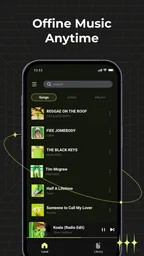
I judge a music player less by how many buttons it offers than by whether it gets out of my way when I need a track. Rhythm Music - Offline Player is an Android music and audio app aimed at straightforward listening, especially when I’m travelling, exercising, or away from a dependable connection. That focus is appealing, but it also sets a clear expectation: this is best considered as a simple player, not as a full streaming service or a feature-rich library manager.
What to expect from everyday playback
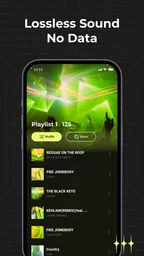
The app’s central appeal is the possibility of listening offline. That can make a practical difference on a commute, during a workout in a basement gym, or while travelling through areas with patchy reception. I can prepare music before leaving and avoid relying on a live connection during the activity itself. For anyone who already keeps audio on their phone, a dedicated player can also be a more direct option than opening a streaming app and navigating through online-focused screens.
Speed is difficult to judge from a description alone, so I wouldn’t promise instant startup or claim that every library loads quickly. In day-to-day use, the sensible expectation is that responsiveness will depend partly on the phone and the size and condition of its music collection. If the app feels slow when first opening a large library, I’d give it a moment to finish loading before repeatedly tapping controls. That simple habit can prevent mistaken taps and make the experience feel less erratic.
For a fair test, I’d try a familiar track and a short playlist before depending on the player for a long trip. Check whether the music you expect to hear is available offline, then start playback with the phone in the same situation you plan to use it in—perhaps in a pocket or connected to headphones. This is a more useful check than judging the app from a quick launch on an empty or rarely used library.
The main trade-off is focus: a lightweight, offline-minded listening routine can be convenient, but it is not automatically a substitute for discovery, cloud libraries, or elaborate playlist tools. If you expect recommendations and a broad online catalogue, a streaming service is likely the better fit. If you mostly want to play music already available to you, Rhythm Music has a more relevant purpose.
Where it fits during travel and workouts
A realistic use case is a morning run where mobile coverage is inconsistent and the phone stays tucked away. I’d choose the tracks beforehand, begin playback while I still have a chance to check that everything is ready, and avoid building a new queue while moving. That workflow reduces fiddling with the screen and makes offline listening useful for more than simply saving data.
Travel calls for a slightly different routine. Before a flight or a long journey, I’d check that the music is actually ready for offline playback rather than assuming that a song visible in a library is necessarily available without a connection. I’d also leave enough battery for the journey and other phone tasks. An offline player can remove the need for continuous network access, but it cannot remove the phone’s own battery limits.
Compared with the usual alternatives, the distinction is straightforward. A streaming app is stronger when I want to discover unfamiliar artists or switch between music and online content. A phone’s built-in player may be enough if it already handles my library smoothly. Rhythm Music makes most sense when I want a separate, simple place for offline listening and am willing to see whether its approach suits the way my collection is organized.
Heavy use, interruptions, and reliability
Long listening sessions reveal more than a few minutes of testing. I’d pay attention to whether playback remains dependable while moving between other apps, locking the screen, or using the phone for everyday tasks. These are the moments when a player either becomes a dependable companion or an extra thing to troubleshoot. I can’t infer a particular background-playback behavior or recovery mechanism just from the app’s stated purpose, so I would test those situations on my own device before relying on it for a long workout or journey.
If playback stops unexpectedly, I’d first check the ordinary causes rather than immediately blaming the player: the phone may have paused audio, the headphones may have disconnected, or the device may be under heavy load. Then I’d reopen the app and resume from the track list. A good practical precaution is to note where a playlist or album sits in the library before leaving, so that recovery does not turn into a search session when I’m away from home.
For heavy use, I would also avoid changing several things at once. Test one routine—such as playing a prepared selection while the screen is locked—before adding navigation, fitness tracking, or other demanding apps. That makes it easier to identify whether a hiccup comes from the player, the phone, or competing activity. It is especially useful on older devices, where background tasks can affect more than one app at a time.
Reliability matters more than a theoretical speed advantage for offline music. A player that opens quickly but leaves me unsure whether my music is ready is less useful than one that behaves predictably in my normal routine. I’d therefore make a short pre-trip check part of using Rhythm Music: open the intended selection, confirm playback, and then leave the app in the state I want. That small step is worthwhile whenever an interruption would be inconvenient.
Device fit and practical limits
Rhythm Music is free and has an Everyone age rating, which makes it easy to consider for ordinary personal listening. Its current version is 1.3.1, and it supports Android 8.0 or later. Those details help establish whether an Android phone is eligible, but compatibility alone does not guarantee that performance will feel identical across devices. Storage availability, the amount of music on the phone, and what else is running can all influence the experience.
If your phone is close to full, I’d sort out storage before building a large offline collection. Keeping room for system updates, photos, and everyday apps is more useful than filling the device simply because a player is available. Likewise, if you use an older phone, test the app with a modest selection first. That gives you a better sense of responsiveness and stability without making a large library the first thing you ask the device to handle.
Resource use deserves a cautious approach. I would not assume that an offline player consumes no battery just because it does not need continuous streaming. Playing audio still uses the phone, and other active apps may matter during exercise or travel. If battery life is a concern, start a session with a reasonable charge, close tasks you do not need, and compare how the phone behaves during a normal listening period rather than relying on a blanket promise about efficiency.
The developer is listed as Photos & Videos Download Tools. That name does not change how I’d assess the app: I’d focus on whether the music workflow is clear, whether playback suits my device, and whether the app behaves well in the situations that matter to me. Its broader audience figures suggest that many people have installed it, but popularity alone cannot tell me whether it will fit a particular library or phone.
What the audience numbers do—and don’t—tell me
Rhythm Music has more than 10 million installs and an average rating of 3.9 from around 6,500 ratings, alongside 72 written reviews. I read that as a sign of broad interest with room for mixed experiences, not as a guarantee that every device or listening habit will be served equally well. Ratings are useful context, but the more important question is whether the app handles your own offline routine without friction.
Because feedback can reflect different phones, music collections, and expectations, I would not treat a single complaint or compliment as definitive. Someone who wants a streaming catalogue may judge it harshly for reasons unrelated to basic playback, while someone with a carefully prepared offline library may value the same narrow focus. The most useful personal test is whether your chosen music is easy to reach and whether listening stays dependable during the tasks you actually do.
If you are deciding between this and a more elaborate music app, be honest about what you use. Do you regularly browse for new releases, rely on synced playlists across devices, or expect detailed library controls? If so, an established streaming service or a music manager designed around those jobs may be a better match. If your priority is simply to listen to music without depending on an active connection, Rhythm Music is the more targeted option to try.
My performance verdict
I see Rhythm Music as a practical candidate for people who want offline listening to be part of travel, workouts, or other routines where a connection is unreliable. Its strongest case is not a claim of exceptional speed or unusually low resource use; it is the usefulness of having a music player focused on listening without a constant online connection. I’d judge it on a few repeated sessions, including one with the screen locked and one in the setting where I plan to use it most.
The app is less compelling for anyone who expects music discovery, deep library management, or a highly polished experience across every phone. Those needs call for a tool built around them, and an existing player may already do the job better. On a constrained device, a large collection or several demanding apps can also make performance harder to predict, so I’d start small and check how the phone responds before making it part of an important routine.
Overall, I’d recommend giving Rhythm Music - Offline Player a try if you want a free Android option for prepared, offline listening and are comfortable testing it against your own library. Start with a short selection, check playback before leaving home, and see how it behaves through a normal session. That approach gives you a realistic answer about speed, stability, and device fit—without expecting an offline-focused player to replace every other music app on your phone.
What we like
- Keeps playback available when there is no internet connection.
- Offers a useful option for listening during travel or commutes.
- Can help avoid mobile data use while playing local tracks.
- Lets listeners enjoy music without streaming service access.
- Provides a focused way to play music stored on the device.
What could be better
- Requires audio files to be stored on the device first.
- Available features may vary by app version and device.
- Local playback does not include a built-in streaming catalog.
- Music library organization may depend on file metadata.
- Playback stops if the app is removed or local files are deleted.





