Remote Control for Rоku & TCL review
 Analysis by Appsdrops
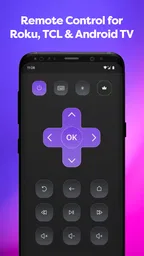
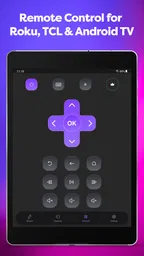
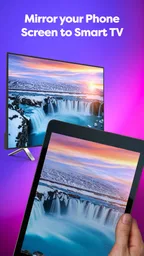
Remote Control for Roku & TCL is built for a familiar little frustration: you want to control the TV, but the physical remote is nowhere to be found. This free TV remote control app also offers screen mirroring, and its appeal is easy to understand from the first use. Rather than adding another gadget to the coffee table, it puts a remote-style option on a device many of us already keep close at hand.
A handy idea that clicks quickly
The app’s stated focus is remote control for Roku, TCL, Hisense and Insignia smart TVs, alongside screen mirroring. That gives it a clear job instead of asking you to learn a complicated entertainment hub. If your television is among the supported brands, the promise is straightforward: use your phone as another way to operate the TV. I like that practical angle. A replacement control method is most useful when it feels like a convenience, not a new hobby.
In the first week, the novelty is part of the attraction. It can feel satisfying to reach for your phone instead of searching under cushions, and the screen-mirroring option gives the app a second reason to stay installed. For occasional TV use, that combination may be enough to make it feel immediately worthwhile. The app is free to download, while in-app purchases are listed at $4.99 per item, so it is sensible to explore the basic experience before deciding whether any paid option suits you.
There is a catch to the simple pitch: your own setup determines whether the idea becomes genuinely useful. The app is aimed at particular smart TV brands, so it is not a universal remote for every television. Before relying on it, I would check that the TV is compatible and that the phone and television can work together as expected. That small bit of setup-mindedness matters more than the first burst of novelty; an app only earns a permanent place if it fits the devices you actually use.
What it is designed to do
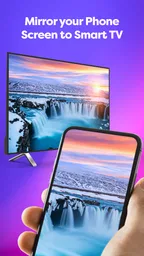
At its core, this is a smart TV remote app paired with screen mirroring. Those are related conveniences, but they serve different moments. The remote function is for everyday interaction with the television, while mirroring is useful when you want to show content from a phone on a larger display. Having both under one app may be appealing if you already reach for your phone as your main personal device.
I also appreciate that the app’s identity is easy to grasp. It does not present itself as a replacement for every piece of home entertainment equipment; its focus is on Roku, TCL, Hisense and Insignia televisions. That narrower scope can be a strength when it matches your household. It also sets a realistic expectation: compatibility comes first, and the app’s usefulness follows from how well that target lines up with your TV.
From first-week convenience to a lasting habit
The real test starts after the first few days. Novelty can make any phone-based remote seem clever, but recurring value comes from ordinary routines: reaching for the phone when the remote is misplaced, keeping the app available for a quick TV session, or using screen mirroring when a larger display is more convenient. If those moments happen regularly, the app has a natural place in your digital routine. If they are rare, it may feel more like a backup tool than a daily essential.
For me, that distinction is important. A good utility does not need to be exciting every time; it needs to save a little effort at the moment it is needed. This app’s strongest long-term case is therefore practical rather than flashy. It offers an alternative control method and a mirroring feature in a single package, but the value depends on whether both match your habits. Someone who regularly uses a compatible TV from a supported brand may find that combination more compelling than someone who already has a reliable remote and never mirrors content.
The app’s broad audience is reflected in its reach: it has over a million installs and a 4.1 average from around 59,000 ratings. Those figures suggest that plenty of people have considered it useful, though they cannot predict how it will fit a particular living room. I would treat them as context, not a guarantee. Your TV model, home setup and patience for using a phone as a controller are what will decide whether it becomes a dependable backup or a short-lived experiment.
Keeping the app useful over time
The maintenance burden appears modest in concept: keep the app available, make sure it remains appropriate for your devices, and revisit it when your TV or phone setup changes. As with any remote-control utility, a change in the household’s hardware can affect whether the app remains relevant. If you replace a television or move to a different brand, the original reason for keeping it may disappear. That is less a flaw than a reminder to review utility apps now and then instead of letting them accumulate indefinitely.
It is also worth being deliberate about expectations. A phone is not always as convenient as a dedicated remote: it may be elsewhere, out of battery, or in use for something else. On the other hand, phones are often within reach, and an app-based option can be handy when the physical remote goes missing. I see the best role here as a complement, not an automatic replacement. Keeping that distinction in mind avoids frustration when the app is useful in some situations but not every one.
Screen mirroring contributes to the maintenance question in a different way. If you use it often, it gives the app an ongoing purpose beyond controlling the television. If you rarely need to display phone content on a TV, that feature may not add much to your monthly routine. The key is to judge the app by the tasks you actually repeat, rather than by the number of functions it advertises. A compact purpose can be more valuable than a long feature list when it solves a recurring annoyance.
Where fatigue can set in
The main source of fatigue is the gap between a neat idea and a smooth everyday fit. A phone-based remote asks you to open and use an app where a dedicated control may already be ready. If the physical remote is consistently nearby, the app may rarely win that comparison. If it is often misplaced, the balance can shift. That means the same product can feel like a smart household shortcut for one person and unnecessary clutter for another.
Compatibility is another practical limit. The app specifically targets Roku, TCL, Hisense and Insignia smart TVs, so people with other television brands should not assume it will suit their setup. Even within the intended audience, it makes sense to think about your particular devices rather than relying on a brand name alone. That caution is not a reason to dismiss the app; it is simply the most important filter before making it part of a routine.
There is also the matter of paid options. The app is free, with in-app purchases listed at $4.99 per item. That structure does not automatically make the experience poor, but it does mean users should notice what is included at no cost and decide whether additional purchases are worth it to them. I would approach it as I would any utility: start with the core use, see whether it genuinely improves your routine, and only then consider spending. A small convenience is only valuable if it remains convenient.
Finally, there is the risk of keeping an app simply because it once solved a problem. If the remote turns up, the TV changes, or screen mirroring never becomes part of your habits, the app may stop earning its place. That is a useful standard for any tool: does it still save time or effort now? If the answer is no, removing it is a reasonable choice. If it continues to come in handy, its modest role can still justify keeping it installed.
Who is likely to appreciate it
I can see this app fitting people who use a compatible Roku, TCL, Hisense or Insignia smart TV and like having a phone-based fallback. It may also suit households that sometimes want to mirror phone content onto a television. In both cases, the benefit comes from matching the app to a real, repeated need. It is less persuasive as a download made out of curiosity alone, particularly if you already have a reliable remote and do not use mirroring.
People who prefer physical controls may find that the phone never becomes their first choice. That is perfectly reasonable. The goal is not to replace a comfortable habit just because an app can offer an alternative. Instead, I would think of this as a flexible extra: useful when the traditional remote is unavailable, potentially handy for mirroring, and easy to reassess if your routines change.
Long-term verdict
Remote Control for Roku & TCL earns its place through practical repetition, not novelty alone. Its combination of TV control and screen mirroring gives it more than one possible use, while its focus on a defined set of TV brands keeps its purpose clear. The free download makes it approachable, and the listed purchase option gives users a reason to check what they need before paying for anything.
My overall view is that this is best treated as a useful companion rather than a guaranteed replacement for a physical remote. During the first week, the phone-as-remote idea can feel pleasantly convenient. Month to month, its staying power depends on whether you reach for it often enough and whether mirroring fits your life. The maintenance burden is mostly about keeping expectations realistic and reconsidering the app when your devices or habits change.
If your TV is in the app’s intended audience and you regularly misplace the remote or use phone-to-TV mirroring, it is easy to understand why this tool could become a quiet household staple. If those needs do not recur, the initial appeal may fade. That is a fair outcome for a focused utility: the best reason to keep it is that it repeatedly makes a small, familiar task easier.
The app is developed by SensusTech LLC and is rated for Everyone. It was released on July 4, 2021, and its current version is 1.8.5, with Android 7.0 as the minimum operating system requirement. Those details make it straightforward to assess whether it fits an Android device, while the more important everyday question remains whether your television and habits make its remote and mirroring tools worth returning to.
What we like
- Offers a convenient way to control a Roku device from a phone.
- Useful when the physical remote is missing or out of reach.
- Touch controls can make menu navigation feel quick.
- Can help manage playback without interrupting viewing.
- A phone-based remote is easy to keep close at hand.
What could be better
- Requires a compatible Roku device and a working network connection.
- Some features may require a paid upgrade.
- Phone controls can be less comfortable than a physical remote.
- Notifications or calls may interrupt use of the remote.
- Compatibility can vary across Roku and TCL device models.





