
RAISE-365 review
 Analysis by Appsdrops
I would approach RAISE-365 as a fundraising tool first, not as a general event planner. That distinction matters: an app can make it easier to coordinate a cause, but it cannot by itself make a campaign trustworthy or successful. My interest here is whether it seems suited to the practical work around fundraising, and whether a prospective user can make a careful choice before relying on it.
Fundraising is also a trust decision
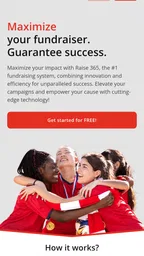
RAISE-365 is an Events app from Raise 365, aimed at making fundraising activities easier to manage. It is free, rated for Everyone, and has a 3.8 average from around 300 ratings, with more than 100,000 installs. Those figures suggest that it has reached a meaningful audience, though they are not a substitute for checking whether the app fits your particular organization or event.
Fundraising involves more than arranging a date and asking people to participate. Organizers may handle donor expectations, event details, and sensitive conversations about a cause. I would therefore judge this app by two standards: whether it can help with the practical coordination, and whether I am comfortable with the account and data choices visible when I use it. Those are related questions, but they are not the same.
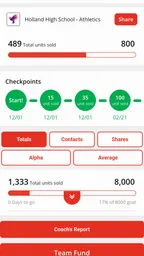
The app’s purpose gives it a clearer focus than a broad calendar or a general-purpose group chat. Those familiar tools can coordinate volunteers, but the organizer often has to assemble the fundraising process around them. A dedicated fundraising app may be a better starting point when the event itself is built around raising support. At the same time, a focused label alone does not tell me how donations, personal details, or campaign records are handled, so I would avoid treating the app’s purpose as a guarantee about those matters.
The app is free to download, which lowers the barrier to trying it. I would still distinguish that from the overall cost of running a fundraiser: an app’s download price does not establish whether an event has other expenses, whether participants need anything beyond the app, or how money is collected. Before inviting a donor or volunteer, I would make sure I understand the complete process rather than assume every part of the campaign happens inside one place.
What the app’s identity tells me—and what it doesn’t
Its Events classification and fundraising focus make it most relevant to people who are organizing an activity with a clear fundraising purpose. For a school group planning a community event, a local cause coordinating supporters, or a team collecting contributions around a shared activity, that focus could be more useful than trying to bend an ordinary event calendar into a campaign tool.
By contrast, if I only need to send a time and location to friends, a calendar invitation or group message is likely simpler. If my organization already has an established donation system and needs a full donor-management workflow, I would compare RAISE-365 with the tools already approved by the organization before moving people or information into another service. The right choice depends on the job: event coordination and fundraising may overlap, but they are not interchangeable.
The app was released in July 2021 and its current version is 2.0.10. It supports Android 7.0 or later. I would check that compatibility before asking a group to install it, especially if participants use older phones. A campaign can lose momentum when an organizer assumes everyone can join from their device, so it is sensible to keep a non-app way to share essential event information.
Check the controls before inviting people
For a trust-conscious review, I would look directly at the choices the app presents rather than guess about its privacy practices. Before creating an account or beginning a campaign, I would read the prompts carefully, note what information is required, and check whether any optional choices are clearly separated from what is necessary to use the app. If the wording is unclear, I would pause before entering personal or campaign details.
I would also check the account controls that are actually available in the installed app. In particular, I would want to know how to review or change account details and how to stop using the account if the event ends. Those are practical questions to answer before a campaign becomes active, not after supporters have been directed to it. I would not assume that a sign-out option, account deletion route, or particular privacy setting exists without seeing it.
This is not a reason to treat the app with suspicion; it is ordinary care for any service used in a fundraiser. People may associate a campaign with a school, charity, or neighborhood group, and that association can make them less likely to question how a digital tool works. I would make the organizer’s own expectations clear: what the app is being used for, who is coordinating the event, and where participants should go if they have a question.
A useful first step is to explore the app with a low-stakes test before an invitation goes out. I would avoid entering real donor details during that check. Instead, I would establish whether the basic flow is understandable, whether the app asks for information that seems necessary to the task, and whether the organizer can explain the process to another person. This small rehearsal can reveal confusion without putting a live campaign or a supporter’s information in the middle of it.
Handle sensitive moments deliberately
Fundraising can involve personal stories and financial expectations, so I would be selective about what I put into any campaign tool. If a cause concerns someone’s health, family situation, or hardship, I would get permission before sharing identifying details and keep the public explanation limited to what supporters need to understand the event. That is good practice regardless of which app is used, and it avoids assuming that a platform’s features make sensitive sharing safe.
For a community event, I would separate coordination from the more personal side of the cause. A short, clear event description can explain the purpose and logistics without turning private circumstances into promotional material. If participants need further context, the organizer can decide what to share through a channel appropriate to the group. The app should not become the default place to store every conversation simply because it is available.
I would also be precise when explaining how contributions work. Before asking someone to take action, I would confirm the route the campaign uses and describe it in plain language. An app focused on fundraising should not lead an organizer to imply that payment handling, receipts, or records are covered unless the app itself clearly explains that process. When money is involved, uncertainty is a reason to verify the workflow before inviting supporters, not something to gloss over in the event announcement.
One practical trade-off is that a dedicated app can make a campaign feel more organized, while also asking participants to adopt another tool. For a small group that already communicates comfortably in a shared chat, that extra step may create friction. For an event where keeping the fundraising activity distinct from everyday messages matters, a dedicated option may be worthwhile. I would make that choice based on the group’s habits and the sensitivity of the event, rather than assuming an app is automatically more convenient for everyone.
Keep the organizer in control of the experience
My preferred way to introduce a fundraising app is to explain why the group is using it and offer a practical alternative for anyone who cannot or does not want to install it. That prevents app access from becoming an unnecessary barrier to participating in the event. It also gives the organizer a chance to notice whether the tool genuinely helps, instead of mistaking downloads for engagement.
For example, imagine a volunteer arranging a weekend community fundraiser. Before sending invitations, I would have that person test the event setup, check the wording participants will see, and make sure the essential time and location can also be shared outside the app. I would then ask one other volunteer to follow the instructions without coaching. If they cannot tell what to do next, the invitation needs clearer guidance, whether the issue is the app or the organizer’s message.
This kind of trial is especially useful because fundraising has several audiences. The person organizing the event may be comfortable with a new app, while a donor may only want a concise explanation and a straightforward way to support the cause. I would not ask supporters to navigate a complicated process simply to satisfy the organizer’s preference for one central tool. If the app makes coordination easier for volunteers but confusing for donors, it may be best used only for the part of the event it handles well.
There is also a useful boundary to keep in mind: an app can support a campaign, but the organizer remains responsible for clear communication. I would keep a separate record of key decisions using tools already accepted by the organization, rather than relying on any single app as the only source of truth. That is not a claim about a weakness in RAISE-365; it is a sensible safeguard when an event involves multiple people, changing plans, and public expectations.
Who should try it, and who may prefer another route
I would consider trying RAISE-365 if I were coordinating an event whose central purpose was fundraising and wanted a tool shaped around that activity. Its focused identity is the main reason to explore it instead of starting with a generic calendar. The rating and install history show that other people have used it, but I would treat those as context rather than proof that it will suit every campaign.
I would be less inclined to use it for a one-off gathering with no fundraising component, where a standard calendar entry would do the job with less setup. I would also hesitate if my organization requires specific account, privacy, or record-keeping controls that I have not personally checked in the app. In that situation, an already approved organizational platform is the safer choice until the relevant controls are understood.
For a group with mixed technical comfort, I would decide in advance how to include people who do not install the app. That could mean sharing essential details through the group’s usual communication channel, while making clear which parts of the process take place elsewhere. The key is not to promise a seamless experience before the organizer has tested it with the people who will actually use it.
My cautious verdict
My recommendation is to test RAISE-365 with a small, low-stakes event before making it central to a fundraiser. Its fundraising focus gives it a reason to be considered over a plain calendar, and its free download makes that initial evaluation accessible. But the decision should rest on the actual flow and choices visible in the app, not on assumptions about how it handles personal information or contributions.
Raise 365’s app has an Everyone age rating, and version 2.0.10 is available for Android 7.0 and above. Those details help determine whether it is suitable for a group’s devices, but they do not answer the more personal question of whether each participant wants to use it. I would explain the purpose, test the process, and keep an alternative route for essential information.
Overall, I see it as a candidate for organizers who want a fundraising-oriented event tool and are willing to check the practical details before inviting supporters. I would not choose it simply because it is dedicated to fundraising, nor reject it because it asks for a little evaluation. If its visible controls and workflow meet the group’s needs, it may help structure the campaign; if they do not, a familiar calendar, communication channel, or organization-approved fundraising service is the more responsible fit.
What we like
- Offers a structured way to set and track personal goals
- Daily prompts can help encourage consistent reflection
- Progress tracking makes milestones easier to review
- Useful for building routines around personal growth
- A focused format may feel less overwhelming than broad planning tools
What could be better
- The approach may not suit users who prefer flexible goal setting
- Daily engagement can feel repetitive over time
- Progress depends on regular and honest user input
- Some features may require a paid plan
- Users seeking detailed coaching may find the guidance limited





