Radio USA - Live Radio FM / AM review
 Analysis by Appsdrops
I can see the appeal of Radio USA - Live Radio FM / AM quickly: it turns the phone into a place to tune in to live radio rather than asking me to choose an album, build a queue, or decide what to play next. That makes it a natural fit for listeners who enjoy letting a station set the mood, whether they want music in the background or a familiar broadcast while doing something else.
It is a free music and audio app from Radio FM Online Free, and its focus is straightforward: listening to AM and FM stations. The best reason to try it is also the clearest limit. If you want a simple way to explore radio, it is worth a look; if you expect a full music library with precise control over every song, you will likely be happier with a streaming service built around on-demand listening.
Why the first week feels easy
In the first few days, radio can feel refreshingly low-effort. Instead of searching for a particular track, I can choose a station and let the programming carry the session. That is especially useful when I am cooking, tidying up, or getting ready to leave: I want sound in the room, not another small decision to make.
The app’s USA focus gives the experience a clear frame. It is aimed at people looking for American radio, not a broad catalog of audio from every country. That focus can make it more appealing than a general audio app when I want the character of radio rather than a playlist designed around my listening history.
A useful way to judge it early is to test it in different parts of the day rather than only during one long session. A station that suits a quiet morning may not be right for a commute or an evening at home. I would try a few listening moments and notice whether I return to the same stations, or whether the appeal depends on browsing for something new.
That distinction matters because live radio is not the same as picking a track. The station’s schedule and selection shape what I hear, so I trade exact control for a more spontaneous flow. If I enjoy being surprised, that exchange can be pleasant. If I am trying to hear one specific song or avoid a particular style, it can become frustrating quickly.
Make radio fit a real routine
One everyday scenario where the app makes sense is a short kitchen routine. I can start a station before making breakfast and leave it playing while I move between tasks, rather than repeatedly unlocking the phone to choose new tracks. The value is not a hidden productivity trick; it is simply that radio can occupy the background without demanding constant attention.
For a commute, I would treat it as a listening option to check before setting off, not something to manage while driving. Choose a station while parked, then keep attention on the road. That advice is practical for any phone-based audio, but it suits radio particularly well because a station can keep going without the listener having to select each next song.
Another useful test is whether you want the sound to be the main event. Radio works well when I am happy to listen broadly while doing something else. For concentrated listening, a chosen album or playlist is usually better: it gives me a more predictable mood and avoids the possibility that a station shifts into material I would not have selected.
What changes after the novelty fades
The first-week excitement of trying stations is not, by itself, a reason to keep an app installed. Month to month, I would judge this one by whether it becomes part of a repeatable habit: a station I turn on during breakfast, a familiar voice during housework, or a radio option I reach for when I do not want to assemble a playlist.
That habit-based value is different from the value of a deep music catalog. On-demand services are better when I want to save a specific album, replay a song, or shape a precise sequence. Radio’s strength is that someone else has already made the programming choice. For a listener who likes that shared, broadcast-style experience, this can be a welcome change from endless searching.
The practical trade-off is that a live station offers less certainty. A listener who expects the same kind of music every time may find the variation irritating, while someone who likes a changing mix may see it as the point. I would keep the app only if its stations fit occasions I actually have, rather than because browsing them was entertaining once.
Its audience figures suggest that many people have found a reason to try it: it has a 4.7 average from around 29 thousand ratings and has passed a million installs. Those figures can provide context, but they cannot tell me whether the available radio experience matches an individual listener’s tastes. I would still make the decision based on whether I enjoy the stations and return to them naturally.
Keeping it installed without adding chores
Radio is at its best when starting a session is easier than deciding what to play. My practical tip is to notice which stations I reach for repeatedly and make those the center of my routine, instead of turning each listening session into another round of exploration. That reduces browsing fatigue and gives the app a fair chance to become useful after the novelty wears off.
I would also avoid treating a radio app as a substitute for a carefully organized music collection. If I need a particular track for exercise, a specific mood for focused work, or reliable replay of a favorite album, I would use an on-demand alternative for that job. Keeping both kinds of app can make sense, but only if radio fills a distinct role rather than duplicating what I already use.
There is little reason to make maintenance complicated: the key question is whether the app still earns its place in ordinary use. If I go weeks without choosing it, that is a stronger signal than any first impression. If it becomes the easy option for a recurring moment in the day, its simplicity is a genuine benefit.
The app is free to download, though it also offers in-app purchases priced from $16.99 to $39.99 per item. I would look carefully at any purchase screen and decide whether a paid option solves a problem I actually have; the basic appeal of listening to radio should be judged on its own, not on the assumption that spending is necessary. That is a sensible approach for anyone trying an app primarily for casual listening.
Where listening can become tiring
The same lack of precise control that makes radio effortless can also cause fatigue. A station may not match my mood every time, and I cannot expect the experience to behave like a personal playlist. If I find myself repeatedly abandoning what is playing to search for something else, the format may not suit my habits, even if I like the idea of radio.
There is also a difference between trying many stations and finding a dependable one. Browsing can be enjoyable at first, but endless switching turns a background activity into a task. I would give a few candidates a proper listen in the settings where I expect to use them, then keep only the ones that work for those moments. That small change makes the app easier to assess honestly.
People who want extensive control, a highly personalized music library, or a guaranteed sequence of particular songs should probably choose a service designed for on-demand playback instead. Likewise, anyone who dislikes broadcast-style variation may not get much lasting value here. This is not a flaw that more enthusiasm can fix; it is a mismatch between radio and the listener’s expectations.
The app is rated for Teen audiences. That is worth keeping in mind if you are choosing audio apps for a younger listener, but a rating alone does not tell me whether any particular station will suit a family’s preferences. I would listen together first if content suitability is important in your household.
Compatibility and the decision to stay
The current version is 4.3.7, and the app requires Android 8.0 or later. That makes the operating-system requirement an important first check before downloading. It was released on July 14, 2020, so this is not a brand-new experiment in the radio category; still, the more meaningful question for me is whether it works well enough for the listener’s own routine today.
Because it is a live-radio app, I would assess it during the times and in the places where I actually expect to listen. A quick test at home may tell me whether the general idea appeals, while a later session in my usual routine reveals whether I reach for it without thinking. I would not keep it just for the possibility of someday exploring more stations.
For a newcomer, the simplest comparison is this: a conventional music-streaming app offers stronger control over exact songs, while radio offers a more hands-off listening flow. Neither approach is universally better. I would choose this app when I want a station to provide the programming, and choose a playlist-based service when I want to be the programmer.
My long-term verdict
Radio USA - Live Radio FM / AM earns lasting space only when radio already fits a real part of the day. I can recommend giving it a try to someone who wants an easy, station-led alternative to choosing every track and who enjoys the unpredictability of broadcast listening. Its free entry point makes that trial straightforward, while the optional purchases are a reason to pause and consider what value they would add before spending.
For me, the lasting test is simple: does it make a recurring moment more pleasant without creating another chore? If the answer is yes, a familiar station can be enough to justify keeping it. If I mostly want control, replay, and a predictable sound, I would skip it in favor of an on-demand music app. The choice is less about which format is superior and more about whether I want to tune in or choose every song myself.
What we like
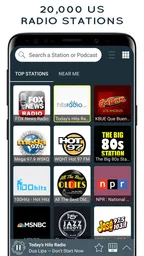
- Browse a broad selection of US radio stations by genre.
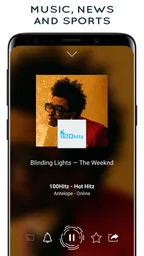
- Listen to live broadcasts from stations across the country.
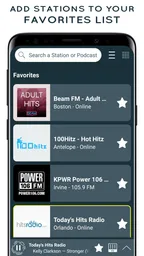
- Save favorite stations for quicker access later.
- Simple controls make playback easy to manage.
- Useful for discovering local and regional stations.
What could be better
- Streaming requires a reliable internet connection.
- Audio playback can use significant mobile data.
- Station availability may vary by location.
- Some broadcasts may have interruptions or buffering.
- The selection may not include every station you want.





