


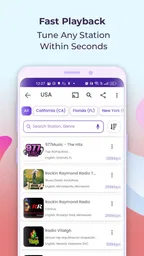
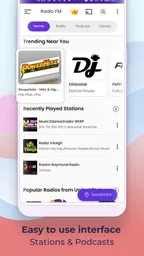
Radio FM review
 Analysis by Appsdrops
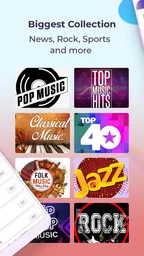
When a shared tablet is on the kitchen counter, a radio app can be more useful than another playlist service: one person can put on a live station while everyone gets on with breakfast, cooking, or chores. Radio FM is built around that kind of flexible listening, bringing radio, drama, and podcasts into one audio app. I’d consider it for a household that wants a straightforward way to find spoken and musical audio, rather than a tightly personalized service tied to one person’s taste.
One device, several listening habits
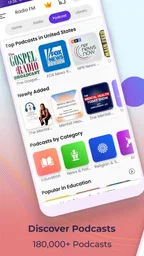
The app’s broad mix is its most practical household advantage. A live station suits a room where people are coming and going, while a podcast or drama is a better fit when someone wants to follow a particular program. Keeping those formats in one place can cut down on the familiar shuffle between separate radio and podcast apps.
That does not mean every listener gets a perfectly tailored experience. On a shared device, the person who chooses what plays still sets the mood for everyone nearby. I’d use the app as a common listening source in a kitchen or living room, but I wouldn’t assume that it creates separate listening spaces or keeps different household members’ preferences apart.
A realistic routine might be to start a station while making breakfast, then switch to a podcast when the room quiets down. The value is not some elaborate household system; it is having different kinds of audio available without changing apps. If each person wants private recommendations, a personal queue, or their own carefully maintained listening history, individual accounts and dedicated services may be a better fit.
What the all-in-one approach changes
Radio and on-demand audio serve different purposes. A live station is convenient when I want sound without choosing a specific episode, while a podcast asks me to decide what to hear and when. Radio FM’s mix makes it easier to move between those intentions, though the experience can feel less focused than an app devoted entirely to podcasts or a service built around music playlists.
That distinction is useful when deciding what to hand to a family member. For casual background listening, live radio can be the simpler choice because there is no need to browse for a long time before pressing play. For a child or another listener who needs carefully selected material, I’d choose the content myself rather than treating a broad audio catalog as a curated household library.
Setting expectations on a shared device
Radio FM is a free app from RadioFM, with optional in-app purchases priced from $0.49 to $53.99 per item. I would treat the free entry point as a way to try the listening experience, not as a promise that every option or use case is included without cost. Before letting someone else make purchases on a device, I’d check the device’s purchase settings and make clear who is responsible for any transaction.
That is especially worth doing on a tablet used by more than one person. An app available to everyone on the device does not automatically give each person a separate account boundary. I would avoid assuming that preferences, saved material, or payment decisions are isolated by user unless I had checked how the app behaves on that particular device.
There is also a practical difference between sharing a device and sharing a listening session. One household member can start audio for the room, but that does not guarantee everyone will want the same station or program. A simple arrangement works best: agree on who is choosing the audio, and switch to headphones or a personal device when tastes diverge.
Making household listening easier to coordinate
For a common-room routine, I’d decide on the listening moment before opening the app: background radio for chores, or a particular show for a quieter stretch. This small habit avoids turning the shared screen into a long browsing session while everyone waits. It also makes the app’s range more useful, because the choice starts with the household’s purpose rather than endless searching.
Another useful trade-off is choosing live audio when the listener wants variety without managing a queue, and a podcast when the household wants a specific program. If one person is responsible for starting playback, they can make that choice before handing over the device. That is a coordination tip, not a special family feature, and it works precisely because it does not depend on separate profiles or controls.
Shared-device use can also expose a weakness of all-in-one apps: the app may be easy to open, but the best choice still depends on knowing what the listener likes and what is appropriate for the room. I would not leave a young listener to browse unsupervised simply because the app includes familiar forms such as radio and drama. A parent or caregiver can choose audio first and keep the device within the household’s normal boundaries.
Age context and trust
The app carries a Teen content rating, so I would take that label seriously when deciding whether it belongs on a child’s device. It is not a substitute for a parent’s judgement about a particular station, podcast, or drama. In a shared home, content can be audible to younger children even when an older teenager chose it, so the room and the audience matter as much as the device owner.
For a teen who already listens independently, the range of radio and spoken audio may be appealing. For a younger child, I’d keep an adult involved in selecting what plays. That recommendation is about sensible supervision, not a claim that the app provides parental controls. Families looking specifically for built-in child profiles, content filters, or tightly managed listening should compare options designed around those needs before relying on this one.
Trust also means being clear about purchases. Because the app is free to install but includes paid items, I would explain that distinction to anyone sharing the device, particularly a younger user. Device-level purchase protections are a more reliable household safeguard than assuming that a free app cannot lead to spending.
How it compares with separate audio apps
Compared with a radio-only app, Radio FM’s appeal is having podcasts and drama alongside live listening. That variety can save space and reduce app switching for someone who moves between background audio and programs they follow. The trade-off is that a specialist radio app may be a more direct choice if the listener only wants stations, while a dedicated podcast app may suit someone who cares most about managing shows and episodes.
It is also different from a music streaming service centered on playlists and personal recommendations. I would not choose it as a replacement for a carefully organized music library if that is the main goal. Its value is broader audio access, especially when live radio and spoken programs matter; the right comparison depends on whether the household wants shared, immediate listening or individualized discovery.
The app has a 4.4 average from around one million ratings, with roughly 35,000 written reviews and over 100 million installs. Those figures suggest it has reached a large audience, but they cannot tell me whether a particular station or program will suit my household. I’d judge it by trying the kinds of listening we actually use, rather than treating popularity as a guarantee of a perfect fit.
Compatibility and the first trial
Radio FM was released on March 21, 2013, and it requires Android 7.0 or later. That requirement matters if the shared device is an older Android tablet: I’d check its operating system before planning to use it around the house. It is listed for Android and iOS audiences, but I would still check the relevant app store on the device I intend to use rather than assume every device has the same setup.
For a low-pressure trial, I’d start with one ordinary listening situation, such as background audio during a meal or a podcast during a quiet task. Notice whether the app makes it easy for the intended listener to get to suitable content, and whether the household is comfortable sharing that device for audio. If those basics work, the app’s mix can be useful; if browsing or shared preferences become a source of friction, a more focused alternative may be easier.
Who will enjoy it, and who may prefer something else
I’d recommend Radio FM to people who want radio and spoken programs together, especially when one device serves a common room and listeners are happy to take turns choosing. It is also a reasonable option for someone who likes moving between live audio and on-demand listening without making a separate app the center of every task.
I’d skip it for a household that needs strong separation between each person’s account, firm child-specific controls, or a highly organized personal music collection. I’d also look elsewhere if a listener wants only one format and would rather have a specialized interface. Those are not small distinctions: on a shared device, the best app is often the one that matches how the household actually listens, not the one with the broadest menu.
A practical household verdict
My view is that Radio FM works best as a shared source of everyday audio, not as a complete household-management solution. Its combination of radio, drama, and podcasts makes it flexible enough for different moments, while its free download gives a family a way to try the basic experience before deciding whether optional purchases matter to them.
The main household rule I’d keep is simple: choose content with the audience in mind, and do not confuse a shared app with separate personal spaces. With that expectation, it can make a kitchen or living room feel less dependent on one person’s playlist habits. If your priority is private personalization or detailed child supervision, another kind of service is likely the better choice; if you want varied audio that people can share informally, Radio FM is worth trying.
What we like
- Offers access to radio stations from many countries.
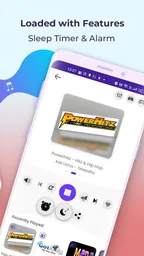
- Includes a sleep timer for listening before bed.
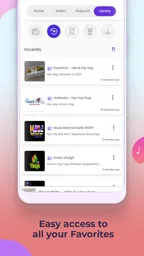
- Lets users save favorite stations for quick access.
- Supports background playback while using other apps.
- Provides a simple interface that is easy to navigate.
What could be better
- Requires an internet connection for streaming.
- Station availability can vary by region.
- Audio quality depends on network speed.
- Some stations may stop working without notice.
- Listening for long periods can use substantial mobile data.





