
Radio App review
 Analysis by Appsdrops
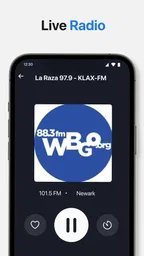
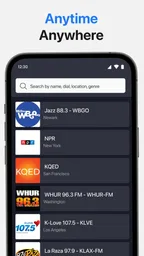
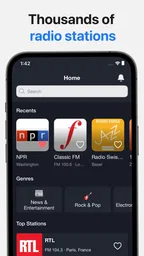
I find a radio app most useful when it fits around ordinary routines: something to put on while making breakfast, doing chores, or sharing a room with someone who wants background sound. Radio App, from RAFIKI APPS LLC, is built for that kind of listening, bringing FM, AM, and online live radio together in one place. In my view, its appeal is less about replacing every music service and more about making live stations an easy option when you want music, news, sports, or local voices.
One listening app for a shared room
In a household, radio can be a simple shared choice. One person might want music while getting ready, while someone else prefers a news or sports station later in the day. Because Radio App covers several kinds of live programming, it can serve those changing moods without asking everyone to agree on a playlist or take turns choosing individual tracks.
That distinction matters if you are used to on-demand streaming. With a playlist, you control exactly what comes next; with a live station, you accept the station’s schedule and selection. I see that as a useful trade-off in a kitchen or living room, where people often want sound in the background rather than a carefully curated listening session. It also means the app is not the best fit when you need a particular song, a quiet passage, or a soundtrack with no interruptions.
A realistic use is putting on a local station while preparing dinner, then switching to a sports broadcast when another person takes over the room. The app’s mix of FM, AM, and online radio gives that routine more range than an app focused solely on one station type. Still, shared listening depends on one person making the selection; I would not mistake the app for a household media system with separate profiles or coordinated listening controls.
Where live radio has an advantage
Compared with music-streaming apps, Radio App is better suited to discovering what a station is airing now, following live talk, or keeping up with a local broadcast. Compared with using a separate app for every station, a single radio app can make it easier to move between different kinds of listening. The value is practical rather than elaborate: open it when you want a live voice or broadcast, rather than spending time building a queue.
There is a useful household compromise here. If one person is cooking and another is nearby, a station can provide shared background sound without requiring either person to hand over a phone to manage a playlist. But radio is still a one-stream choice in the room, not a way for several listeners to personalize what they hear simultaneously. If that separation matters, personal headphones and individual services are a better match.
Set expectations before making it the default
The app is free to download, with in-app purchases listed from $2.99 to $24.99 per item. I would start with the free experience and decide whether any paid option matters to your own listening before spending. The presence of purchases is worth mentioning in a shared-device setting: a family member using the same phone should know that purchases are possible, rather than assuming every action is part of a no-cost experience.
Radio App is a music and audio app, but that broad label can set the wrong expectation if you mainly want albums, saved playlists, or precise control over playback. Its focus is live radio. I would choose it for stations and broadcasts, and keep a conventional music service available for occasions when the household wants to pick exact tracks or avoid a station’s programming choices.
One practical way to use it is to agree on a few listening situations rather than treating it as the answer to every audio need: local programming while doing chores, a live broadcast when an event is on, and a separate service for focused listening. That small distinction prevents frustration. Live radio’s strength is that it gives you an ongoing broadcast; its limitation is that the content follows the station rather than your personal schedule.
Coordination without assuming family controls
For a shared phone or tablet, I would keep the expectations simple. Decide who is choosing the station when the app is used in a common room, and make sure the next person knows that a live broadcast may already be playing. That is ordinary coordination, not a feature of the app, but it can make shared use smoother—especially when one person expects music and another expects talk or sports.
I would also avoid treating a shared device as a private listening account. The app’s appeal is its access to radio, not a promise of household profiles, child-specific settings, listening histories separated by person, or remote coordination. If those boundaries are important to you, look for a service whose account and family features explicitly meet that need. For casual use on a household device, a simple handoff may be enough.
Another small but useful habit is to make the intended station clear before leaving the device for someone else. With live radio, the station itself determines what comes next, so a broadcast that suits one person’s morning routine may not suit another person’s quiet study time. A quick verbal handoff is more reliable than assuming that a live stream behaves like a saved playlist.
Age context and trust in a shared home
Radio App carries a Teen content rating. That is relevant for families deciding whether it belongs on a shared device, but I would not treat an age label as a guarantee that every station or broadcast will suit every listener. Live stations can cover different subjects and styles, so parents and caregivers should use their judgment about what is appropriate for the person listening and the particular station being played.
For younger users, I would introduce it as a way to listen to broadcasts with an adult nearby, rather than assuming that all radio content is automatically suitable. In a household with teens, the app may be a straightforward option for music, news, sports, and local programming, while the family can still set its own expectations about shared-device use and purchases. Those boundaries come from household decisions; I would not rely on an unmentioned in-app control to enforce them.
The developer is RAFIKI APPS LLC. Radio App has a 4.4 average from around 1.7 thousand ratings, and it has passed 500 thousand installs. Those figures suggest that it has found an audience, though I would weigh them alongside your own needs: whether you want live stations, whether the available radio format suits your routine, and whether you are comfortable with the free app’s purchase options.
Who should choose it, and who should look elsewhere
I would recommend trying it if you often want a live station close at hand, especially for background listening, local broadcasts, or a mix of music and spoken programming. It is also a reasonable choice for someone who prefers radio’s shared, continuous feel to choosing every track. The app is free, is rated Teen, and is on version 1.2.0; its stated minimum operating-system requirement is 7.0, so checking device compatibility before installing is sensible.
I would skip it as a primary music app if your routine depends on offline listening, carefully assembled playlists, exact song selection, or separate preferences for multiple household members. Those are different needs from tuning into live radio, and a streaming service designed around personal libraries may serve them better. I would also avoid choosing it solely as a child-safe audio solution: the age rating gives useful context, but families still need to judge the stations and listening situation themselves.
My overall view is that Radio App makes most sense as a practical household radio rather than an all-purpose audio hub. Its range of FM, AM, and online listening can make station switching convenient, while live programming offers an easy shared backdrop for everyday tasks. The trade-offs are equally clear: you follow the broadcast, shared use calls for a little coordination, and in-app purchases deserve attention on a common device. If those limits fit your expectations, it is a sensible free place to start when you want radio within reach.
What we like
- Easy access to many radio stations in one place
- Station variety helps suit different listening moods
- Live broadcasts offer programming beyond music
- Simple controls make playback easy to manage
- Useful for discovering stations from other regions
What could be better
- Streaming requires an internet connection
- Playback can use significant mobile data
- Some stations may be unavailable in certain regions
- Audio quality depends on the station stream
- Advertisements may interrupt listening





