



Kids Place: Parental Controls review
 Analysis by Appsdrops
I look at a parental-control app less as a promise that a child will always be safe and more as a tool for making a shared device easier to manage. Kids Place: Parental Controls is built around that practical problem: giving children a more limited space on an Android device, while letting a parent decide which apps belong there and how screen use is handled. That focus makes it worth considering for families who hand over a phone or tablet, but it also means the experience depends on how carefully an adult sets it up and checks that it suits the household.
A child-focused layer for a shared device
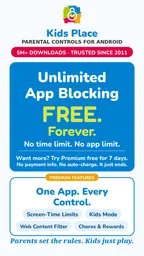
In the parenting category, Kids Place takes a launcher-style approach rather than trying to replace a child’s device with a completely separate ecosystem. Kiddoware - Parental Controls App Provider has developed it for families who want to shape what a child can access on an Android device. The app is free to install, with optional in-app purchases priced from $0.99 to $89.99 per item. It is rated for Everyone, and its current version is 3.10.15.
The basic appeal is straightforward: instead of repeatedly handing over a phone and hoping a child stays in one app, a parent can create a more bounded experience. That can be useful for a young child who borrows a parent’s tablet for a video, a game, or a quiet activity while dinner is being made. The app’s job is not to choose the content for you; the parent still needs to decide what is appropriate and make the available options fit the child.
Its long presence in the app stores may reassure some families that this is an established product rather than a new experiment. It was released on October 16, 2011, and has passed five million installs, with an average rating of 4.3 from around 48,000 ratings. Those figures suggest broad use, but they should not be treated as proof that every family’s setup will be trouble-free. Parental controls are especially sensitive to device settings, adult expectations, and a child’s age.
Trust begins with realistic expectations
I would approach Kids Place as a boundary-setting tool, not as a guarantee of privacy or complete protection. The useful question is whether the app’s visible controls give you a workable way to limit a child’s access on a device you manage. The equally important question is whether you are comfortable with the setup and ongoing supervision that a launcher-based arrangement calls for.
Before relying on any parental-control app, I recommend reading the permission prompts presented during installation and setup, then checking the app’s privacy information in the app store. Those are the places to assess what access is requested and how information is handled. I would not assume that a particular permission is required, or that a particular data practice applies, without seeing it directly. If a prompt is unclear, pause and investigate rather than approving it just because the app is intended for children.
This is a sensible habit with any app that shapes a child’s device use. The parent’s phone, the child’s borrowed tablet, and a device used by several family members may involve different expectations. A control that feels appropriate on a dedicated tablet may be inconvenient on a parent’s everyday phone, especially if adults need to switch back and forth often.
What the controls are useful for in daily life
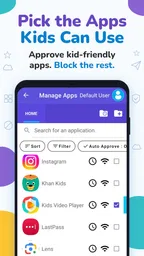
The strongest use case is a device that is shared on an adult’s terms. Imagine a parent preparing dinner while a child asks to use a tablet. A curated set of available apps can make the handoff more predictable: the child gets access to activities the parent has chosen, rather than browsing through the whole device. That is a more practical goal than trying to negotiate every tap in the moment.
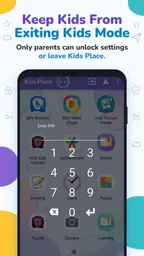
For a smoother routine, I would decide on the allowed apps before handing over the device, rather than configuring everything while a child is waiting. I would also test the child-facing experience myself: open the apps the child is meant to use, check that the route back to the approved space is understandable, and see whether the adult can regain normal use without confusion. This small rehearsal can expose friction before it becomes a daily argument.
A second useful scenario is keeping a device ready for short, repeatable periods of use, such as a tablet reserved for travel or visits to relatives. The parent can think through the intended session in advance: which activities are suitable, what the child may need help with, and when the device should be put away. A control app can support that routine, but it cannot substitute for a family agreement about when screen time ends.
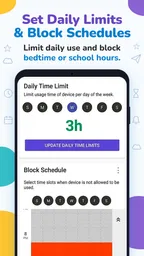
That distinction matters because “limit screen time” can mean different things to different parents. Some want a simple, preselected space for a young child; others expect detailed schedules, activity reports, remote management, or restrictions spanning several devices. I would verify that the controls visible in the installed app match your specific expectations before building a household routine around them.
Setup choices matter more than the label
Launcher-style control has a practical trade-off: it changes the child’s route into the device, so the way you configure the approved space affects the whole experience. Too few choices can make the device frustrating or leave a child unable to complete an activity. Too many can weaken the boundary you wanted. I would start with a small set of familiar apps, use the device alongside the child, and adjust only after seeing where they get stuck.
It is also worth thinking about who else uses the device. If several children share one tablet, a set of apps that works for an older child may not suit a younger one. If an adult relies on the same device for messages, work, or navigation, repeatedly entering and leaving a child-focused environment may become tedious. In those cases, a dedicated child device or the built-in parental controls offered by the device platform may be a better fit.
For families comparing options, the main alternative is often not another standalone app but the controls already available in Android or iOS settings. Built-in tools can be more convenient when a parent wants system-level limits or manages a child’s own account. Kids Place is more appealing when the immediate task is to create a curated, child-oriented space on an Android device that an adult is sharing. These approaches solve related but not identical problems, so I would choose based on how the device is used, not on a general claim that one kind of control is always superior.
Screen-time boundaries still need a human plan
A technical limit is easiest to live with when it supports a routine the child already understands. I would tell the child what the device is for before starting a session, give a clear warning when it is nearly time to stop, and keep an offline activity ready for the transition. That approach can reduce the chance that the app becomes the only visible authority in a disagreement. The parent remains responsible for explaining the boundary and deciding when an exception makes sense.
There is a difference between choosing which apps appear and deciding whether a child’s overall screen habits are healthy. Kids Place can help organize access, but it cannot tell you whether a particular game is a good fit for your child, whether a video is upsetting, or whether a device is displacing sleep and play. I would review the approved apps periodically, especially after a child’s interests change or the device is passed to a sibling.
Another non-obvious point is to test the setup after app updates or changes to the device. The app is currently at version 3.10.15, but any parental-control arrangement deserves a quick adult check after updates, device changes, or a change in who uses it. Confirm that the intended apps remain available and that the child-facing experience still matches your rules. A brief check is more dependable than assuming yesterday’s setup will behave exactly the same forever.
What to weigh before installing
Kids Place has a substantial audience, and its 5.3 thousand written reviews give prospective users plenty of other experiences to consider alongside its average rating. I would read recent comments with a specific question in mind: do people describe the kind of device and family routine you have? A report about a dedicated child tablet may not predict what happens when an adult uses the same phone for work and family life.
The free starting point makes it possible to assess the basic fit before deciding whether any optional purchase is worthwhile. Since in-app purchases range from $0.99 to $89.99 per item, I would check the purchase details inside the app and compare them with the controls I actually need before paying. A wide price range is a reason to be deliberate, not a reason to assume that every useful feature requires a purchase or that a particular purchase is essential.
For a younger child using a parent-managed Android device, the app may be a practical way to make handoffs calmer and access more intentional. I would be less enthusiastic about it for a family seeking a comprehensive, multi-device monitoring system, or for a parent who wants controls to work without regular setup and review. It is also not the right answer if the child needs an unrestricted, personally managed device and the family is ready to teach digital independence instead.
A cautious recommendation for the right household
I would consider Kids Place when the goal is modest and concrete: give a child a familiar selection of apps on an Android device without handing over the entire device experience. Its value is in helping a parent prepare that space and establish a repeatable routine. The app is not a substitute for checking permissions, reviewing privacy information, choosing suitable content, or talking with a child about screen use.
My recommendation is cautious but positive for families who want a child-focused launcher and are willing to test the setup themselves. Begin with a few approved activities, try the controls before relying on them, and revisit the arrangement as the child’s needs change. If you want a different kind of oversight, or if the device must remain convenient for several adult users, compare the platform’s built-in controls and other options before committing. Used with those limits in mind, this app can make a shared-device routine more manageable without pretending that software can do the parenting for you.
What we like
- Lets parents limit access to selected apps and games.
- Can prevent children from making accidental in-app purchases.
- Offers screen-time limits to support healthier device habits.
- Includes options to block incoming calls while Kids Place is active.
- Supports multiple child profiles with separate settings.
What could be better
- Some useful features require a paid subscription.
- Setup can feel confusing for less tech-savvy parents.
- Children may try to exit the app or bypass its restrictions.
- Parental controls may not cover every app or device setting.
- Background restrictions can affect how reliably some features work.





