

Quran Player Audio Offline review
 Analysis by Appsdrops
I approach a Quran audio app with a simple question: can I get from opening it to listening without fuss, and will it still be useful when I’m away from a reliable connection? Quran Player Audio Offline is built around that focused purpose. It is an Events-category app from Rydea GO, though its practical appeal is for anyone who wants Quran recitation close at hand rather than event planning tools. I like the clarity of that premise, but a focused app still needs a little care during setup and everyday use.
Getting past the first listening hurdle
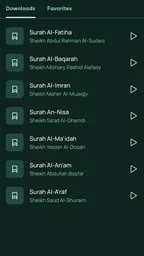
The most important distinction is between being able to play audio now and having audio available offline later. Offline playback is a central part of this app’s appeal, but I would not assume that installing the app alone means every recitation is already stored on the device. Before heading somewhere with poor reception, open the app while connected and check what listening or download controls it presents. If you plan to rely on offline listening, confirm the audio actually plays after disconnecting.
That small test prevents a common disappointment: an app can open without a connection while the audio you want is not yet available locally. I would test the exact listening routine you intend to use, rather than merely launching the app in airplane mode. Start a recitation, let it play briefly, stop it, and then try again without connectivity. This is a practical check, not a claim about a particular download menu or storage system.
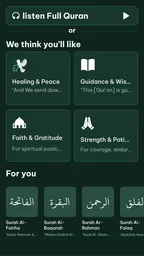
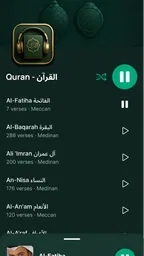
Another place people can get stuck is expecting a broad media library. The app’s identity is a Quran player, not a general audio service. If you want Quran recitation in a straightforward listening context, that focus is useful. If you need a particular reciter, translation, commentary, reading plan, or a way to manage a large personal collection, first inspect the choices available in the app before making it your only tool. I would not choose it on the assumption that it includes every study feature found in larger Quran platforms.
The store describes the sound as clear and high quality, but perceived clarity depends on the recording, the speaker or headphones, and the listening environment. I would test it with the headphones I normally use, especially if I listen in a noisy commute. At home, a phone speaker may be adequate for casual listening; in a shared space or on public transport, headphones give more control and help avoid disturbing others.
Small setup checks that save time later
When installing, make sure the device runs Android 7.0 or newer. The app is free to install and carries an Everyone age rating. That makes it accessible to a broad audience, but it does not answer every personal suitability question: families should still decide whether the app’s audio and any available in-app options fit their own needs.
I’d also check available device storage before relying on offline playback. Audio files can take meaningful space, and a nearly full phone is a poor place to begin an offline listening routine. If storage is tight, clear items you no longer need or choose another listening arrangement before setting out. This is a general device check, not a statement about the size of this app’s files.
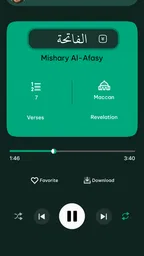
Keep the first test deliberately simple. Use a stable connection, open the app, choose something to play, and verify that sound comes through the intended output. If the phone is connected to a car system, wireless headphones, or a speaker, check whether audio is routed there rather than through the handset. When sound is missing, raising the volume and checking the active output are sensible first steps before assuming the app has failed.
The current version is 4.1. If something behaves unexpectedly, updating through the app store is a reasonable first check; so is closing and reopening the app. I would avoid repeatedly reinstalling as the first response, particularly if I had already made audio available for offline use. Reinstallation can remove local app content, so it is better to understand what is stored on the device before taking that step.
A reliable routine for offline listening
For a commute, a walk, or a quiet break in a place with weak coverage, I would prepare while still on Wi-Fi or another dependable connection. Open the app, make the intended recitation available if the app offers that option, and play it once. Then test it with connectivity disabled. The key is to confirm the specific content you need, not just that the app itself opens.
If playback stops unexpectedly, I would recover in stages. First check whether the connection has dropped and whether the selected audio is actually available offline. Next, pause and resume or return to the playback screen. If that does not help, close and reopen the app, then try again. These steps separate a temporary playback interruption from a connectivity issue without jumping straight to deleting stored content.
Battery management matters too. Long listening sessions can drain a phone, particularly if the screen stays on. Once playback is underway, use the device’s usual screen-lock behavior and keep an eye on battery level before a long trip. I’m not assuming the app has a timer or special battery setting; the useful point is to make the phone itself part of the plan.
For a shared device, it is worth checking the volume before handing it to someone else. A recitation that sounded comfortable through headphones may be unexpectedly loud through the speaker. I’d also show another listener how to return to the audio they were using, rather than leaving them to navigate from scratch. That is a small bit of preparation that makes a focused player easier for less confident phone users.
When a playback problem comes from elsewhere
Not every interruption is an app problem. If audio is silent, check the phone’s media volume, mute settings, and connected output. If it works on headphones but not through the handset, the route or speaker may be the cause. If it works online but not offline, the likely issue is whether the intended audio is locally available, rather than whether the player can start at all.
Connectivity can also create misleading symptoms. A weak signal may make an online stream pause or take longer to start. Moving to a stronger connection and retrying helps determine whether the problem follows the network. Conversely, if a recitation already plays offline, poor reception should not be the deciding factor for that playback session.
When the app opens but sound still will not play, check whether another audio app is already using the phone’s output, then try a fresh start. If the problem continues after basic checks, note what happens: whether the app opens, whether a selection begins, and whether the issue occurs online, offline, or with a particular accessory. That description is more useful when seeking help than simply reporting that “the audio is broken.”
There is also a useful distinction between an audio player and a study companion. If your goal is to listen attentively, a dedicated player can reduce distractions. If you want synchronized text, detailed search, memorization tools, or several kinds of learning material in one place, a more comprehensive Quran app may suit you better. I’d choose based on the activity I actually do most, rather than expecting one focused app to replace every resource.
How it fits beside other listening options
Compared with a general music or podcast app, a Quran-focused player has a narrower purpose, which can make it easier to keep the listening session centered on recitation. General audio services may be more convenient for people who already organize all their listening there, but they are not automatically a better fit for someone seeking a dedicated Quran experience. The choice comes down to whether you value a single-purpose player or prefer to keep all audio in one familiar library.
Compared with a broad Quran learning app, this one’s strongest case is simplicity of intent: listening is the point. That can be welcome when I want to begin a recitation without navigating study material. The trade-off is that users who rely on reading alongside audio or structured learning may prefer an app designed around those tasks. I would treat it as a listening option, not assume it is a complete replacement for a Quran study toolkit.
There may also be a cost distinction worth noticing. The app is free to download, with in-app purchases listed from $9.99 to $50.00 per item. I would look carefully at the purchase screen before confirming anything and decide whether a paid item is relevant to my use. The free price makes it easy to try, but it does not mean every possible option inside the app is free.
Who I would recommend it to
I’d recommend it to someone who mainly wants a convenient place to listen to Quran recitation and values the possibility of listening offline. It makes particular sense for a person who has a repeatable routine—perhaps listening during a morning walk or on a train—and is willing to prepare audio before leaving a good connection. Its focused role is a strength when the alternative is opening a more cluttered app and searching through unrelated content.
For an everyday example, imagine leaving home for a commute through areas where mobile coverage is unreliable. Before departure, I’d check the chosen audio on Wi-Fi, confirm it plays offline, and connect my headphones. If the train enters a tunnel, the listening session is then less dependent on reception. That preparation is more dependable than discovering the limitation after the connection has already vanished.
The app has an average rating of 4.4 from around 17,000 ratings and more than 1 million installs. Those figures suggest that it has reached a substantial audience, though they cannot tell me whether a particular reciter or workflow will match my preferences. I’d use the free installation as a chance to test the basics directly rather than treating popularity as a guarantee.
My practical verdict: Quran Player Audio Offline is worth trying if focused recitation playback is what you need, especially when offline listening is part of your routine. I would prepare and test audio before relying on it away from a connection, and I would check any in-app purchase carefully. If you want a rich study suite or already depend on a different audio workflow, another app may be the better fit. For a simple listening habit, though, this is a reasonable option to keep on your phone.
What we like
- Listen to Quran recitations without an internet connection.
- Audio playback makes it easy to follow along while away from a screen.
- Offline access can help reduce mobile data use.
- Useful for listening during travel or in areas with weak signal.
- Can support regular Quran listening without relying on streaming.
What could be better
- Downloaded audio can take up substantial storage space.
- The reciter selection may be limited compared with streaming services.
- Audio files may need to be downloaded before offline listening.
- Playback controls may be basic compared with dedicated audio players.
- Audio quality can vary between available recitations.





