

PureLink:Phone&Location Track review
 Analysis by Appsdrops
When several people share a household, the smallest communication mix-ups can become surprisingly inconvenient: someone is waiting, plans change, or a device needs to be passed along. PureLink is presented as a straightforward way to make sharing easier, which gives it a practical place in the everyday tools category. My first impression is that its appeal rests on a simple idea: make communication feel less cumbersome rather than turning it into another complicated system to manage.
A practical idea for shared everyday life
The app’s short description, “Easy sharing makes communication simpler,” points toward a focused purpose. That matters in a shared-use setting, where a useful tool should be easy to understand and should fit around people’s existing habits. Rather than assuming that every household needs a sophisticated organizer, I see PureLink as an option to consider when people want a more convenient way to share information and coordinate routine conversations.
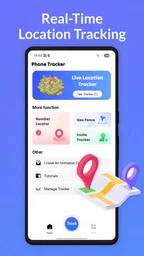
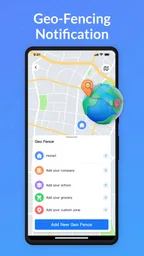
There is an important distinction between a tool that supports communication and a complete household-management solution. The app’s name includes “Phone & Location Track,” but a name alone is not a reason to assume that it offers particular tracking controls, family dashboards, or safety features. I would approach it by looking at the actual options in the app and deciding whether they suit the people who will use it. That cautious, practical mindset is especially valuable when multiple devices or household members are involved.
For shared-device use, the main question is not simply whether an app sounds convenient. It is whether everyone understands which account is active, what information is being shared, and who is expected to use the device. Those everyday boundaries can make the difference between a helpful communication tool and a source of confusion. I would keep the intended use clear from the beginning and avoid treating a shared phone as if it automatically represents every person who picks it up.
Keeping setup simple and expectations clear
A good setup starts with a straightforward conversation about purpose. Before installing any communication or location-oriented tool on a shared device, I would agree on who will use it and what each person expects it to do. This is not a special app feature; it is a sensible household habit. It helps prevent one person from assuming that everyone has the same view of the app or the same understanding of what is shared.
Account boundaries deserve similar care. If a device moves between adults, teenagers, or other family members, users should know whose account is open and whether the information shown belongs to that person. I would avoid leaving a personal account signed in on a device that others use casually. A little attention at setup time can spare people from confusing messages, unintended access, or mistaken assumptions about who is communicating.
The app is free to download, while optional in-app purchases are listed at $6.99 to $29.99 per item. That gives households a chance to begin without an upfront purchase, while making it worth checking the purchase details before choosing any paid option. In a shared setting, it is best for the person responsible for the device to understand what might involve a charge and to make that clear to anyone else who uses it.
Compatibility is another practical part of setup. The listed minimum operating system is Android 8.0, so I would check the device’s software before relying on the app as part of a household routine. A smooth start depends on the phone being compatible and on users knowing how to reach the app when they need it. Keeping expectations modest at first is sensible: try the basic experience, learn how it fits into daily communication, and only then decide whether it belongs in the household’s regular toolkit.
Making coordination less of a chore
Coordination is often about reducing friction, not adding more notifications or rules. If family members already share plans through conversations, a tool that aims to simplify sharing may be worth exploring as a complement to those habits. I would use it with a specific purpose in mind, such as helping people communicate more easily, rather than expecting it to replace every conversation or solve every scheduling issue.
Clear expectations help here, too. People should know whether they are expected to check the app regularly or whether it is only there for occasional use. A tool works better when everyone agrees on how it fits into the day. That can be as simple as deciding that urgent matters still deserve a direct conversation, while less immediate updates can be handled through the usual sharing routine.
For households with a shared phone, I would be particularly careful not to assume that a message or piece of information has reached the right person just because it appears on the device. The person holding the phone may not be the intended recipient. A quick check of the account and the audience can make shared use more considerate and avoid awkward misunderstandings.
One encouraging sign of broad interest is the app’s reach: it has passed one million installs and has an average rating of 4.5 from around fifteen thousand ratings. Those figures suggest that many people have tried it and that the general response has been positive. They are useful context, but they cannot tell me whether it will match a particular family’s routines. The best test is still whether its approach to sharing feels clear and useful in the situations that matter to you.
Age, trust, and responsible use
The app is rated for Everyone, which makes it suitable for a broad audience in store terms. That rating should not replace an adult’s judgment about how a child or teenager uses a device. Age-appropriate communication depends on context, understanding, and trust—not just the label attached to an app. I would explain what the app is being used for and make sure younger users know how to ask questions if something feels unclear.
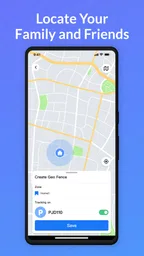
Location-related language calls for an especially thoughtful approach. In a household, convenience should not be confused with automatic permission to monitor another person. People should understand what they are agreeing to, and adults should be mindful of the difference between supporting someone and removing their privacy. This is a general principle for any tool associated with phones or location, not a claim about a particular control inside the app.
Trust also means setting reasonable limits. If adults choose to use a communication tool with younger family members, they can talk openly about when it is useful and when a direct conversation is better. Clear, respectful explanations are more constructive than relying on assumptions. For older relatives or anyone less comfortable with apps, a patient walkthrough can help them decide whether the experience is understandable and worth keeping.
With a free app that offers optional purchases, I would also keep spending transparent. Whoever manages the device can review purchase choices and explain which options, if any, are appropriate. That keeps the household conversation practical and avoids surprise charges. It is a small point, but it matters when one device is used by more than one person.
Who may find it worth trying
PureLink may be worth a look for people who want a tool centered on easier sharing and simpler communication. Its appeal is strongest when the household has a clear use for it and everyone understands how the device and accounts are being used. People looking for a highly specific family-management system should first check the app itself rather than infer capabilities from its name or general description.
Its developer is easysoft, and the current version is 1.3.3. The app is free, though individual in-app purchases range from $6.99 to $29.99. I would treat those details as part of a sensible decision rather than the main reason to install it. What matters more is whether the app’s everyday experience supports the way your household already communicates.
It is also useful to remember that popularity is not the same as a personal recommendation. A broad user base and a strong average rating offer some reassurance that the app has found an audience, but each household has different needs around privacy, shared devices, and communication. I would start with a small, clearly understood use case, then decide whether it genuinely makes coordination easier.
A measured household verdict
Overall, this is a potentially useful option for households looking to make sharing and communication feel simpler. Its straightforward positioning is appealing, and the free starting point makes it easy to consider. The most responsible way to use it is to be deliberate about setup, account ownership, age-appropriate expectations, and any paid choices. Those basics matter more than assuming the app will automatically organize a family’s routines.
For a shared device, I would make sure each user knows whose account is active and what the app is being used for. For a personal device, I would still talk through expectations when other household members are involved. That approach keeps convenience balanced with respect and reduces the chance of confusion. If the app’s actual tools match your needs after you explore them, it could become a handy part of your communication habits.
My final take is that PureLink is best approached as a simple sharing-focused tool, not as a substitute for clear household conversations. It has a broad audience, a positive average rating, and a free entry point, while optional purchases make it sensible to review costs before choosing extras. For families and shared-device users, the right fit comes down to transparent expectations and a purpose everyone understands.
What we like
- Shows location updates on a shared map for easier coordination.
- Can help families check whether members have reached a destination.
- A location-sharing setup can reduce the need for repeated check-in calls.
- May be useful for coordinating meetups when plans change.
- Location sharing can support basic safety check-ins.
What could be better
- Accurate tracking depends on the phone having a reliable signal.
- Background location access can affect battery life.
- Tracking requires clear consent from the people being located.
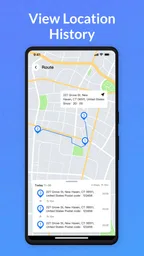
- Location history can expose sensitive personal routines.
- Some features may require an account or paid access.





