
Propel EBT & SNAP Benefits review
 Analysis by Appsdrops
When I’m trying to make a grocery trip work on a tight benefits budget, the most useful thing is knowing what’s available before I reach the checkout. That is the practical problem Propel EBT & SNAP Benefits is built around: helping people keep an eye on food-benefit balances and related support in one place. I find that focus more valuable than a broader money app that treats benefits as an afterthought.
Knowing what remains before you shop
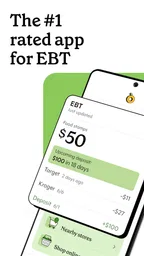
Propel is a free finance app from Propel Inc, aimed at people who use EBT, SNAP, or WIC benefits. Its central appeal is straightforward: check benefit balances and manage food assistance without relying only on memory, a paper receipt, or a last-minute guess at the register. The app has a 4.8 average from around 763,000 ratings, and it has passed 10 million installs, which suggests it has become a familiar tool for many benefits users.
The balance-checking focus matters because food benefits do not behave like a general-purpose bank account. A household may need to plan separate purchases around its available assistance, and a missed or outdated estimate can make an ordinary grocery run stressful. Having a dedicated place to check can make that decision less uncertain. In my view, the strongest reason to consider Propel is not that it replaces budgeting; it is that it gives benefits information a more practical role in everyday planning.
The app’s broader promise includes saving money with benefits, but I would approach that as support for making a food budget go further, not as a guarantee that every shopping trip will be cheaper. The helpful part is being able to plan with a clearer picture of what remains. If you already track every balance carefully and prefer your state’s own tools, Propel may feel like an extra stop rather than a necessity.
What checking a balance changes
A balance is most useful when it changes a decision. Before leaving home, you can use the available amount as a guide for whether to shop now, postpone a nonessential item, or split a list across trips. That small pause can be more helpful than trying to reconstruct recent spending from memory while standing in a store.
I also think the value is emotional as much as practical. A predictable way to check benefits can reduce the awkwardness of discovering a shortfall at checkout. It does not remove every uncertainty around a transaction, but it can help you arrive with a better sense of your limits and make a backup plan before you are under pressure.
A useful routine, not a replacement for judgment
For the best result, I would make a habit of checking before a planned shop and comparing the balance with the list you intend to buy. If the trip includes groceries for several days, decide in advance which items are essential and which can wait. That way, the app informs a choice instead of tempting you to treat the displayed balance as permission to spend it all at once.
One subtle trade-off is that a balance check is a snapshot, not a complete household budget. Other purchases, pending activity, or timing differences can affect what you can actually use. I would leave a little room for surprises rather than planning a cart down to the last cent. The app can help you stay oriented, but it cannot make a careful buffer unnecessary.
Where it fits among the usual options
The main alternative is often a state or benefits-program tool, which may be the natural choice for someone who wants to go directly to an official source. A general budgeting app is another option, particularly if your priority is seeing rent, bills, savings, and everyday spending together. Propel is more specialized: it puts food benefits at the center rather than asking you to adapt a broad finance tracker to them.
That specialization is an advantage when your immediate question is, “What can I plan to spend on groceries?” It is less compelling if you want a full household ledger, financial advice, or one unified view of every account. I would not choose it as a substitute for an official account channel when you need to resolve a benefits issue. For routine planning, though, a benefits-focused tool can be easier to return to than a general-purpose app crowded with unrelated categories.
The practical workflow I would use is simple: check the balance before the trip, set a personal spending ceiling below the displayed amount, and keep the receipt or other records you normally rely on. On the next check, compare what you expected with what remains. That habit helps reveal whether your estimates are realistic, without assuming the app itself tracks every household expense or explains every transaction.
Everyday situations where it earns its place
Imagine planning a weekly shop after several smaller purchases. Rather than assuming the original amount is still available, you check Propel at home, revise the list, and decide which staples matter most. If the balance is tighter than expected, you can postpone optional items or make a smaller trip instead of discovering the problem at the register. That is an ordinary use, but it is exactly where a quick balance check can have an outsized effect.
It can also be useful when more than one person in a household shares shopping responsibilities. A quick check before someone heads out gives the shopper a common reference point, which may prevent two people from making plans based on different assumptions. I would still communicate about purchases directly; an app cannot replace agreement about who is buying what. But a shared, current reference can make that conversation more concrete.
Another helpful use is planning around irregular shopping patterns. If you shop in small trips rather than one large weekly visit, it is easy to lose track of how those purchases add up. Checking before each trip encourages a brief reset: what is left, what is needed, and what can wait? The app is most effective as a prompt for that decision, not as a reason to shop more often.
Limits to keep in mind
Benefits tools depend on the underlying program and account information, so the experience can vary by the benefits you use and where you live. I would confirm that the app supports your particular situation before building a routine around it. If access or account connection is unreliable, the practical fallback is to use the official channel available to you and keep your own notes until the issue is resolved.
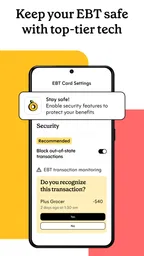
There is also a privacy decision worth making before using any finance app. Benefits and account details are personal, so I recommend reading the app’s current privacy information and considering whether you are comfortable entering the information needed for your intended use. Someone who avoids linking sensitive accounts, or who prefers to check balances through an official state service, may reasonably decide that the convenience is not worth the extra app.
Propel is free, which makes trying it less of a financial commitment, but free does not mean friction-free. You still need a compatible device and a willingness to use a separate app. The current version is 9.8.0, and the listed minimum operating-system requirement is 7.0; that can matter if you use an older phone. The app is rated Everyone, so its content rating is not a barrier for ordinary users, though the relevant question for many people will be whether its benefit support matches their needs.
Who is likely to benefit most
I would recommend giving Propel a look if you regularly use SNAP, EBT, or WIC and find yourself guessing about your remaining food budget before shopping. It is especially suited to people who want a quick check to inform a list, coordinate a household grocery run, or reduce the chance of an unpleasant surprise at checkout. Those are concrete, recurring tasks, and the app’s narrow focus makes sense for them.
I would skip it if you want one app to manage every part of your finances, if you already have a balance-checking routine that works well, or if you would rather interact only with your official benefits provider. It is also not a substitute for contacting the appropriate agency about eligibility, account problems, or program decisions. Knowing a balance and resolving a benefits issue are different jobs.
Overall, I see Propel EBT & SNAP Benefits as a practical planning aid rather than a complete financial toolkit. Its best contribution is giving benefits users a clearer starting point before they shop, so they can shape a realistic list instead of relying on guesswork. If that small moment of clarity would make your grocery routine calmer, the free app is worth considering; if you need broad budgeting or official case support, another tool will serve you better.
What we like
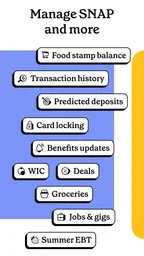
- Quickly check SNAP balance and recent transactions
- Find nearby retailers that accept EBT
- Get alerts about benefit deposits and spending
- Review transaction history to track purchases
- Simple layout makes key account details easy to find
What could be better
- Availability and features vary by state
- Some stores may not appear in the retailer search
- Balance updates can be delayed after purchases
- Requires internet access for current account information
- Account setup may require personal details





