

ProCleaner - Storage Cleaner review
 Analysis by Appsdrops
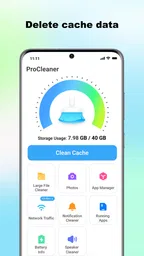
On a shared phone, storage problems rarely belong to just one person. A cache-heavy app, a pile of downloaded files, or a device that has been passed between household members can leave everyone dealing with the same “not enough space” warning. ProCleaner: Storage Cleaner is a straightforward tools app from Appsiko that focuses on clearing cached data and reclaiming storage. I see its appeal less as a magic speed booster and more as a quick maintenance option when a phone is crowded and someone needs a simple place to start.
When one phone serves several people
The most useful shared-device scenario is a phone that moves between people but has one owner responsible for keeping it usable. Imagine a parent preparing to take photos, only to find that the device is nearly full after other household members have used social, video, or browsing apps. A cache-cleaning tool can help address accumulated temporary data without requiring the owner to hunt through every app’s storage screen first.
That convenience has a boundary: clearing cache is not the same as deleting personal files, and it should not be treated as a general-purpose cleanup of everything on the device. Before tapping a cleaning action, I would still check what the app is proposing to remove and make sure important downloads, photos, or offline content are handled separately. For a family device, that short pause matters more than the promise of a one-tap fix.
The app’s central idea is deliberately narrow. It is intended to make a cache cleanup feel accessible, rather than asking each household member to understand Android’s storage menus. That can be handy for the person who maintains a shared phone but does not want to explain the same settings path every time space gets tight.
Make the owner’s boundaries clear
On a shared device, the key question is not just whether cleaning is easy, but who decides when it happens. I would keep the cleaning step with the person who manages the phone, especially if other users rely on apps that may recreate cached content or store useful offline material. A child or guest can flag that the phone is running low; the owner can review the proposed cleanup and decide whether it is appropriate.
This is also a sensible way to avoid confusing cache with account data. A cleaner should not be used as a substitute for signing out, removing someone’s account, or managing their private files. Those are separate tasks. If a device is being handed to another person permanently, I would use the phone’s own account and reset tools rather than assume a cache-cleaning app changes who can access what.
For personal phones, I find the same principle useful: run a cleanup when storage pressure is real, not simply because a cleaner is available. Cache often exists to make apps load content more conveniently, so removing it may mean some apps need to fetch material again. On a limited connection or before a trip, that trade-off can be more annoying than the space recovered.
Coordinate cleanup instead of repeating it
A practical household routine is to agree on a simple signal: the owner checks storage when a warning appears, reviews what is taking space, and then uses a cache cleaner only if that fits the situation. This avoids several people running separate cleanup tools back-to-back without knowing what the previous person already did. It also makes it easier to notice when the real problem is large videos or downloads rather than temporary cache.
I would not expect a one-tap cleaner to replace that diagnosis. If a phone remains full immediately after a cleanup, the next step should be to inspect storage in Android settings and decide whether to move or delete actual files. Repeating a cache sweep is unlikely to solve a space problem caused by substantial media or apps that need their stored data.
That distinction is where a focused tool can be both useful and limited. It lowers the effort of one maintenance task, but it does not remove the need to make decisions about personal content. In a household, the best workflow is therefore “review, clean if suitable, then check storage,” rather than tapping repeatedly and assuming the phone has been comprehensively optimized.
What to expect from a focused cleaner
Compared with the usual alternatives, ProCleaner sits between manual Android settings and broader utility suites. The built-in storage screen gives more direct control and is the better choice when you want to identify large files or make careful, item-by-item decisions. A general cleaner may offer more kinds of maintenance, but that extra scope can make it harder to tell which action is relevant. This app’s narrower purpose is attractive when the immediate goal is cache and storage housekeeping.
The trade-off is that a cleaner’s usefulness depends on whether temporary data is actually the source of the pressure. Cache can grow again as apps are used, so a single cleanup is not a lasting solution to a phone that is routinely overloaded. I would not install it expecting a permanent performance transformation or a way to recover every kind of occupied storage. It is better understood as a convenient tool for a particular maintenance job.
For an everyday workflow, I would use it after checking that there is a genuine storage need, then pay attention to how the phone behaves afterward. If an app takes longer to display previously viewed content, that can be an ordinary consequence of having cleared cached material. If the phone still lacks space, I would stop cleaning and look for large files or unused apps instead. That sequence is more useful than treating every slowdown as proof that the cache needs another sweep.
Age, trust, and household expectations
The app is rated for Everyone, which makes its age classification broad, but that does not mean every household should leave cleanup decisions to a young user. The more important point is that a storage tool can affect how content is retained locally, so children should understand that it is not a button for managing accounts or deleting another person’s private material. I would keep access and responsibility consistent with whoever owns or supervises the device.
Trust also comes from using a cleaner with realistic expectations. A tool that says it can clear temporary data should not be assumed to protect family accounts, back up photos, or decide which files matter. I would continue using the phone’s normal backup and account settings for those jobs. Keeping these roles separate makes it easier for everyone to understand what the app is—and what it is not.
ProCleaner is free, and its current release is version 1.2.4. It has a 4.0 average from around 11 thousand ratings, alongside more than 5 million installs. Those figures suggest it has reached a sizable audience, but I would still judge it by whether its focused cleaning step suits the device and the household’s habits, not by popularity alone.
Where it fits, and where it does not
ProCleaner is a reasonable fit for someone who wants a low-friction way to deal with cache buildup and prefers not to start in Android’s more detailed storage menus. Its audience may include a household phone’s designated caretaker, a less technical user, or anyone who only needs a quick first step before checking the rest of the device.
I would choose the built-in settings instead if I needed precise control over individual apps, wanted to identify large files, or was deciding what personal content to remove. I would also skip this kind of cleaner if I expected it to recover space taken by photos, videos, or downloads without reviewing those items. And for a device used by several people, I would not let convenience replace clear ownership and a quick review before cleanup.
Appsiko’s tool is best when the task is modest and specific: make cache cleanup easier, then reassess. That is a useful role, but it is not a complete storage-management plan. Treating it as one step in a careful routine—rather than a universal fix—helps avoid disappointment and makes its simplicity an advantage.
My household verdict
I would recommend it to the person in a household who regularly keeps a shared Android phone usable and wants a simple cache-cleaning option close at hand. The app’s appeal is its focused purpose and low-effort approach, especially when the phone is temporarily cramped and the owner is willing to review the cleanup rather than tap blindly.
I would not make it the default answer to every storage warning. Check what is occupying space, consider whether cached content may need to be loaded again, and use Android’s own storage controls when you need finer decisions. With those boundaries, ProCleaner can be a convenient maintenance helper; without them, it is easy to expect more than a cache-focused tool can reasonably provide.
What we like
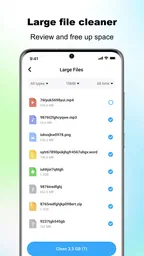
- Helps identify large files that may be taking up space.
- Duplicate-file detection can make cleanup more targeted.
- A clear interface makes storage checks easy to follow.
- You can review items before choosing what to remove.
- Useful for occasional maintenance when device storage is low.
What could be better
- Cleaning results depend on which files the app can access.
- Removing files may be difficult to undo.
- Some cleanup features may require a paid upgrade.
- Ad interruptions may slow down the cleaning process.
- The app cannot expand your device's built-in storage.





