



Pregnancy Tracker & Baby App review
 Analysis by Appsdrops
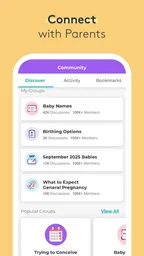
Pregnancy questions rarely arrive at a convenient time. They tend to show up between appointments, during a quiet moment at home, or while trying to make sense of a new symptom. Pregnancy Tracker & Baby App is built for that changing stretch of life, with a pregnancy timeline and parenting material gathered in one place. I find its main appeal less in replacing a clinician or a notebook than in giving expectant parents a steady place to orient themselves and return to questions as they arise.
Useful guidance depends on when you can reach it
What to Expect is the developer, and the app sits in the parenting category. It is free to download, has a Teen content rating, and has been around since October 26, 2010. Its current version is 7.93, and it requires iOS 10 or later. The scale of its audience is notable: it has more than 5 million installs, with an average rating of 4.9 from around 122,000 ratings and about 19,000 written reviews.
Those figures tell me many people have found it worth trying, but they do not guarantee that every article or explanation will suit every family. Pregnancy experiences vary, and app content is best treated as general guidance rather than a personal assessment. If a symptom feels urgent or worrying, a timely call to a healthcare professional matters more than searching for reassurance in an app.
Connectivity is part of the practical experience. An app that brings together changing pregnancy information and parenting content is most useful when the relevant screen is reachable at the moment you need it. I would not plan around being able to use every part without a connection; instead, I’d check important information before travel or a clinic visit and keep critical medical contacts available separately.
That distinction matters on an ordinary day. Imagine noticing a question about a pregnancy change while waiting for a bus. If the app loads, you can use the spare minutes to read and note what you want to ask later. If access is slow, the same moment can become frustrating, especially when you expected an immediate answer. I’d use it for context and preparation, not as an emergency reference.
A timeline is most helpful when it becomes a routine
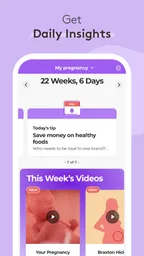
The pregnancy-tracking format makes more sense as a companion you revisit than as a one-time encyclopedia. A short check-in can help you follow what stage you’re in and focus on material that feels relevant now, rather than wading through unrelated parenting topics. My practical suggestion is to pick one calm moment each week to browse and write down questions for your next appointment. That keeps the app from turning every passing worry into a long search session.
It can also help partners stay in the loop. One person may be doing most of the reading, while another wants a concise way to understand what is happening and how to be helpful. Instead of forwarding a stream of articles, I’d choose a small number of useful topics and talk them through together. The app can prompt a conversation, but it cannot decide which advice fits your particular medical history.
Compared with a general web search, a pregnancy-focused app offers a more organized starting point and a sense of progression. Search engines are often better when you already know the exact question and want to compare sources. A calendar or personal notes app is better for tracking appointment details and reminders you create yourself. I see this app as a layer for orientation, not a replacement for either tool.
On a phone, convenience has a few trade-offs
Mobile access is especially useful when you have a brief pause rather than time for a long read. You might check a topic while waiting for an appointment, then save the actual discussion for the clinician. But pregnancy content can be emotionally intense, and reading in tiny fragments can make a nuanced explanation feel more alarming or definitive than it is. When something concerns you, I’d read the full context in a quiet moment instead of relying on a headline or a quick skim.
Notifications and frequent check-ins can also make a tracker feel more demanding than helpful, depending on how you prefer to use your phone. I’d keep the routine intentional: open it when you have a question or want to follow the pregnancy timeline, rather than treating every day as a test of whether you have read enough. That small boundary helps preserve the app’s usefulness without letting pregnancy information take over every spare minute.
Another useful workflow is to turn reading into a question list. If an explanation raises a concern, write down the symptom, when it started, and what you want to ask your care team. The app then serves as a prompt for a more specific conversation instead of an answer that you have to interpret alone. This is particularly valuable when appointment time is short or nerves make it easy to forget what you meant to ask.
When access falters, keep a simple backup
Any app experience can be interrupted by a weak signal, a stalled screen, or a phone that needs attention. I would not assume that an article or tracker page will always be available at the exact moment it is wanted. If a screen fails to load, a sensible recovery is to try again when connectivity improves, then use a trusted clinical contact for a time-sensitive concern rather than repeatedly refreshing the same page.
For routine planning, a small backup makes the experience less dependent on the phone. Keep appointment dates, questions, and essential contact information somewhere you can reach without opening the app. This is not a substitute for the tracker; it simply separates practical necessities from reading material. It also helps if your battery is low, your connection is unreliable, or you would rather focus on the appointment than troubleshoot a screen.
I’d also avoid assuming that a page you viewed once will remain available later. If there is a passage you want to discuss, make a brief note of the topic in your own words. That is more reliable than counting on a particular screen to be ready in a waiting room. The key is not to duplicate every detail, but to preserve the question that matters to you.
Use it thoughtfully if data and attention matter
Because the app brings together reading and tracking, time spent in it can grow gradually. For anyone watching mobile data use, I’d do longer browsing when connected to a dependable network and keep phone settings in mind. I’m not assuming that all content is stored locally or that every feature behaves the same way on every connection; the safest approach is simply to notice how your own device handles it.
There is also an attention cost to consider. A large library of pregnancy and parenting information can be reassuring, but it can invite unnecessary searching when you are already anxious. I’d start with one clear question, read enough to understand the general idea, and stop when the next step is to consult a clinician. More reading is not automatically better, especially when several pages describe possibilities that may not apply to you.
The app is likely to suit someone who wants pregnancy information organized around this life stage and appreciates a single place to revisit it. It may be less satisfying for a reader who wants only appointment scheduling, a minimalist journal, or tightly individualized medical advice. In those cases, a calendar, a dedicated notes tool, or direct guidance from a healthcare professional may be the better fit.
My connectivity verdict: helpful, with realistic expectations
For me, Pregnancy Tracker & Baby App is most useful as a familiar guide for the questions that come up between appointments. Its pregnancy focus makes it more directed than a broad parenting resource, while its wider parenting scope gives it room to remain relevant as a family’s needs change. The trade-off is that a broad collection of material still requires judgment: the app can help you find a starting point, but it cannot know your circumstances as well as your care team.
I’d recommend trying it if you want an organized pregnancy companion and are comfortable using a phone as one part of your information routine. Make it a habit rather than an obligation, keep urgent contacts and appointment notes easy to reach elsewhere, and use what you read to prepare better questions. If you need dependable access in places with poor reception, or you prefer a tool focused solely on personal records, pair it with a simpler backup or choose a more specialized alternative.
Overall, the strongest reason to keep it installed is convenience: it gives pregnancy-related reading a clear home on your phone. Its usefulness depends on choosing the right moment to consult it and knowing when an app is not enough. Used that way, it can make everyday questions easier to organize without pretending that connectivity, general information, or a tracker can replace personal medical care.
What we like
- Tracks pregnancy week by week with timely updates.
- Includes a baby growth tracker for following development.
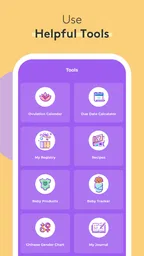
- Offers tools to help organize appointments and key dates.
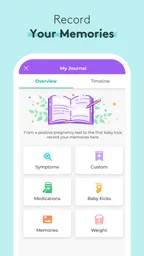
- Provides a place to record pregnancy symptoms and notes.
- Features useful information for preparing for birth.
What could be better
- Some features may require a subscription.
- Personalized guidance depends on entering accurate details.
- Health content is not a substitute for medical advice.
- Notifications may feel excessive for some users.
- The app may collect sensitive pregnancy information.





