



Pregnancy Track - Bump Journey review
 Analysis by Appsdrops
I can see why Pregnancy Track - Bump Journey might earn a place on someone’s phone early in pregnancy: it puts a changing week-by-week timeline alongside practical planning tools, rather than treating pregnancy as a stream of generic reminders. The appeal is easy to grasp, but the bigger question is whether checking in stays useful after the first burst of curiosity. To me, the answer depends on how much you enjoy tracking personal details and whether you want a companion to organize the journey, not to replace advice from a clinician.
What feels useful in the first week
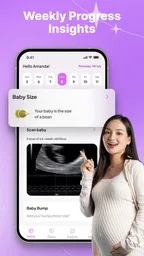
This is a free parenting app from LUONG HONG QUANG, with an Everyone content rating. It has reached over 500 thousand installs, and its current release is version 1.0.8. The app’s core idea is straightforward: follow pregnancy week by week, see information about the baby’s growth, keep a due date in view, work through a checklist, and record a bump log.
That combination gives the first few visits a natural rhythm. I would start by setting up the pregnancy timeline, then read the current week’s growth information, and finally look at the checklist for anything that needs attention. The bump log offers a more personal way to mark the experience. Rather than opening a general pregnancy article and searching for what applies today, you can use the week as an organizing point for both information and notes.
The most useful early habit is to treat the checklist as a planning prompt, not as a test you must pass. A due date can make a long stretch feel more concrete, but it cannot predict exactly how pregnancy will unfold. I’d use the list to identify a next step, then decide whether it fits my circumstances. That keeps the app helpful without letting a checklist dictate priorities.
The growth timeline can also be a good conversation starter. If a particular week raises a question, I’d save that question for a midwife or doctor instead of treating an app explanation as a diagnosis. This is an important boundary: week-by-week guidance is best used for orientation and preparation, not medical decisions. Pregnancy is personal, and a general app cannot know an individual’s history or care plan.
A small routine beats constant checking
For an everyday scenario, imagine reaching a new week on a busy morning, with errands and work already competing for attention. A quick visit could help you check the week’s growth note, glance at the checklist, and add one bump-log entry when you have a quiet moment later. That is a more sustainable use than opening the app repeatedly to look for changes it may not be designed to report.
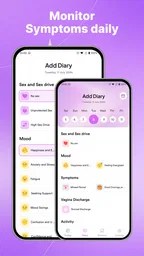
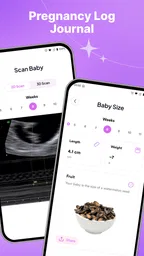
I’d also keep entries in the bump log simple. A brief note about how the week feels, or a photo if the app’s log supports the way you want to record things, can be more meaningful later than trying to document every day. The confirmed feature is a bump log; how you prefer to use it is personal. The practical point is to choose a level of effort you can maintain, rather than turning memory-keeping into another obligation.
Where the value can grow month to month
The strongest long-term case for this app is the way its tools can work together. The due date gives the timeline a destination; the weekly growth content makes each check-in feel tied to the present; the checklist helps translate that awareness into preparation; and the bump log preserves a personal record. Each feature answers a different question: where am I in the journey, what might I want to learn, what should I plan, and what do I want to remember?
That mix is more useful than a single-purpose counter if you want one place to return to. Compared with reading pregnancy articles in a browser, a week-based app can reduce the work of finding material relevant to the current stage. Compared with a notebook, it can keep the timeline and checklist beside personal notes. On the other hand, a notebook may feel more flexible and private to someone who wants to write freely, while a clinician’s guidance is the better source for individualized health questions.
One non-obvious way to use the checklist is as a conversation organizer. Before an appointment, you could review it and note which items are relevant to ask about, rather than assuming every item applies. Another is to use the due date as a planning anchor for non-medical preparations, breaking larger tasks into smaller decisions over time. Those workflows make the app more than something you open for a weekly comparison, while still leaving important choices in your hands.
The bump log may have lasting value even if you do not write much. A few entries at meaningful moments can preserve details that are easy to forget later, such as what you were looking forward to or what changed in your routine. If regular logging feels like work, there is no need to force a daily streak. A record that reflects your actual life is more useful than a complete-looking record created out of pressure.
What maintenance asks of you
The app’s ongoing usefulness depends partly on keeping its pregnancy timeline aligned with your situation and making occasional updates to the checklist or log. That is a modest burden if you like structured tracking, but it may feel unnecessary if you already use a calendar, a notes app, and a paper list. Before adopting another routine, I’d decide which of those existing tools this app would replace. If it simply adds one more place to check, its convenience can disappear quickly.
There is also a balance between tracking and over-monitoring. A weekly rhythm is naturally less demanding than recording every small change, and it gives you a reason to return without asking you to make the app part of every day. I would set a personal rule such as checking in when a new week begins, then logging only when I have something I genuinely want to remember. This keeps the habit tied to a useful moment rather than to guilt about missed entries.
For anyone wondering whether the app can stand alone, I would not treat it as a substitute for prenatal care, a personalized appointment schedule, or a medical record. Its described strengths are the timeline, growth information, due-date tracking, checklist, and bump log. If your main need is communicating with a care team or managing clinical records, a dedicated service recommended by your provider may fit better. If your need is a simple personal companion, the focused set of tools makes more sense.
When novelty fades, and who may tire of it
Pregnancy content can become repetitive if you already follow several books, newsletters, or apps. Seeing another weekly explanation may be reassuring at first, then feel like one more version of information you have read elsewhere. The checklist can also create friction if it seems too broad for your circumstances or if you prefer to make plans without a preset structure. In that case, use only the parts that help and ignore the rest; the app does not need to become a complete record of your pregnancy to earn its space.
Another possible source of fatigue is comparison. A growth timeline can make development easier to picture, but pregnancy does not proceed identically for everyone. I would avoid using general descriptions as a measuring stick for whether your experience is normal. If a comparison causes worry, it is a sign to step back and bring the concern to a qualified professional, rather than searching for certainty in repeated app visits.
This app is a better fit for someone who likes a compact, week-centered routine and wants planning and personal tracking together. It is less compelling for someone who dislikes logging, wants extensive clinical tools, or already has a trusted system that covers the same tasks. Its minimum operating system is Android 7.0, which is worth checking against your device before planning to rely on it. The release date is March 18, 2026, but what matters more to a new user is whether the current version supports a steady routine that feels comfortable.
My long-term verdict
I’d recommend Pregnancy Track - Bump Journey to a friend who wants a low-friction way to connect a weekly pregnancy timeline with preparation and a personal bump record. Its lasting value is not in demanding constant attention; it is in giving a few different needs a shared place. The best approach is to choose one recurring check-in, use the checklist selectively, and make the log personal rather than exhaustive.
I would skip it if the idea of another app-based habit already feels tiring, or if you mainly need medical guidance and care coordination. For those needs, a clinician’s advice or a service designed around appointments and records is a better choice. But if you want a simple companion that helps you notice the current stage, plan a manageable next step, and preserve a few memories along the way, this app has a clear reason to stay installed after the initial curiosity passes.
What we like
- Tracks pregnancy progress by week.
- Offers a simple way to follow baby development.
- Can help users keep pregnancy details in one place.
- Useful for checking upcoming pregnancy milestones.
- Designed for quick access to pregnancy-related information.
What could be better
- Pregnancy information is not a substitute for medical advice.
- Some features may require an internet connection.
- Tracking estimates may not match every pregnancy.
- App content may not reflect individual health needs.
- Personal health details may raise privacy concerns.





