
Preggers: Pregnancy & Baby App review
 Analysis by Appsdrops
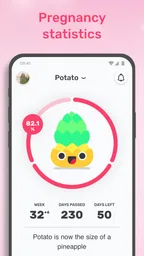
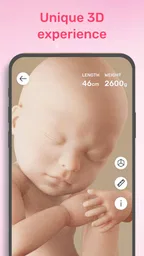
Pregnancy apps can easily become a stream of weekly updates that I read once and then forget. What makes Preggers more memorable is the way it turns a baby’s changing size into something I can picture: its 3D comparisons and fruit references give a simple visual anchor to a stage that might otherwise feel abstract. I would treat that as a helpful conversation starter, not a medical measurement. The app is most useful when a quick, approachable check-in is what you want—not when you need clinical guidance or a detailed health record.
Why the size comparison works
As a parenting app from Stroller AB, Preggers brings pregnancy-oriented content together with practical extras, but the size comparison is the feature I’d put at the center of the experience. A fruit reference is easy to understand at a glance, and a 3D view can make the idea feel more tangible than a line of text. That small shift matters: it can help someone imagine progress and share the moment with a partner or family member who may not follow pregnancy milestones closely.
The comparison is a visual aid, not a promise that every baby develops in exactly the same way or matches a neat object comparison. I would enjoy it as a friendly way to mark time while keeping expectations flexible. If a comparison prompts questions about growth or health, those are better discussed with a qualified healthcare professional than answered by an app illustration.
The approach also suits people who prefer a light, visual update over reading long explanations. Instead of asking you to study a lot of information before getting something useful, the app gives you a concrete image to react to. That makes it easier to return for a short check-in, although readers who want in-depth medical context may find the visual angle too brief on its own.
A small routine rather than a research project
I’d use the comparison as part of a simple weekly ritual: open the app, look at the current visual, and decide whether there is anything I want to ask or share. The useful detail is not just the image; it is the way a compact reference can give a couple a common point of conversation. One person may be following every change, while the other is trying to keep up. A quick visual can close that gap without requiring either person to read a long article.
There is a trade-off, though. Fruit and 3D comparisons simplify a complicated process, and the metaphor can feel more playful than reassuring if someone is anxious. I would not use a comparison to judge whether a pregnancy is progressing normally, and I would not let a cute image substitute for advice from a clinician. Its strength is emotional accessibility, not diagnosis.
Using the comparison in everyday life
In practice, I can imagine opening Preggers during a quiet moment at home, checking the current comparison, then showing it to a partner over breakfast. That is a realistic use because it takes little effort and gives both people something specific to talk about. If relatives ask how things are going, the image can also make an update easier to explain, without turning the conversation into a medical report.
A useful habit is to separate “interesting to picture” from “important to verify.” The app’s visual makes the former easy; questions about symptoms, growth, or care belong with a medical professional. Keeping that boundary clear lets the comparison remain enjoyable rather than becoming a source of unnecessary worry. It also helps avoid treating a simplified visual as a precise representation of an individual pregnancy.
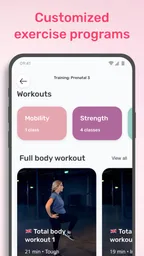
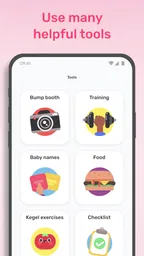
Preggers also includes a smart checklist, trending names, and training content. Those additions suggest a broader role than a weekly visual companion: the checklist can help organize preparation, while name browsing is useful when a family wants ideas to discuss. I would use those tools in short bursts rather than expect the app to replace a dedicated planning system. For example, a couple could check the visual together, then use a separate moment to review practical preparations or compare name ideas.
The combination is convenient, but it can also make the app feel less focused if you only want one specific function. Someone seeking just a task manager may prefer a general checklist app; someone who wants a deep library of medical articles may prefer a resource built around expert health information. Preggers’ appeal is the blend of visual pregnancy context and lightweight planning, rather than maximum depth in any single area.
Where it fits beside other pregnancy tools
Compared with a paper calendar or a notes app, Preggers offers a more visual way to make pregnancy feel connected to a changing stage. Compared with a general task list, its checklist sits in a pregnancy-focused setting, which can make preparation feel more relevant. But those alternatives can be better if you want complete control over reminders, categories, or long-term notes. I would not assume that a focused visual app should become the only place a family records important details.
That distinction matters for practical use. A visual update is easy to revisit and share, while personal notes or appointments may need a separate system that suits the household. I’d keep any essential medical questions and appointment information somewhere reliable and easy to access, rather than relying on a fun comparison to serve as a record. This is a sensible division of labor: Preggers for approachable context and ideas, other tools for whatever needs more structure.
Who is likely to enjoy it—and who may not
I think Preggers is best suited to expectant parents who like visual explanations, want a low-effort way to mark progress, or are looking for a shared conversation prompt. It can also work well for a partner or family member who wants a simple way to feel involved without needing to absorb a large amount of pregnancy reading. The checklist and name section broaden its usefulness for people who are beginning to think about preparations as well as the baby’s development.
It is less suitable for anyone expecting personalized medical monitoring, detailed clinical analysis, or a comprehensive record of care. A pregnancy app can support curiosity and organization, but it should not take the place of a healthcare professional. It may also be a poor fit for someone who dislikes playful comparisons or finds frequent milestone content stressful; in that case, a plain planner or a trusted medical resource could feel calmer and more relevant.
The app is free to download, with optional in-app purchases ranging from $0.49 to $84.99 per item. I’d consider that range before treating every part of the experience as included: the free starting point makes it easy to explore, while purchases can change what a user ultimately spends. It is rated for Everyone, so its presentation is intended for a broad audience, though parents should still decide what content and spending choices make sense for their household.
Practical details and the overall feel
Preggers has a 4.8 average from around two thousand ratings, and it has passed over one hundred thousand installs. That suggests it has found an audience among people looking for an approachable pregnancy companion, though popularity alone cannot tell me whether its style will suit every user. It launched on February 10, 2022, and version 4.14.0 is the current release. The app requires Android 7.0 or later on Android devices.
My main reservation is about expectations. The visual comparison is engaging precisely because it is simplified, but that simplicity means it cannot answer every question a pregnant person may have. The broader set of tools is useful for casual planning, yet it is not a reason to move all family organization into one app. I’d start with the features that genuinely help—especially the visual check-in—and only keep returning to the others if they fit naturally into your routine.
Overall, I’d recommend Preggers to someone who wants pregnancy progress to feel more concrete and shareable, with a few planning and inspiration tools alongside it. I wouldn’t recommend relying on it for health decisions or choosing it solely for advanced organization. If a short visual moment helps you and your partner connect with each stage, it has a clear purpose; if you need clinical depth or a highly customizable planner, another resource will serve you better.
For me, the strongest reason to try Preggers is that it makes a weekly update easy to understand without demanding a lot of time. Keep the comparisons in their proper role—as a friendly way to picture change—and the app can be a pleasant companion through pregnancy. If that balance sounds right, the free download gives you a straightforward way to see whether its style works for you.
What we like
- Pregnancy updates are tailored to the current week.
- The app includes tools for tracking symptoms and appointments.
- A baby name feature can help with choosing a name.
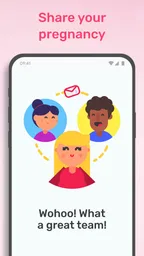
- Partner access makes it easier to share pregnancy updates.
- The interface is colorful and easy to navigate.
What could be better
- Some features require a paid subscription.
- Personalized content may require sharing sensitive health details.
- Notifications can feel frequent if left enabled.
- The amount of content may feel overwhelming at first.
- Some information may not be available in every language.





