
POV – Disposable Camera Events review
 Analysis by Appsdrops
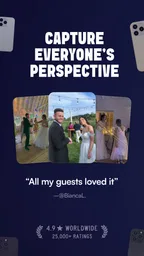
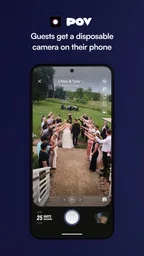
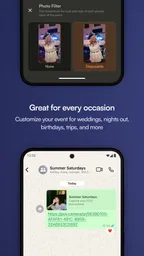
I would choose POV – Disposable Camera Events when I want the photos from a gathering to feel like they belong to everyone there, rather than arriving later as a scattered collection of texts. Its focus is event photos: guests contribute pictures from their own points of view, making it a more social option than asking one person to document the whole occasion. The idea is especially appealing for weddings, parties, and other get-togethers where the best moments happen in several places at once.
That shared approach is also the main thing to understand before installing it. This is not a general-purpose photo editor or a replacement for a camera app you use every day. I see it as a purpose-built tool for bringing guest photos together around an event. If you are planning a gathering and want to make it easier for people to contribute, it is worth a look; if you mainly want to edit your own pictures or manage an existing photo library, another kind of app will probably suit you better.
What to expect from a shared event camera
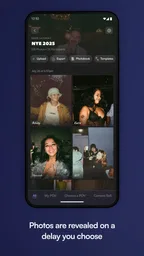
POV is an events app from Untitled Tech, Inc., and the central appeal is the shared perspective. A host can use the idea of a common event to encourage guests to take part, while guests get a clear reason to contribute photos instead of leaving them buried on their phones. The result can capture small, candid moments that a single photographer might miss: conversations at different tables, a friend arriving, or the bustle before everyone gathers for a group picture.
That does not mean every event album will automatically become a complete record. The quality of the result depends on whether people understand how to join in and remember to take photos. I would think of the app as a way to coordinate contributions, not as a guarantee that someone will capture every important moment. For formal portraits, key ceremony shots, or anything that must be reliably documented, I would still arrange a dedicated photographer or use a separate camera plan.
The app has a 4.8 average from around seven thousand ratings, and it has been installed over one million times. Those figures suggest that the shared-event concept has found an audience, but they do not tell me whether it fits a particular gathering. The useful question is whether your guests will be comfortable participating and whether collecting their viewpoints is more valuable than keeping every photo in one person’s hands.
It is free to install, with in-app purchases listed from $4.99 to $119.99 per item. I would start by deciding what you need for the event before spending anything. A small family gathering may not need the same arrangement as a large celebration, and an in-app purchase should make sense for your actual plan rather than being treated as a prerequisite. The app is rated Teen, so it is also sensible to consider whether that age rating is appropriate for the people you expect to invite.
Why the guest perspective can matter
The strongest use case is an occasion where the host cannot be everywhere. At a wedding reception, for example, the couple may be greeting relatives while friends are dancing and children are exploring the room. A shared photo flow can give the hosts a chance to see moments they would otherwise hear about later. That is a different benefit from simply taking more pictures: it gives the event a wider record, shaped by the people who were actually there.
There is a trade-off, though. More contributors can mean a more varied collection, but also inconsistent framing, repeated shots, and pictures that are less polished than a professional’s work. I would value that informality for a birthday or relaxed party. For a carefully styled event where a consistent visual result matters most, a photographer or a conventional shared album may be a better fit.
Set up around the event, not the download
For a first-time user, I would install the app before the day itself and explore the event flow while there is still time to make a simple plan. The current version is 1.58.5, and the minimum operating-system requirement is Android 6.0. The app is also available in the iOS context, so iPhone users can consider it as well; in either case, checking compatibility on the device you plan to use is a sensible first step.
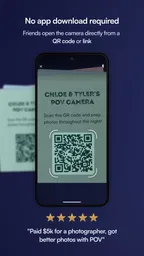
Before inviting anyone, decide who will create or manage the event and how guests will learn to participate. This small bit of preparation avoids a common problem with event tools: people arrive, hear a quick explanation over music or conversation, and then forget what they were meant to do. I would put the invitation or joining instructions somewhere guests will actually notice, such as a message sent before the gathering or a brief announcement when they arrive.
It also helps to choose one person besides the host who can answer basic questions. The host is often busy, especially at a wedding or birthday, and a helper can remind guests about the shared photos without turning the occasion into a technical support session. This is a practical advantage of planning the workflow in advance: the app should support the event rather than demand attention throughout it.
Make the first contribution easy
The first meaningful success is not installing the app; it is getting one guest to contribute a photo to the right event. I would test that sequence with a friend before the gathering. Ask them to find the event, take or add a picture through the intended flow, and confirm that both of you can see the contribution where expected. That short rehearsal can reveal confusing instructions while there is still time to simplify them.
For the event itself, give guests a concrete prompt instead of a broad request to “take photos.” For instance, ask them to capture the setup before everyone arrives, a candid moment with someone they have not seen in a while, or a view from their table during a toast. Specific prompts make participation feel natural and reduce the chance that everyone takes the same posed group picture.
I would also avoid asking every guest to document the entire occasion. A lighter invitation tends to fit social events better: contribute a few moments you genuinely want to remember, then put the phone away and enjoy the gathering. That balance is important for an app built around guest photos. If participation becomes a chore, people may stop contributing; if it feels optional and personal, the collection is more likely to reflect the actual atmosphere.
One useful workflow is to assign different moments to different people. A friend who arrives early can capture the room before it fills, while someone else can focus on the informal conversations later. This is not a special technical feature; it is a simple way to make a shared camera collection more varied without putting one person in charge of everything.
Where first-time users can get confused
The word “shared” can lead people to assume that every guest will know what to do automatically. In practice, the host’s invitation needs to explain the expected action in plain language. If someone is unsure whether to join an event, take a photo, or simply wait for someone else to do it, they may give up. A short, direct instruction and a quick demonstration are more useful than a long explanation of why the app is being used.
Another likely point of confusion is the difference between an event collection and a complete backup of everyone’s camera roll. I would not present the app to guests as a way to preserve every picture on their phones. Frame it as a place for selected photos from this occasion. That sets a reasonable expectation and gives people a clear choice about what they want to contribute.
Hosts should also think about what kinds of moments belong in a shared event. Not every candid picture is suitable for a group collection, and guests may have different comfort levels about being photographed. A quick, friendly reminder to be considerate can prevent awkwardness. If a gathering includes people who prefer not to appear in shared photos, respect that preference rather than treating participation as compulsory.
For a poor connection or a crowded venue, avoid making the photo-sharing flow the only way to capture something important. I would keep essential photos with a designated photographer or another reliable method, then treat guest contributions as an extra layer. This is a useful distinction: the app can enrich the record of a social event, but the host should not rely on every guest’s device and attention for must-have shots.
How it compares with familiar alternatives
The usual alternative is to ask guests to send pictures afterward. That works, but it often leaves the host chasing messages and trying to sort images from different conversations. A shared event approach is more intentional because the photos are connected to the occasion from the start. On the other hand, guests who do not want another app or prefer familiar messaging may find the usual method easier.
A standard shared album is another sensible choice, particularly when the main goal is to collect selected images from a small group. It may feel simpler for people who already use that service, while POV is more specifically centered on the event and the guest-camera idea. I would choose based on the crowd: if most guests are willing to follow a dedicated event flow, POV’s focus is useful; if several people are reluctant to install or learn something new, a familiar album or post-event message may get better participation.
Hiring a photographer is not a direct substitute, either. A professional is better for planned portraits and dependable coverage of key moments. Guest photos are better at capturing the atmosphere from inside the group, though they can be uneven. For an important celebration, combining the two approaches can make sense: let the photographer handle the essential images and use guest contributions for informal viewpoints.
Who should use it, and who should pass
I would recommend trying POV if you are organizing a wedding, party, or other gathering where many people will want to remember different parts of the day. It is particularly promising for hosts who do not want to spend the whole event taking pictures themselves. The app can also suit a group of friends who enjoy candid snapshots and are comfortable following a shared plan.
I would skip it if you want a private, individual camera tool, a powerful editing suite, or a guaranteed professional-looking album. It may also be the wrong choice for a group that dislikes installing apps or is unlikely to follow instructions. In that situation, the theoretical benefit of collecting everyone’s perspectives may be outweighed by the effort of getting people to participate.
There is a practical way to decide before committing to the workflow: ask a few likely guests whether they would be willing to contribute photos through a dedicated event app. If the response is enthusiastic, prepare the event and test a contribution with one person. If the response is hesitant, choose a familiar alternative and spend your planning time on making that approach easy instead.
A realistic first-event plan
Imagine hosting a birthday dinner with friends arriving at different times. Before the day, I would install the app, check that it runs on my phone, and rehearse the event flow with one guest. I would then send a concise invitation explaining how to participate and suggest a few kinds of moments worth capturing: the table before dinner, a candid conversation, and a group photo near the end.
At the gathering, I would ask one friend to help answer questions and avoid repeatedly interrupting the group with reminders. Afterward, I would look through the contributions as a collection of perspectives rather than judging it by whether it resembles a polished photo shoot. This approach makes the app useful without allowing the phone activity to take over the occasion.
That plan also helps answer the questions a first-time host is likely to have: install and test before the event, explain the contribution process clearly, and do not assume every guest will participate. Guests should be invited to share selected moments, not pressured to provide a full record. For important photographs, keep a separate plan. Those habits make the experience more reliable even when the group is mixed in age, confidence, or enthusiasm for apps.
My recommendation
POV – Disposable Camera Events has a clear purpose, and I find that focus more compelling than a generic photo-sharing tool when the occasion itself is the center of the experience. Its value comes from making guest viewpoints part of the plan, not from promising perfect coverage. Untitled Tech, Inc. has built an app for people who want their celebrations documented by the people in the room, and the strong average rating and broad install base suggest that many users appreciate that idea.
My advice is to try it for an event where candid variety matters, but to prepare the guest instructions and test the first contribution beforehand. The free install makes it approachable, while the range of in-app purchases is a reason to check your needs before buying anything. If your guests are willing to participate, the shared perspective can give you moments you would not have captured alone. If they are not, a familiar shared album or professional photographer will be the more dependable choice.
What we like
- Creates a nostalgic disposable-camera look for event photos
- Encourages guests to capture candid moments
- Offers an alternative to collecting photos from every guest
- Can make shared event albums feel more personal
- Works well for weddings and other group celebrations
What could be better
- Photo quality may depend on each guest's phone camera
- Guests need to install the app to take part
- Participation can be uneven across the event
- A disposable-camera effect may not suit every occasion
- The app's usefulness depends on having an active event to join





