






Posh – Create & Find Events review
 Analysis by Appsdrops
When a household is trying to settle on a concert, party, or other local outing, the hardest part is often not finding something to do. It is getting everyone to agree on a plan and keeping the details straight. Posh is an event-focused social app that can help with discovery and organizing, but I would treat it as a shared planning space rather than a family calendar or a substitute for talking through who is going.
That distinction matters when several people use the same phone or tablet. An event account reflects the person signed in, not everyone in the home. I would avoid handing one logged-in device around as if it were a communal household profile: choices, messages, and event activity can become hard to attribute. For a family or group of roommates, the more reliable approach is for each participant to use their own account where appropriate, then agree on the plan in a conversation everyone can follow.
Finding an event is only the first step
Posh belongs to the events category, and its focus is connecting people around happenings rather than managing every part of a household’s schedule. That makes it useful when someone wants to look beyond the usual group chat and see event activity in a more dedicated setting. The app is developed by Posh, and its broad community focus may appeal to both people looking for things to attend and people involved in organizing them.
In practical use, I would start with a specific question: are we trying to find an outing, or have we already chosen one and need to coordinate? Posh is more compelling for the first question and for event-centered coordination. If the household already has a date, venue, and attendee list, a shared calendar or ordinary messaging app may be simpler. Choosing the right tool before inviting everyone avoids turning event planning into another place where people have to check for updates.
A realistic example is a group of friends or relatives deciding what to do on a weekend. One person can use the app to explore event options, then bring a small set of realistic choices to the group. That is usually more effective than sending an open-ended message asking what everybody wants to do. Once the group picks one, share the essential details in a place everyone actually checks, especially if some participants do not use Posh.
Keep shared-device use deliberate
If a phone is shared among family members, I would not assume that the app is designed to separate each person’s activity on one device. Sign-in boundaries are a basic consideration for any social app: before another person uses the device, make sure the account owner is comfortable with what is visible and what actions could be taken while signed in. Avoid letting a child or guest make decisions from an adult’s account simply because it is already open.
For a household, a useful workflow is to designate one person as the event researcher, not the unquestioned decision-maker. That person can shortlist options, while everyone else weighs in before anyone treats an event as confirmed. This small distinction prevents a common planning mix-up: a saved or discussed event is not necessarily a commitment from the whole group.
Posh should also not be mistaken for a household organizer. I would keep practical details such as transport, pickup arrangements, accessibility needs, and who is responsible for accompanying younger attendees in a shared note or calendar that the relevant people can access. The event app can support the discovery side, while a separate tool handles responsibilities that need to remain clear even if someone does not have an account.
Coordinate without losing the details
Event planning gets messy when a group makes decisions across several conversations. My tip is to agree on a single “source of truth” after choosing an event: one message or calendar entry with the event name, time, meeting plan, and the person coordinating. This is especially helpful when one person found the event in Posh but others are following along through text messages. It reduces the chance that an early idea gets confused with the final plan.
Another worthwhile habit is to separate interest from commitment. Ask who is genuinely going before arranging shared transport or buying anything through whatever process the event uses. That is not a special feature of Posh; it is a sensible boundary when an event app brings discovery and social interest together. A quick confirmation from each attendee is more dependable than assuming that everyone who reacted or discussed an option will show up.
For organizers, an event-centered app can make more sense than trying to build an audience through scattered personal messages. For attendees, the benefit is having a dedicated place to engage with event activity instead of relying solely on word of mouth. Still, it is worth keeping expectations practical: discovery does not remove the need to check the event’s own details and coordinate with the people in your party.
Compared with a general social network, Posh is narrower in purpose, which can make event-related activity easier to focus on. Compared with a calendar app, it is oriented toward events and community rather than maintaining a household’s complete schedule. And compared with a group chat, it can offer a more event-specific starting point, while the chat may remain better for quick questions such as who is driving or where to meet. I would use these tools together only when each has a clear job, not duplicate every detail everywhere.
Age, trust, and sensible boundaries
Posh is rated for teens, so I would not present it as a children’s activity app or assume that a parent’s account makes it suitable for every age in the home. A teen considering an event should discuss the practical plan with a responsible adult: who is attending, how they will get there and back, and what to do if plans change. The age rating is a useful starting point, not a replacement for household judgment.
For adults evaluating an event with younger family members, I would verify the event’s own information and suitability before making plans. An app that helps people connect around events is not the same thing as a guarantee that every event is appropriate for every attendee. Keep personal details limited to what is necessary when discussing plans, and be cautious about treating an online connection as someone the family knows in person.
These are ordinary precautions, but they matter more in a shared-use setting. If a parent and teen both want to use the app, separate accounts and clear expectations are preferable to passing one account back and forth. That preserves personal boundaries and makes it easier to know whose plans or decisions are being discussed.
What the ratings and availability tell me
The app is free, carries a Teen content rating, and has reached over 100,000 installs. Its average rating is 4.8 from around 2,400 ratings, alongside 165 written reviews. Those figures suggest that many users find value in it, but they cannot tell me whether the events available in a particular area match a household’s interests. Local relevance is the deciding factor for an event app, so I would judge it by the options you can actually find and use.
It was released on May 16, 2023, and the current version is 8.24.0, with Android 8.0 as the minimum operating system requirement. I would check compatibility before installing on an older device. If a household member uses an unsupported phone, they can still take part in the decision through shared event details, but they may not have the same direct app experience.
One limitation I would keep in mind is that Posh is not automatically the best answer for every kind of outing. Someone who wants a quiet, private way to coordinate a small family visit may prefer a calendar and messaging. A person who wants a complete itinerary manager may also be better served by a dedicated planning tool. Posh makes the most sense when finding and engaging with events is itself part of the goal.
Who I would recommend it to
I would recommend Posh to people who like discovering events and want a focused place to engage with that scene, including organizers who need to connect with prospective attendees. It can also work for a household when one person takes responsibility for browsing and then brings options to the group. The app is less compelling if nobody in the household wants another social account, if the group already knows exactly what it is doing, or if the main need is private coordination among a few people.
My household verdict is positive with a clear boundary: use Posh to find or explore events, but do not make it the only place where shared plans live. Decide who is using which account, confirm attendance directly, and keep the final time and logistics somewhere the whole group can access. With that approach, the app can make the search for a night out feel less scattered without pretending to solve every coordination problem that comes afterward.
What we like
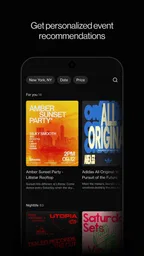
- Browse events by date and location to find nearby plans.
- Event pages make it easy to check details before joining.
- Users can create events and share them with others.
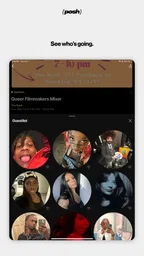
- Social features help users connect around shared interests.
- The app offers a convenient way to discover local activities.
What could be better
- Event availability may be limited in less active areas.
- Some events may require payment or separate booking.
- The experience depends on accurate details from event hosts.
- Users may need an account to access key features.
- Notifications can become distracting if too frequent.





