

PocketPal AI review
 Analysis by Appsdrops
I like the idea behind PocketPal AI: instead of sending every prompt to a remote service, it lets you run language models directly on your phone. That changes the main question from “Is this the most capable chatbot?” to “Is having an AI available offline, with your data kept on-device, useful enough to accept the limits of a phone?” For me, that makes it a distinctive productivity app rather than a straightforward replacement for a familiar online assistant.
It is developed by LLM Ventures and is free to install. The app has a 3.2 average from around 4,000 ratings, with 1 million-plus installs. Those figures suggest a real audience, but the modest average rating is worth keeping in mind: the offline approach is appealing, yet the experience may not suit everyone. I would treat it as a practical tool to try, not a guaranteed upgrade to the AI services you already use.
What you get without paying
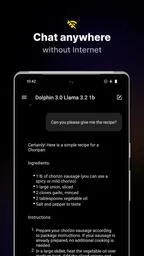
The basic appeal is clear: PocketPal AI is an AI chat app in the productivity category, and its core proposition is local use rather than dependence on an internet connection. That can matter when you are travelling, working somewhere with unreliable reception, or simply prefer not to send a prompt to a cloud service. For quick drafting, brainstorming, or asking a question about text you provide, having an assistant available offline can be more useful than waiting until you are back online.
There is no upfront purchase price to install it. At the same time, the app offers in-app purchases ranging from $1.39 to $46.99 per item. I would not read that range as a promise that a particular capability or model costs a particular amount; it simply means optional purchases exist. If you are deciding whether it is worth trying, the sensible approach is to start with the free experience and consider a purchase only after you know what you want to do more often.
That distinction matters because “free” does not automatically mean the whole experience will meet every need at no cost. Someone who only wants to experiment with offline chat may be satisfied without spending anything. Someone hoping to make the app a regular work tool should first see how it behaves on their own device and whether the available options suit their tasks before paying for anything. I would avoid buying on the assumption that local AI will automatically match the speed or quality of a cloud assistant.
The age rating is Everyone, which makes the app broadly accessible, but the practical question is still whether its style of AI use fits the person holding the phone. A casual user may value convenience and privacy more than polished, up-to-date answers. A person who depends on AI for demanding work may care more about output quality, speed, and easy access to current information. PocketPal AI is most compelling when offline availability is itself part of the value, rather than when it is judged only against the strongest connected services.
Why local AI changes the workflow
Running a model on a phone brings a useful trade-off: you can use the assistant without an internet connection, but the phone becomes responsible for the work. In practice, that makes device capability and the choice of model important considerations. I would begin with short, low-stakes prompts and see how comfortably the app handles them before relying on it for a long document or a complicated task. This is a better test than assuming that every model will feel equally responsive on every phone.
There is also a privacy benefit in the basic design: prompts can be handled on-device rather than sent to a cloud service. I find that especially attractive for rough personal notes, private brainstorming, or rewriting text that I would rather not submit to an online chatbot. Still, local processing is not the same as a complete privacy guarantee for every part of an app’s operation. I would use the offline design as a meaningful reason to try it, while avoiding claims about details beyond that central on-device approach.
A useful everyday scenario is preparing for a commute. Before leaving home, I could put a few notes into a prompt and ask for a concise outline, then continue working with the assistant on the train even if the connection drops. Another is drafting a polite message while away from Wi-Fi: I can ask for a warmer or more direct version, compare the wording, and edit it myself. These are modest tasks, but they show where offline availability can save friction without requiring a complicated setup or an important decision based on a perfect answer.
For better results, I would keep prompts focused. Instead of asking for a broad report, I would provide the relevant context and request a specific format, such as a short summary or a list of possible next steps. This is a particularly useful habit with a phone-based assistant: smaller requests are easier to assess, and I can quickly revise the prompt if the answer misses the point. I would also treat generated facts as suggestions to check, especially if the result will be used professionally.
Where it fits beside online assistants
Compared with a typical cloud chatbot, PocketPal AI’s strongest difference is not an automatic claim of better answers; it is the option to work offline and keep the interaction on the device. That makes it a useful companion for moments when connectivity or data handling matters. Online services are generally the more natural choice when I need current information, want a highly polished response, or expect the assistant to handle a demanding task without much prompt adjustment.
It can also complement ordinary productivity tools rather than replace them. A notes app is better for storing and organizing information I need to find later; PocketPal AI can help reshape a note into a draft or extract a few possible action points. A search engine is better when I need to verify something against current sources. The distinction is important: an offline model can help me think through material I already have, but I would not treat it as a live research tool.
One practical way to decide whether it earns a place on your phone is to choose a task you already repeat. Try turning a rough note into a clear message, summarizing a short passage, or generating a few alternative phrasings. Notice not only whether the answer is good, but how much editing it takes and whether offline access is genuinely useful in that moment. If the result needs extensive correction, a connected assistant or your own usual workflow may be faster.
Limits worth considering before you rely on it
The main trade-off is that local AI has to work within the phone’s resources. That can make the experience less predictable across devices and can affect how comfortable longer or more involved conversations feel. I would not assume that installing the app means every model or prompt will be equally practical. A quick trial on the phone you intend to use is more informative than comparing it to a cloud service in the abstract.
Offline access also has a boundary: an assistant working without an internet connection cannot be relied on to fetch fresh information from the web. That makes it a poor choice for checking breaking news, current opening times, recent product details, or anything where the latest facts matter. For those jobs, I would switch to a connected source and verify the answer rather than asking an offline model to guess.
There is a learning curve in understanding what kind of prompt gives useful results and what the on-device setup can comfortably handle. If you want an assistant that simply opens and answers complex questions with little thought, this may feel like extra work. The average rating of 3.2 is another reason to keep expectations measured rather than assuming the local approach will be smooth for every user. It is a signal to test the app against your own routine, not a verdict that it cannot be useful.
Version 1.23.0 is the current version, and the app supports Android 7.0 or later. That broad minimum makes it relevant to people using older Android software, though the minimum operating-system requirement alone does not tell you how well a particular phone will run local models. If your device feels constrained during other demanding tasks, I would be especially cautious about expecting a consistently effortless AI experience.
Who is likely to get real value
I would recommend giving PocketPal AI a try if you often work without reliable internet, want to experiment with running language models locally, or prefer to keep prompts on your device when possible. It is also a good fit for someone curious about AI who is willing to test different prompts and accept that a useful answer may need editing. Since installation is free, you can judge that fit through your own routine before deciding whether any optional purchase makes sense.
I would skip it, or at least avoid making it my main assistant, if I needed current web information, dependable answers for high-stakes decisions, or the convenience of a powerful connected service. It may also be a poor match if you rarely work offline and have no particular reason to keep AI interactions on-device. In those cases, the local-first distinction may not compensate for the extra limits and experimentation.
My verdict is that PocketPal AI offers a specific kind of value: an offline assistant you can try without paying upfront, with optional in-app purchases if you later decide they are worthwhile. Its appeal is strongest when privacy-minded local use or a lack of connectivity solves a real problem for you. I would install it, test it with a few everyday writing tasks, and keep it only if the answers are useful on your phone. For everyone else, a connected assistant or a conventional notes-and-search workflow may be the better choice.
What we like
- Runs AI models locally for greater privacy.
- Works offline after downloading a model.
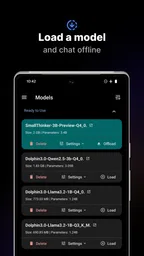
- Offers several models to try.
- Lets users customize model settings.
- Does not require a cloud account for local chats.
What could be better
- Model downloads can take up substantial storage.
- Large models may run slowly on older phones.
- Local inference can drain battery quickly.
- Results vary considerably between models.
- Some models require technical setup to use well.





