
PlayNest: MP3 Music review
 Analysis by Appsdrops
I like the idea behind PlayNest: MP3 Music: make the music already on your device easy to browse and play, without requiring a streaming subscription or a network connection. It is a straightforward local music player, and that focus is also its main trade-off. If you have a collection of MP3s and want a practical way to organize listening around folders and playlists, it sounds well aimed at your needs. If you expect a service that discovers new music, syncs a library across devices, or manages a large cloud collection, this is a narrower tool.
A local player built around your own collection
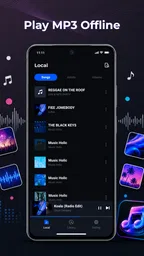
PlayNest is a free Music & Audio app from SmarTtDev. Its central appeal is offline playback: your tracks live on your device, so listening does not depend on a streaming connection. The app is rated for Everyone, and it has an average rating of 4.2 from around 500 ratings. That gives a prospective user some context, though the more useful question is whether a local player fits the way you already keep music.
The current release is version 1.0.2, and the app supports devices running Android 8.0 or later. It has passed over a million installs, suggesting that offline music playback remains a useful everyday need. Those figures are background, not a guarantee that it will suit every music library: the quality of your experience depends heavily on how your own files are stored and organized.
In my view, the most sensible way to approach PlayNest is as a listening companion for music you already own or have saved locally. It is not trying to replace a streaming catalog. That distinction matters: with a local player, you choose and maintain the collection, while the app’s job is to make it comfortable to navigate and play.
Folders make the library easier to understand
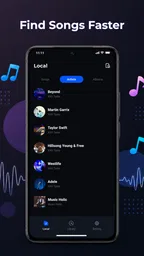
Folder-based browsing is more than a convenience if your music is already arranged by album, artist, project, or mood. Instead of relying on a single automatically assembled library view, you can use the structure you have created on the device. That is especially handy for independent releases, DJ sets, spoken-word recordings, or personal mixes that may not fit neatly into the usual artist-and-album categories.
A practical tip is to tidy the folders before building playlists. If you group a road-trip selection or a set of workout tracks in a clearly named folder, it becomes easier to find the source material later and less likely that a playlist will become your only way to locate it. This workflow also makes PlayNest a reasonable fit for people who move audio between a computer and a phone and prefer to keep their own organization rather than rebuild it inside a service.
There is a trade-off, though. Folder browsing is only as orderly as the folders themselves. If your tracks are scattered across downloads, transfers, and old backups, a folder-first approach can feel like rummaging through a drawer. Taking a few minutes to group files before listening can pay off; someone who wants an app to automatically curate a polished library may find this approach too hands-on.
Playlists help with listening that has a purpose
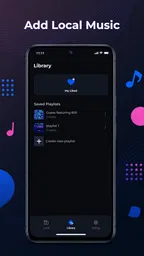
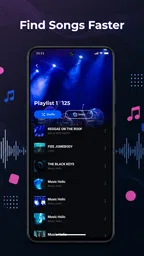
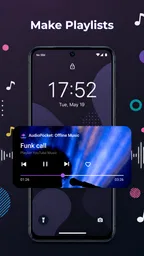
Playlists are useful when you want a deliberate queue rather than a broad shuffle through everything on the device. I can see them working well for a familiar commute, a warm-up before exercise, or a selection of tracks for focused work. The useful habit is to make lists around situations, not just genres: a short playlist for a regular errand is easier to reuse than repeatedly searching through a large collection.
That said, playlists and folders solve different problems. A folder preserves the way files are grouped on the device; a playlist gives you a listening sequence that can draw on your collection. Keeping those roles separate avoids needless duplication. For example, leave album folders intact and create a playlist for a particular activity, rather than rearranging the underlying files whenever your mood changes.
Because PlayNest is centered on offline MP3 playback, it is also a good match for prepared listening. Before heading somewhere with unreliable reception, you can make sure the tracks you want are already available locally and arrange them into a playlist. This is a more dependable routine than assuming a streaming app will have cached the right songs, though it does mean you need to manage the files yourself.
Background controls suit ordinary routines
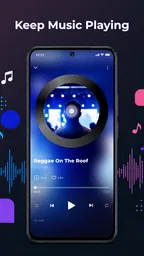
Background controls matter because music is rarely the only thing happening on a phone. You may be walking, cooking, commuting, or using another app while a playlist runs. Being able to control playback without keeping the music screen in front of you makes a local player more practical for those moments than an experience that requires constant attention.
One realistic use case is a commute through areas where mobile service comes and goes. I would prepare a few albums or a playlist at home, start playback, and then use the background controls while checking directions or handling another task. The main benefit is predictability: the music is on the device, and the listening session does not hinge on a stable connection.
This also highlights a limitation that is easy to overlook. Background playback is convenient, but it does not solve collection management. If you forget to copy a track onto the device, or your files are poorly labeled, controls cannot make that missing or hard-to-find music appear. PlayNest’s strengths are most apparent after you have done the basic work of keeping a usable local library.
Where it sits beside streaming apps
Compared with the usual streaming alternatives, PlayNest offers a different kind of control. A streaming service is generally the better choice when you want a large catalog ready to explore, recommendations, or access to music you have not already collected. PlayNest is more appealing when you want to play your own MP3s offline and do not want every listening session to begin with an online search.
It also differs from more elaborate library managers. A feature-heavy music app may be preferable if you care about extensive sorting options, detailed playback tools, or managing a complex collection from one interface. PlayNest’s described focus is narrower: folders, playlists, and playback that can continue in the background. That simplicity can be a relief, but it also means I would not choose it on the assumption that it will replace every specialized audio tool.
For podcasts, radio, or audio that changes frequently, a dedicated service may be more convenient than manually maintaining local files. For a stable collection of albums, mixes, and personal recordings, the opposite can be true: keeping everything on the device makes the listening routine less dependent on an account or a connection. The right choice depends less on which type of app is universally better and more on whether you want to discover music or manage what you already have.
The main friction is the work around the music
The honest drawback is that offline playback puts more responsibility on you. You need to have the audio files, keep them on the device, and organize them well enough to find what you want. That is a fair exchange for listening without streaming, but it will feel like extra housekeeping to anyone accustomed to searching a vast catalog and pressing play immediately.
There is also a natural limit to what folder and playlist organization can do. If you often switch between devices, want a library that follows you automatically, or depend on suggestions to decide what to hear next, a local player is unlikely to be the most convenient center of your music life. I would also consider a different app if your priority is advanced library control rather than a simple path from stored files to playback.
For a smoother start, I would first check that the tracks I care about are actually stored on the phone, then put them into a small number of clearly named folders. After that, I would create playlists for repeatable situations rather than trying to build a perfect catalog all at once. This modest setup keeps the strengths of local playback while reducing the most common frustration: knowing the music is somewhere on the device but not being able to locate it quickly.
Who I would recommend it to
I would recommend PlayNest to someone with a personal MP3 collection who wants uncomplicated offline listening, especially if they already think in folders or like creating their own playlists. It also makes sense for a person who wants music during travel, exercise, or everyday errands without depending on a data connection. The free price removes a purchase decision, while the Everyone age rating makes its intended audience broad.
I would suggest skipping it if your main pleasure comes from discovering unfamiliar artists, browsing a huge catalog, or letting an app handle organization for you. It is also not the first choice for listeners who need sophisticated management across a large, frequently changing library. In those cases, a streaming service or a more advanced music manager is likely to match the routine better.
My overall take is that PlayNest has a clear and useful purpose rather than an all-in-one ambition. Its combination of local playback, folder browsing, playlists, and background controls addresses the everyday needs of a listener who has already gathered music. The trade is equally clear: convenience depends on your own files and the care you put into arranging them. If your music is yours to manage and you want it available offline, this is a focused option worth trying.
What we like
- Simple playback controls make it easy to manage a music queue.
- A lightweight design can suit users who want a straightforward player.
- Local audio playback can work without a continuous internet connection.
- Playlist support helps organize tracks by mood or occasion.
- A dedicated music app keeps playback separate from video streaming apps.
What could be better
- Local playback requires music files to be stored on the device.
- Features and audio formats may vary by app version.
- The app may not include a licensed catalog for streaming new releases.
- Background playback can increase battery use during long sessions.
- The listening experience depends on the quality of your stored audio files.





