



PixVerse: AI Video Generator review
 Analysis by Appsdrops
I’d reach for PixVerse: AI Video Generator when I have a visual idea that would be awkward to film, or when an ordinary photo needs a more playful second life. It is a photography app built around AI-generated video effects, so the appeal is less about carefully editing a traditional clip and more about turning a prompt or image into a short piece of moving content. In my view, that makes it useful as a creative sketchbook and social-posting tool, though not a replacement for a full video editor.
PixVerse is made by PixVerse and is free to install, with in-app purchases ranging from $3.99 to $599.99 per item. It has a 4.4 average from around 4.6 million ratings, and has been installed over 50 million times. Those figures suggest a sizeable audience, but I would still judge it by whether its particular AI workflow fits the kind of videos you want to make. The app is rated Teen, so it is not intended as a child-focused creative tool.
Starting with an idea, not a timeline
The most natural way to approach this app is to begin with a simple visual intention: make a portrait feel animated, give a still image a more dramatic mood, or create a striking clip for a post. That is different from opening a conventional editor, where you usually start by trimming footage and arranging shots. Here, the creative decision comes first; the AI effect is the means of turning that idea into motion.
This can lower the barrier for someone who does not know camera settings, keyframes, or editing terminology. It also makes the app appealing when you have no suitable footage on hand. A photo can serve as the starting point for an experiment rather than just a finished image. I find that particularly handy for social content, where a surprising visual can matter more than a polished, documentary-style record of an event.
There is a trade-off, though: AI video is interpretive. The result may not match the exact movement or mood you pictured, even if the starting image is clear. I recommend thinking in terms of a direction—such as energetic, dreamy, or humorous—rather than expecting precise control over every detail. That mindset makes the process more enjoyable and helps avoid treating an unexpected result as a failed edit.
Choose source material that can survive motion
A useful, non-obvious preparation step is to inspect the image before you animate it. A clean subject with some separation from the background gives an effect less visual clutter to work around. If a face, hand, or important object is already partly obscured, motion can make that problem more noticeable. When I want a quick result, I would choose a simple, well-lit image over a busy group shot, even if the latter feels more personal.
It also helps to decide where the finished clip will be used before creating it. A video intended for a casual story can tolerate a more exaggerated effect than one meant to sit beside carefully edited footage. For a post that needs to look consistent with a brand or a work project, I would test the visual style against the rest of the material first. PixVerse is strongest when novelty is part of the goal, not when every frame must match a fixed production brief.
Making a clip without a traditional edit suite
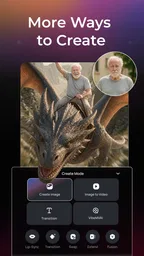
The app’s central draw is the ability to animate and edit AI video with effects, rather than building a sequence from multiple recorded takes. That is convenient when the source is a still image or a short concept and you want to see a possible direction quickly. It gives casual creators a route to visual experimentation without first learning a desktop editing workflow.
For an everyday example, imagine taking a photo from a weekend outing and wanting something more lively to share with friends. Instead of assembling a montage, you could use the image as the seed for an AI-styled clip, review the result, and decide whether it feels playful enough to post. The practical advantage is speed of ideation: you can explore a visual treatment that would take extra effort to stage with a camera.
That convenience should not be confused with precise editing control. If your project depends on exact timing, carefully synchronized audio, several layers, or a sequence that must follow a script, a standard mobile editor is likely the better tool. PixVerse is oriented toward generating an effect-driven result; a timeline editor is more suitable for shaping known footage into a deliberate story. I would use them together only if the generated clip can be brought into a separate editor for the finishing work I need.
Iteration: treat each result as a draft
AI output is worth approaching as a series of drafts. Rather than repeatedly changing everything at once, I would alter one part of the idea at a time: simplify the source image, make the intended mood clearer, or choose a different visual direction. This makes it easier to understand what improved the result and avoids spending effort on a vague prompt or unsuitable starting material.
A second practical tip is to keep the original image untouched and think of the generated video as a variation, not a replacement. That preserves a clean fallback if the motion changes the subject in a way you do not like. It also lets you compare the still and animated versions before deciding which one communicates the moment better. For personal sharing, the original may be more sincere; for a playful post, the generated version may be more attention-grabbing.
There is a patience cost to this kind of experimentation. A result that is visually interesting may still have an odd movement or a detail that distracts from the subject. I would not plan a time-sensitive post around getting one exact outcome on the first try. If consistency matters more than surprise, a manually edited clip or a straightforward camera recording is usually a safer choice.
From generated clip to a finished post
For handoff, the key question is whether the generated result is ready to stand alone or needs a finishing pass elsewhere. PixVerse is a reasonable place to create the central visual idea, but a creator may still want a separate editor for precise trimming, captions, sound choices, or arranging several clips into a sequence. Keeping that distinction clear prevents frustration: the app can help produce the eye-catching piece without necessarily being the entire publishing pipeline.
Before sharing, I would watch the clip once with the sound off and once at the size where people are likely to view it. The first check reveals whether the motion reads clearly without relying on audio; the second helps catch details that disappear on a small screen. If a generated effect competes with the subject, I would choose a simpler treatment rather than trying to rescue the clip with more edits.
Creators should also be selective about what they upload. A personal photo may be convenient source material, but it is still worth considering whether the image is appropriate for an AI transformation and eventual public sharing. For work involving clients, private events, or people who have not agreed to appear in a post, I would use a different source or get permission first. That is a sensible habit for any creative app that turns personal imagery into shareable output.
Where it fits among photography and video apps
Compared with a conventional photo editor, PixVerse is about motion and effects rather than careful adjustment of a still image. Compared with a standard video editor, it offers a more generative starting point and less of the familiar shot-by-shot construction. That middle ground is its identity: it can produce an idea that neither a basic photo filter nor a timeline alone makes as quickly, but it is not the best choice for every production task.
I would recommend it to people who post casually, enjoy experimenting with AI visuals, or want to turn a static image into something more animated without a complicated setup. It may also help creators who need a quick visual concept before deciding whether to develop it into a larger project. People who want exact control, reliable continuity between shots, or a polished edit built from their own recorded footage should look first at a dedicated video editor.
The app is free to start, but its in-app purchases span from $3.99 to $599.99 per item, a broad range that makes it worth checking the purchase details carefully before committing. I would explore the available workflow first and only pay if I had a recurring use for it. The version is 3.22.35, and the minimum operating system is 7.0, useful details to check against an older device before installing.
My creator verdict
PixVerse earns its place as a playful AI video-making tool, especially when the brief is “make this image feel different” rather than “edit this footage exactly.” I like the idea-generation angle: it encourages experimentation and can turn a familiar photo into a more eye-catching piece of content. Its main limitation is also built into that approach—AI motion can be unpredictable, and a visually exciting result is not always a controlled or consistent one.
My advice is to use it for exploration and short, effect-led posts, then hand off to a conventional editor when timing, continuity, or detailed finishing matters. If you enjoy trying alternate looks and can accept a little trial and error, it is an approachable addition to a mobile creator’s toolkit. If your priority is precise editing or faithful documentation, you will probably be happier starting with a camera-focused workflow instead.
PixVerse was released on September 25, 2024, and its Teen rating is another reason to think about the audience and source images before sharing generated work. Overall, I see it as a creative side tool rather than an all-purpose production studio: useful when you want motion and novelty, less convincing when a project demands predictable results from brief to delivery.
What we like
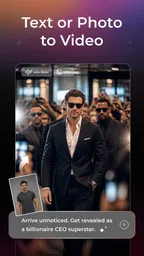
- Text prompts make it easy to create short videos without editing skills.
- Image-to-video tools can add motion to still pictures.
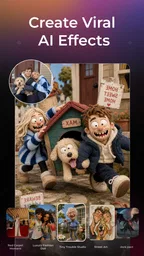
- Multiple visual styles help shape the look of generated clips.
- The interface makes core creation tools easy to find.
- Generated videos are convenient to share on social platforms.
What could be better
- Results may differ from the details requested in a prompt.
- Generation can take time during busy periods.
- Free usage may be limited by credits or daily quotas.
- Some outputs can contain visual glitches or inconsistent motion.
- Creating videos may require a stable internet connection.





