

PicFusion Lab review
 Analysis by Appsdrops
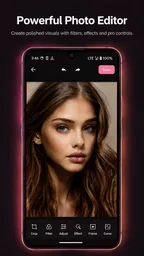
I look at photo apps as tools for getting from a rough idea to an image I’m happy to share, not just as filters to tap for a few seconds. PicFusion Lab is a free photography app from X PhotoKit, and its name suggests an image-making workspace rather than a camera replacement. My view is that it’s best approached as a place to experiment with photos you already have: start with a clear visual goal, make deliberate changes, and decide whether the result feels ready to pass along.
Starting with a photo and a clear idea
The first useful question is not “What effect should I try?” but “What do I want this picture to do?” A family snapshot may need to feel warmer; a product photo may need a cleaner, more deliberate look; a travel image might benefit from a more expressive treatment. Having that intention before opening PicFusion Lab helps keep editing from turning into aimless effect-hopping.
That distinction matters because creative apps can make every image feel like an invitation to keep tweaking. I get better results when I choose one priority—mood, visual consistency, or emphasis—and judge each change against it. If an edit makes the subject harder to read, it is not an improvement simply because it looks more dramatic.
PicFusion Lab is a photography app, and I would consider it for the creative stage of a small personal or social project. It is not a substitute for a dedicated camera when the main need is capturing a moment, nor would I treat it as a full production suite without first checking that its editing workflow matches the job. That makes it most appealing to someone who wants to shape images, rather than manage every part of a professional photo pipeline in one place.
The app is rated for Everyone, which makes its audience broad, but that does not mean every editing choice is automatically simple. Newer editors may find it helpful to work on a copy and compare the result with the original. That small habit keeps experimentation low-risk and makes it easier to tell whether an edit genuinely improves the photograph.
Choose the source image before chasing a style
A practical starting point is to pick a photo with a clear subject and enough visual information to support the result you want. If the image is already blurry, poorly framed, or dominated by distracting clutter, editing may not solve the underlying problem. I would first choose the strongest frame from a set, then use PicFusion Lab to refine its character rather than expecting the app to rescue every weak shot.
For a small creative project, consistency is often more valuable than making each image striking on its own. If I were preparing several pictures for a club announcement or a family album, I would decide on a shared mood before editing the first one. Then I could compare each finished image against that reference and avoid ending up with a collection that feels visually disconnected.
Making changes without losing the photograph
The best editing workflow is usually a restrained one: make a purposeful adjustment, pause, and check whether the subject still reads naturally. I recommend looking at the image both as a whole and at its focal point. A treatment can seem attractive when viewed quickly but become distracting once the eye settles on the person, object, or detail that matters.
One useful technique is to make a “stop point” before you begin. Decide what success means in plain language, such as “the face should stand out” or “the colors should feel calmer.” When the image meets that goal, save or set it aside instead of continuing simply because more options are available. This is especially helpful in a creative app, where the ease of trying another look can lead to over-editing.
Another good habit is to compare versions in context. A photo intended for a phone screen may need a different balance than one that will sit beside other pictures in a post. I would review the image at the size people are likely to see it, rather than judging only a close-up view while editing. That can reveal whether a subtle detail survives or whether a bold treatment overwhelms the composition.
I would also keep the original separate from the finished version. That gives you room to revisit the image if your taste changes, and it prevents an experimental pass from becoming the only copy you have. This is a simple workflow safeguard, not a special capability I’m attributing to the app; it is a sensible way to work with any photo editor.
Iteration is useful only when each pass has a purpose
When I am unsure between two visual directions, I find it more productive to make two distinct versions than to keep nudging one image without a plan. One version can prioritize a natural appearance, while another explores a stronger creative mood. Comparing those outcomes side by side makes the decision clearer and reduces the temptation to combine every appealing idea into a single frame.
For a real everyday example, imagine taking a quick photo of a handmade gift before sending it to a friend. I would first check that the object is easy to see, then decide whether the image should feel bright and cheerful or quiet and intimate. After editing, I would view it at ordinary screen size and ask whether the gift remains the focus. If the styling draws attention away from it, I would go back to the simpler version.
There is a trade-off here: exploration can help you discover an unexpected look, but too many edits can make it difficult to remember what the original image did well. If you work on a batch of pictures, finish one as a reference before moving on. Use it to guide the others, while still checking each photo individually; the same treatment may not suit a shadowy indoor image and a sunlit outdoor one equally well.
From finished image to handoff
Finishing an edit is not quite the same as completing a creative task. Before sharing, I would check the image for obvious distractions, make sure the intended subject is clear, and consider whether the result fits the place it will be used. A casual message to a friend allows more personal experimentation than a set of images meant to look consistent on a public-facing page.
PicFusion Lab’s practical value depends on how smoothly it fits into that final step for your needs. I would test the route from opening a photo to getting a finished image into the destination where I plan to use it before relying on the app for a time-sensitive project. For routine personal edits, a short trial is enough to learn whether the process feels comfortable. For a client or deadline, I would confirm the whole handoff early rather than discovering a workflow mismatch at the end.
This is also where it helps to separate editing from organization. If you need extensive cataloging, precise asset tracking, or a tightly controlled production workflow, a dedicated photo-management or desktop editing tool may be the better choice. PicFusion Lab is more compelling for a focused creative session than for someone who expects one app to handle every stage of image production.
The app is free to install, with in-app purchases priced from $7.99 to $15.99 per item. I would begin with the free experience and decide whether it meets a real need before spending. In particular, ask yourself whether you are reaching for the app regularly and whether the paid option would remove a specific obstacle. Buying on the assumption that extra spending automatically means better results is rarely a good editing strategy.
For device compatibility, the listed minimum operating system is version 7.0. The current release is version 1.2.4, so I would check that your device meets the requirement and that the version available to you works comfortably before building a larger workflow around it. The app has reached over 500,000 installs, with a 4.4 average from 922 ratings and 103 written reviews. Those figures suggest that it has found an audience, but they cannot tell you whether its particular creative approach suits your own habits.
Who should use it—and who may prefer another tool
I would recommend giving PicFusion Lab a try if you enjoy shaping personal photos and want a dedicated place to explore a visual direction without turning the task into a full desktop project. It could suit casual creators, people preparing images for friends or social sharing, and anyone who likes comparing a few treatments before settling on one. Its free entry point also makes it easier to judge the experience for yourself before deciding whether any in-app purchase is worthwhile.
I would look elsewhere if your priority is dependable, detailed control over a large professional workflow, advanced image organization, or a proven route through capture, editing, review, and delivery. I would also skip it if you mainly need a camera utility or if you prefer to make quick, minimal adjustments and are already comfortable with the photo tools on your device. A separate editor may be a better fit when precision, repeatability, or a specific established workflow matters more than casual experimentation.
Made by X PhotoKit, PicFusion Lab is best judged as a creative option to test against your own pictures, not as an automatic upgrade to every photo routine. My advice is to begin with one image that has a clear purpose, keep the original, and stop when the edit serves that purpose. If the process feels natural and the finished picture is easier to share or enjoy, the app is doing useful work. If you find yourself fighting the workflow or making changes without improving the image, another editor—or a lighter touch—will serve you better.
What we like
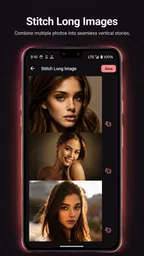
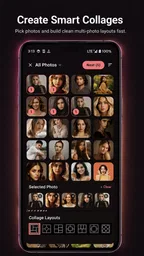
- Combines several photos into a single composition.
- Offers creative options for making personalized images.
- Makes photo experimentation accessible to casual users.
- Can help create visuals for social media posts.
- Provides a focused space for photo fusion projects.
What could be better
- Results may vary depending on the source photos.
- Detailed edits can take time to get right.
- Some features may require an internet connection.
- Export quality may depend on the selected settings.
- Privacy details are worth checking before uploading photos.





