
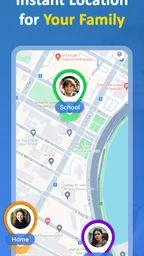
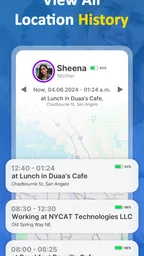
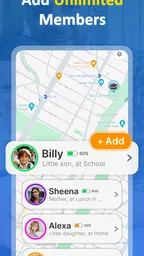
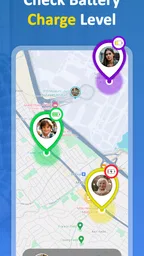
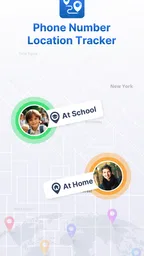
Phone Number Location Tracker review
 Analysis by Appsdrops
When I consider a family location app, I start with a practical question: will it help people coordinate safely without making everyone feel watched? Phone Number Location Tracker, published by Midgard Production, is aimed at families who want location tracking in one place. That focus can be useful, but it also makes trust, consent, and expectations just as important as the map itself.
This is a free parenting app, with optional in-app purchases priced from $4.99 to $22.99 per item. It is rated for Everyone and runs on Android 7.0 or later. The app has a 4.1 average from around 321,000 ratings, and more than 5 million installs. Those figures suggest a substantial audience, but they are not a substitute for checking whether its approach suits your household.
Start with the family’s actual need
Before installing any tracker, decide what problem you are trying to solve. If the goal is to coordinate school pickup, check that a family member has arrived, or make it easier to meet in a busy place, a location app can reduce unnecessary calls and messages. If the goal is to monitor someone without their knowledge, this is the wrong starting point. Healthy use depends on clear agreement about who is included and why.
The name and short store description emphasize phone-number location, while the product’s broader positioning is real-time family tracking. I would treat those as prompts to investigate the app’s actual workflow during setup, rather than assume a phone number alone makes someone’s location available. Location sharing generally requires the person being located to participate in some way; families should understand the prompts and permissions shown on their own devices before relying on the app.
That distinction matters especially for parents. A younger child may need help understanding why location sharing is enabled, while a teenager may reasonably want a say in when it is used. I would explain the purpose plainly, agree on sensible boundaries, and avoid turning an occasional safety check into constant supervision. A tracker is most useful when everyone knows what it is for.
Test the routine before depending on it
My advice is to try the app in a low-pressure situation first. Set it up with the family members who have agreed to participate, then check whether each person appears as expected and whether everyone understands how to use the app. Do this before relying on it for a late pickup or an unfamiliar outing. A calm trial gives you time to sort out setup friction without making a child or caregiver wait.
Also agree on a fallback. A location app should not be the only way a family can coordinate: phones can lose battery, connections can be unreliable, and a map is not a substitute for a direct message when plans change. For a school pickup, for example, I would still make sure the child knows where to wait and whom to contact if the expected ride does not arrive.
Where this app may earn a place
The strongest case for Phone Number Location Tracker is a household that wants a dedicated location-focused option rather than relying only on messages. A shared view can be more convenient than repeatedly asking “Where are you?” when a parent is on the way to collect a child or relatives are trying to meet after an event. The benefit is less about dramatic emergencies and more about small, ordinary coordination problems.
Consider a realistic school-day scenario: a caregiver is delayed, another adult is available to pick up the child, and the family needs to coordinate without sending a string of updates. If everyone has agreed to use the app and the setup is working, checking location may help clarify who is nearby. It can make a handoff easier to plan, though I would still confirm the arrangement directly rather than infer that a moving marker means the pickup is settled.
There is a useful distinction between location as a coordination aid and location as proof. A map can help answer where someone appears to be, but it cannot explain why plans changed, whether a person is safe, or whether they are able to respond. Treating it as one source of context—rather than a complete account of someone’s situation—keeps expectations realistic and reduces the risk of unnecessary worry.
The app is developed by Midgard Production and is currently version 11.0.0. Its free entry point makes it possible to explore the basic experience before deciding whether an optional purchase is worthwhile. I would first identify what you actually need from it, then review any purchase details in the app before paying. A family should not assume a paid item is necessary, or that it unlocks a particular feature, without checking what is presented at the time of purchase.
Keep setup and expectations simple
A practical approach is to choose one shared purpose for the first week, such as coordinating arrivals, and see whether the app genuinely saves effort. Avoid adding every relative immediately. Starting with a small, consenting group makes it easier to understand who can see what and whether the notifications or routine feel comfortable. If the app creates more checking and discussion than it prevents, that is useful evidence that it may not fit your household.
Families should also talk through privacy in concrete terms. Who is allowed to view the shared location? When is checking it reasonable? What should someone do if they do not want to share at a particular moment? These conversations may feel less exciting than installing an app, but they are central to making a location tool feel supportive rather than intrusive.
It is equally sensible to review whether the app remains useful after the original need passes. A short-term arrangement for a new commute or a busy family trip may not need to become permanent. I would revisit the agreement occasionally, especially as children grow older or schedules change, and remove the app from the routine if the family no longer benefits from it.
When another kind of option fits better
Phone Number Location Tracker is not automatically the best choice for every family. If you only need to say “I’m five minutes away,” ordinary calls or messaging may be simpler and less privacy-sensitive. If the household already uses a broader family-safety service, adding a separate tracker could create duplicated alerts or another account to manage. In that situation, I would compare the everyday workflow, not just the number of features advertised.
Built-in location-sharing tools on a phone are another category to consider. They may suit families who prefer to use settings already familiar to them and do not want an additional app. A dedicated tracker can be more appealing when the family wants a separate place for this task, but the better option depends on who uses the devices and how comfortable they are with setup. I would not switch simply because a dedicated app sounds more specialized.
There is also a difference between locating a family member and managing a child’s broader digital life. If what you need is screen-time guidance, content boundaries, or device-use rules, a location-centered app may not address the main concern. Choose a tool for the job you actually have; combining unrelated goals in one app can make expectations confusing for both adults and children.
Another reason to skip it is discomfort with ongoing location sharing. Some people find that a visible location helps them feel secure; others find it stressful or invasive. If a family member strongly objects, pushing ahead can damage trust without solving the underlying issue. A clear check-in agreement or scheduled message may be a better compromise than tracking.
Think about the cost of switching
Trying a new tracker is not only a matter of downloading it. Everyone who will participate must understand the arrangement and complete whatever setup the app requires. You may also need to adjust family habits, decide who checks the app, and make sure nobody mistakes a missing update for an emergency. Those small costs are easy to overlook when comparing apps, but they affect whether a tool becomes genuinely useful.
Because this app is free to install and includes optional purchases, I would begin without spending money. Use the free experience to judge whether the household can set it up, whether it helps with a real routine, and whether everyone is comfortable with the sharing arrangement. If you consider an in-app purchase later, check its price and terms at that point; listed items range from $4.99 to $22.99, so it is worth understanding the specific offer before confirming.
Switching away later should also be discussed openly. Tell family members if you plan to stop sharing through the app, and agree on another way to coordinate if one is needed. That avoids a situation where someone assumes they can check a location and only discovers the change during a stressful moment. The app should support a family plan, not quietly become the plan by default.
My recommendation for families
I would consider Phone Number Location Tracker if your family has a clear, shared reason to use location information and wants a focused app to help with routine coordination. Its parenting focus, free starting point, and large installed audience make it a reasonable candidate to evaluate. The 4.1 average rating gives prospective users one broad signal of reception, but your own setup test and family discussion matter more than any score.
I would skip it if you expect a phone number alone to reveal someone’s location, if your household does not agree on sharing, or if a basic message already solves the problem. I would also look elsewhere when your priority is broader parental controls or when an existing phone feature already handles location sharing comfortably. Those are not shortcomings to work around; they are signs that a different category may fit better.
For a family that does try it, my practical recommendation is to start small, use it for one specific routine, and pair location checks with direct communication. That makes it easier to see whether the app reduces coordination friction without letting a map replace conversation. If it earns a place in the household, keep the boundaries explicit and revisit them as circumstances change. If it does not, there is no reason to keep adding complexity just because tracking is available.
What we like
- The map makes a location easier to understand at a glance.
- A simple interface helps new users find the main features quickly.
- Number lookup can help identify an unfamiliar caller.
- Location sharing can support coordination with trusted contacts.
- Useful for checking approximate regional information.
What could be better
- A phone number alone cannot reveal a caller's precise live location.
- Location results may be outdated or inaccurate.
- Some features may require a paid subscription.
- The app may request sensitive location or phone permissions.
- Tracking someone without their consent raises privacy concerns.





