
Phone Junk Files Clear review
 Analysis by Appsdrops
Phone storage can get cluttered over time, and figuring out what is safe to remove is not always a pleasant chore. Phone Junk Files Clear is a free tools app from DingBAng with a straightforward aim: make cleaning phone junk files easier. Its store summary describes it as an easy-to-use, practical file-cleaning app, so the appeal is clear for anyone who wants a simple place to start when tidying a device.
A practical starting point for phone cleanup
Phone Junk Files Clear keeps its focus on file cleaning rather than presenting itself as an all-purpose phone manager. That narrow purpose can be useful: when I want to deal with unwanted files, I would rather open a tool built around that task than hunt through a collection of unrelated options. The short description, “Phone Junk Files,” reinforces the same idea and makes the app’s intended role easy to understand.
The experience makes the most sense as one part of a regular storage routine. I would begin by opening the app when the phone feels untidy, reviewing whatever cleaning information it presents, and taking a moment to understand the suggested action before proceeding. That careful rhythm matters with any cleanup tool. A tap should not replace judgment, especially when files have personal value or are needed by other apps.
With version 1.0.0, the app is at an early point in its release history. That does not tell me how every screen behaves, but it does make a measured first impression especially sensible. I would explore the available controls at a comfortable pace, learn what each one does, and avoid treating a cleaning prompt as a command to remove everything automatically.
Building a repeatable baseline workflow
For a dependable routine, consistency is more useful than urgency. I would open Phone Junk Files Clear when there is a clear reason to check storage, look through the cleanup options, and make deliberate choices rather than running a cleanup simply because the button is there. This approach helps turn an occasional task into a manageable habit without making the app feel like something that needs constant attention.
A good first pass should be observational. I would check what the app identifies, pause over anything unfamiliar, and consider whether it is genuinely disposable. If I recognize a file or know that an app relies on it, I would leave it alone unless I understand the consequences. The key is to treat a file-cleaning app as a helper for making decisions, not as a substitute for them.
After that initial review, a second pass can be useful. I would revisit the choices before confirming a cleanup, particularly when a category sounds broad or when I cannot easily tell what it contains. This small bit of caution is not complicated, and it makes the process feel more controlled. The app’s practical focus works best when paired with a user who takes a moment to review rather than tapping through on autopilot.
It also helps to connect cleanup with ordinary phone habits. If I have just finished removing files manually or reorganizing content elsewhere, I can use the app as a separate check rather than repeating the same action blindly. The point is not to clean for its own sake; it is to keep storage decisions understandable and avoid removing something that I later wish I had kept.
Settings and choices worth checking
Before making Phone Junk Files Clear part of a routine, I would spend a little time exploring its visible controls and any settings it offers. The aim is not to assume there are hidden modes or complicated tuning options. It is simply to learn how the app presents its cleaning task, what confirmation steps appear, and whether there are choices that affect how I review a suggested cleanup.
Whenever an app is designed to remove files, the most important setting is often the one that helps me stay in control: a clear review before deletion. If the interface offers a way to inspect a proposed action, I would use it. If an option is unfamiliar, I would leave it unchanged until I understand it. This is a sensible rule for any junk file cleaner, and it keeps convenience from turning into careless cleanup.
I would also pay attention to the device itself. Phone Junk Files Clear supports devices running Android 10 or later, which gives prospective users a straightforward compatibility checkpoint. Before installing, I would confirm that the device meets that minimum and that I am using the version of the operating system I expect. Basic compatibility checks are easy to overlook, but they help avoid unnecessary frustration at the start.
Because the app is free, there is no purchase decision to weigh before trying it. I would still approach installation and setup as I do with any utility: read the prompts on screen, understand the choices being made, and keep the app’s purpose in mind. A free tool can still deserve a thoughtful setup, particularly when it is meant to help manage files that may matter to the owner.
Faster patterns without rushing
Once the basic workflow feels familiar, the fastest approach is usually to reduce indecision rather than skip review. I would keep a simple mental checklist: open the cleaner, examine the proposed cleanup, preserve anything uncertain, and confirm only what I am comfortable removing. Repeating the same sequence makes the task feel quicker over time, while still leaving room for a careful decision.
Shortcuts are useful only when they support that judgment. If the phone offers a convenient way to reach the app, I could use it to make the occasional check easier, but I would not assume the app includes a particular shortcut feature. The broader habit is what matters: make the cleanup tool easy to find, use it when there is a practical reason, and avoid turning every spare moment into another scan.
It is also worth separating cleanup from troubleshooting. If a phone is running slowly or behaving oddly, removing junk files may not address the underlying cause. I would treat Phone Junk Files Clear as a tool for file tidying, not as a guaranteed fix for every performance issue. That realistic expectation makes the app easier to evaluate: it has a focused job, and it should be judged on how well it supports that job.
For people who manage several devices or frequently change their storage habits, a repeatable personal rule can help. I would decide what kinds of files I am comfortable reviewing and what I prefer to leave untouched, then apply that standard each time. This is not a special feature of the app; it is simply a way to make a familiar cleanup task more consistent and less prone to rushed decisions.
Where a cleaner’s limits matter
A file-cleaning app can make a routine more convenient, but it cannot decide what every file means to its owner. Names and categories may be unfamiliar, and a file that looks unimportant at first glance can still be useful. That is why I would not measure Phone Junk Files Clear by how aggressively it appears to clean. I would value a clear, understandable process and keep the final decision in my hands.
The app’s focused description also helps set a fair boundary around expectations. It is presented as a practical file-cleaning app, not as a complete solution for every storage, battery, or speed concern. If I need to organize personal documents, review photos, or diagnose a phone problem, those tasks may call for other tools or a manual check. Keeping the purpose narrow is a strength when it prevents exaggerated expectations.
Its audience is broad: the content rating is Everyone, and the app is intended for general use. Still, a simple rating does not remove the need for basic care. Anyone sharing a device should be especially mindful of whose files might be affected before confirming a cleanup. A few seconds spent checking can be more valuable than an extra tap saved.
There is also a difference between a tool being easy to use and every cleanup choice being obvious. The store summary emphasizes simplicity and practicality, but users should still take time to learn the interface on their own device. My best advice is to begin conservatively, watch how the app presents its options, and only become more comfortable as the workflow becomes familiar.
What its standing suggests
Phone Junk Files Clear has an average rating of 3.9 from around 350 ratings, with 33 written reviews. It has also reached over 100,000 installs, suggesting that many people have tried it as a utility for phone cleanup. Those figures offer a useful snapshot of its store presence, but I would not treat popularity as proof that the app is right for every phone or every cleanup style.
The developer is DingBAng, and the current release is version 1.0.0. For a newly positioned utility, my preference would be to judge it through everyday use: Is its purpose easy to understand? Can I review a cleanup calmly? Do I feel in control of what I choose to remove? Those questions are more practical than expecting a file cleaner to transform the whole phone experience.
For searchers comparing a phone junk files cleaner, the clearest reason to consider this app is its direct focus and free entry point. It is aimed at people who want a practical way to approach unwanted files, rather than a broader suite that mixes many unrelated tools together. If that describes what you need, its simple premise is easy to grasp before you install it.
A measured verdict for everyday use
Overall, Phone Junk Files Clear looks best suited to people who want a straightforward file-cleaning companion and are happy to stay involved in the process. I like the clarity of its purpose: it sets out to help with phone junk files, and its short description does not make the app sound more complicated than it needs to be. That focus is a good starting point for a small, repeatable storage routine.
My approach would be to install it on a compatible device, explore the available controls, and begin with a cautious review rather than an aggressive cleanup. I would use it when there is a real reason to tidy files, check each proposed action, and leave uncertain items alone. This gives the app room to be useful without asking it to make personal storage decisions on my behalf.
The main limitation is also a general one: no cleaner can know what I personally want to keep unless I make that decision. Users looking for a broad phone optimization suite may want a different kind of tool, while someone who simply wants help approaching junk files may appreciate the focused concept. Either way, sensible expectations and a repeatable workflow matter more than speed.
For me, Phone Junk Files Clear is worth considering as a modest utility, not a magic fix. Its free price, practical positioning, and clear file-cleaning purpose make it an approachable option for Android users who meet the minimum system requirement. Use it thoughtfully, keep control of deletion choices, and it can fit neatly into an occasional phone-maintenance habit.
What we like
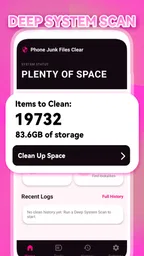
- Quick scans help identify junk files taking up storage space.
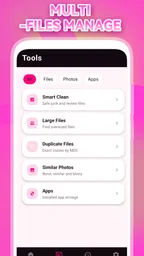
- A simple interface makes cleanup easy for first-time users.
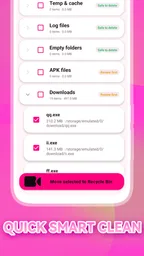
- Users can review detected files before removing them.
- Cleaning may free space for photos and other downloads.
- Useful for routine maintenance on phones with limited storage.
What could be better
- Some detected files may still be useful to other apps.
- Removing app data can sign users out or reset preferences.
- Cleanup results depend on the files stored on the device.
- Background cleanup features may require ongoing permissions.
- Storage improvements may be limited on phones with little junk.





