


PheedLoop Go review
 Analysis by Appsdrops
Event apps are most useful when they remove small hassles at the exact moment you have somewhere to be: finding the next session, checking a change, or remembering where to go. PheedLoop Go is designed for events powered by PheedLoop, so its value depends less on being an all-purpose planner and more on whether the particular event you attend has made it part of the experience. I’d treat it as a practical companion for that event, not as a general calendar or a replacement for every organizer’s communication channels.
Where a connection matters most
At an event, the app’s usefulness can rise and fall with the network. When you are deciding what to attend next, checking the event’s information on your phone can be more convenient than searching through email or printed materials. But if the relevant information is being fetched or updated, a weak connection can turn a quick check into a pause. That is the main trade-off I would keep in mind before relying on a mobile event app as my only source of directions or timing.
The app is from PheedLoop, and its focus on events powered by that platform is important. It is not automatically a universal guide to every conference, festival, or meeting. Before travelling, I would confirm that the organizer is using PheedLoop for the event and install the app early enough to see what information is available. That simple check avoids discovering at the venue that the event you care about uses a different system.
For a connected attendee, a dedicated event app can be more useful than a generic notes file because event details are organized around the gathering rather than around your personal reminders. The advantage is especially clear when an event has several activities or locations. The limitation is equally specific: the app’s usefulness depends on the event’s setup and the network conditions where you need it. It cannot make an organizer’s incomplete event information more complete.
Plan before the busy moments
I would use the app before arriving to get oriented, then avoid leaving every decision until I am moving through a crowded venue. If there is a session I particularly want to attend, I would check its details while I have a stable connection and keep a simple backup note of the time and place. That is not a criticism unique to this app; it is a sensible habit whenever an event plan lives on a phone and may need to be consulted under pressure.
There is also a useful distinction between information you need once and information that may change. A venue address or a planned meeting time can be written down in advance. A last-minute room change is different: you will want to check the latest communication from the organizer, and an internet connection may be necessary to see it. I would keep the organizer’s email or other event communication accessible rather than assuming the app is the sole channel for urgent updates.
Useful on the move, with a little preparation
The strongest use case is a person attending a PheedLoop-powered event who wants event-related information close at hand while moving between sessions, rooms, or appointments. That could be a conference attendee checking what comes next during a short break, or someone at a multi-part gathering trying to avoid repeatedly searching through inbox messages. In those moments, a purpose-built event app can feel more focused than a general web search.
It is less compelling if you only need a single start time and address. For a small appointment or a one-room talk, a calendar entry and the organizer’s message may be enough. Likewise, if you are attending several unrelated events that use different platforms, installing a separate app for each can create clutter. In that situation I would compare the effort of maintaining another app with the actual amount of event information I need.
A realistic day might look like this: I check the event details before leaving home, arrive with the schedule already in mind, and use a break to confirm where the next activity is taking place. If reception becomes unreliable, I do not want to spend that break repeatedly refreshing the screen. I would instead use any information already available, consult my saved note for fixed details, and try again when connectivity improves. That small workflow makes the app a helpful companion without making the whole day depend on uninterrupted service.
When something does not load
Network trouble is often hardest to diagnose because the same symptom can have several causes: poor reception, a temporarily busy connection, or information that has not been updated by the event organizer. I would first give the page a moment, then check whether other apps or pages are also struggling. If they are, the connection is the likely bottleneck; if they are not, reopening the event app may be a reasonable next step.
For important changes, I would verify through the event’s other official communication channel when possible. That is particularly sensible for a room change, a schedule adjustment, or anything that could make me miss a session. The app is a convenient route to event information, but a careful attendee should not treat one screen as the only authority when the connection is unstable or details seem inconsistent.
Preparation can reduce the impact of a failure. Before setting out, I would make sure I can open the app and find the event I am attending, rather than doing that for the first time in a crowded lobby. I would also keep essential fixed details somewhere easy to reach. This does not imply that the app works without a network; it simply means I am not asking a mobile connection to solve every problem at the last minute.
That approach also helps with a different kind of friction: switching between the event app and messages while walking. I prefer to review what I need before moving, then check again once I have stopped somewhere safe. It is quicker, easier on attention, and less likely to leave me navigating the venue while staring at my phone.
Keep data use deliberate
If you are watching mobile data, the practical choice is to use the app when you need event information rather than repeatedly opening it out of habit. I would connect to trusted Wi-Fi before arrival when that is convenient, especially if I want to inspect the event details in advance. I would not assume that every item will remain available after leaving a connection, so I would still note down the essentials that matter most to my plans.
Battery and attention matter alongside data. A day of checking a phone between every activity can become tiring even when the app itself is straightforward. I find it more useful to set a rough plan, check for changes at natural pauses, and keep the screen away while I am listening or talking. That makes an event app serve the day instead of turning the day into a string of phone checks.
For people who rely on a limited data plan, the app is most attractive when the event’s information is genuinely useful throughout the day. If the organizer provides little beyond a basic schedule, a saved message may be enough. If you expect to consult event details repeatedly, installing and checking the app over a reliable connection ahead of time is the more comfortable option.
Who should install it
This is a free Events app for everyone, and I see the best fit as an attendee whose organizer uses PheedLoop and whose schedule has enough moving parts to justify a dedicated companion. It has a 4.0 average from around three dozen ratings and over ten thousand installs, which gives a prospective user some context without telling the whole story of how it will work at one particular event. The event’s own setup is still the deciding factor.
The app is on version 1.24.1, and it runs on Android 8.0 or later. That makes checking device compatibility worthwhile before an event, particularly if you use an older phone. I would install it in advance rather than while queuing at registration, since that gives you time to confirm that your event is available and that your phone can open it comfortably.
I would skip it if your event is not powered by PheedLoop, if you only need one or two fixed details, or if you prefer not to rely on a phone for event planning. A calendar app is a better option for personal reminders across many unrelated occasions; an organizer’s email may be better for a small event with a simple schedule. Those alternatives are not inferior in general—they are simply better matched to lighter needs.
My connectivity verdict
What I like about PheedLoop Go is its clear role: it is meant to bring event information onto a phone for gatherings that use PheedLoop. That focus can make it more convenient than juggling messages and general-purpose notes, especially when the day includes several activities. What gives me pause is the practical dependence on being able to reach the information when I need it, so I would not build my entire event plan around a single live connection.
My recommendation is straightforward: install it when your organizer directs you to it, check your event before travelling, and keep fixed essentials handy in another form. Use the app for convenience and current event information, while turning to the organizer’s other communications if something important will not load. With that realistic approach, it can be a useful event companion; without a PheedLoop-powered event or a need for ongoing event details, a calendar entry or message is probably enough.
What we like
- Attendees can keep event details and updates in one place.
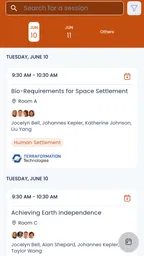
- In-app schedules make it easier to plan sessions.
- Networking tools can help attendees connect with other participants.
- Event-specific information reduces the need to search elsewhere.
- Push notifications can alert attendees to important changes.
What could be better
- Available features depend on the event organizer's setup.
- Some content may require an event account or registration.
- The app is less useful outside supported events.
- Event information may be incomplete if organizers do not update it.
- Notifications can be distracting during busy event days.





