

Phantom: Trading Wallet review
 Analysis by Appsdrops
I would treat a crypto wallet differently from an ordinary finance app: a clean interface is useful, but it is not a substitute for understanding what you are approving or where your assets are held. Phantom is aimed at people who want to manage crypto from a phone, including SOL, BTC, ETH and a broad range of tokens. My view is that it makes the most sense for someone already comfortable with the basics of crypto, rather than a first-time investor looking for a guided savings app.
Trust starts with knowing what a wallet does
Phantom is a finance app from Phantom Technologies, Inc. It is free, has an Everyone age rating, and is described as a trusted crypto wallet. It has a 4.4 average from around 154,000 ratings, with more than 10 million installs. Those figures suggest that it is widely used, but popularity alone cannot tell me whether a particular transaction is safe or suitable. I still approach every crypto action with care.
The practical distinction to keep in mind is that a wallet is a tool for interacting with digital assets, not a guarantee against market losses, mistaken transfers or deceptive requests. That matters especially when an app supports many tokens: seeing an asset in a wallet does not make it a sensible purchase, and a familiar-looking transaction prompt deserves the same scrutiny as an unfamiliar one.
I would use Phantom when I want a mobile place to manage crypto activity and keep an eye on holdings, not as a replacement for a bank account or a general-purpose budgeting tool. If your main goal is to track household spending, pay bills or build an emergency fund, a conventional finance app is the more natural fit. Phantom is for a narrower job, and that focus is useful only if it matches what you actually need.
What “trusted” should mean in practice
Trust is not a feeling I would base on a slogan or a high download count. In a wallet, it comes down to habits: checking the asset and destination before confirming, understanding what a requested action will do, and avoiding rushed decisions. A crypto app can make those choices easier to review, but the user still has to pause and read them.
I would also separate confidence in the app’s interface from confidence in every token or transaction encountered through it. Supporting thousands of tokens offers flexibility, but it also means a user may come across assets they do not recognize. I would not treat availability as an endorsement. Before buying or transferring anything unfamiliar, I would check its identity and purpose independently and make sure the transaction is one I intended.
Controls matter more than a polished screen
The useful question before installing any wallet is not simply whether it looks easy to use; it is whether its visible steps give you enough opportunity to make an informed choice. I recommend approaching Phantom with a deliberate setup routine: use a device you control, protect access to that device, and take time to understand the wallet’s prompts before moving funds. Those are sensible precautions for any crypto wallet, not special guarantees about this one.
During use, I would make a habit of checking the selected asset and the destination details at the point of a transfer, rather than assuming a previous transaction’s details still apply. That small pause can prevent a common kind of costly mistake: confirming quickly because the screen looks familiar. For a larger move, I would first consider whether a small test transfer is appropriate, while remembering that even a test does not eliminate every risk.
One practical trade-off is convenience versus attention. Keeping crypto accessible on a phone makes it easier to review or act on it away from home, but a phone is also a place where people multitask and tap through prompts. I would avoid making a significant transaction while distracted, on a rushed commute or in response to pressure from someone else. The extra minute spent checking the details is more valuable than a faster confirmation.
Where sensitive decisions show up
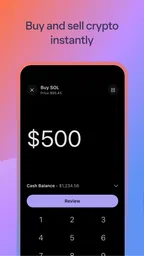
Buying crypto is a moment to slow down. Phantom’s role is to provide access to crypto activity, not to decide whether a token fits your finances. I would set my own limit before opening the buying flow, compare the asset I selected with the one I meant to buy, and read the transaction summary carefully. That is particularly important if I am moving between major assets such as SOL, BTC and ETH and a less familiar token.
Transfers deserve a separate check because a wrong destination can be harder to correct than a mistaken screen selection. I would copy or enter a recipient’s details only from a source I trust, then compare the displayed destination with the intended one before confirming. If someone sends a message urging me to transfer funds urgently, I would treat the urgency itself as a reason to stop and verify through a separate, trusted channel.
There is also a privacy dimension to using any finance app. I would review the choices and notices presented during installation and use, and I would make decisions based on what the app actually shows rather than assuming a particular permission or data practice. On the phone itself, I would use the device’s available security protections and avoid exposing sensitive information in screenshots, shared notifications or casual conversations.
Keeping control of your routine
A useful everyday workflow is to decide what job the wallet is serving before opening it. For example, if I planned to buy a small amount of a major asset, I would first set a spending ceiling, then check that I had selected the intended asset and review the final details before proceeding. Afterwards, I would keep a private record of the transaction for my own tracking. That makes the app one part of a considered routine, rather than the place where I make impulsive financial decisions.
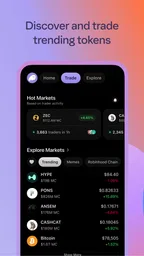
For someone who already holds crypto across several assets, the range Phantom supports can be convenient: it can reduce the need to switch between separate apps just to check or manage different tokens. The counterpoint is that a wide selection can make a wallet feel more complicated, especially for a new user who is still learning which assets and networks matter. I would start with the assets I understand and resist exploring unfamiliar tokens simply because they are available.
Another useful choice is deciding how much activity belongs on a phone at all. A mobile wallet suits quick checks and deliberate, modest actions, but a person managing a larger or more complex portfolio may prefer a more structured setup and a separate way to review transactions. If you value a simple account relationship, customer support for ordinary payments and familiar protections, a bank or established brokerage may suit you better than a crypto wallet.
Who will appreciate it, and who may not
I think Phantom is most appropriate for someone who has a clear reason to hold or use crypto, recognizes that token prices can move sharply, and is willing to verify each important action. It may also suit an experienced user who wants mobile access to a broad selection of assets. The app’s current version is 26.38.1, and it runs on Android 7.0 or later, so owners of older compatible Android devices may be able to use it without needing a newer operating system.
I would steer a crypto newcomer toward learning the basics before depositing money. In particular, they should understand the difference between buying an asset and transferring it, why destination details matter, and why an unfamiliar token should not be trusted just because it appears in a wallet. If those ideas feel like a burden, Phantom may not be the right first finance app. A conventional savings or investment service is likely to offer a clearer path for someone who wants a more familiar, guided experience.
It is also not the best choice for anyone who wants their app to make investment decisions for them or who expects crypto holdings to behave like cash in a bank account. I would not recommend using a wallet as the sole place to keep money needed for rent, bills or other near-term essentials. The possibility of price swings and the care required around transfers make crypto a poor substitute for funds that must remain dependable and readily available.
A measured recommendation
Phantom has a clear purpose: it brings crypto management to a mobile app and supports a wide range of assets. I can see why that is appealing to people who already use crypto, and its large user base makes it easy to find discussions and general learning resources. Still, those advantages do not remove the need to review transactions closely or to make independent decisions about risk.
My recommendation is cautious rather than universal. If you understand what a crypto wallet is for, want mobile access to assets such as SOL, BTC, ETH and other tokens, and are comfortable being responsible for each action, Phantom is worth considering. If you are new to finance apps, need predictable savings, or prefer an institution to guide every step, I would choose a more familiar alternative first. The best reason to use Phantom is a specific crypto need, paired with the patience to check what you are authorizing.
What we like
- Supports multiple blockchain networks in one wallet
- Lets users swap tokens without leaving the app
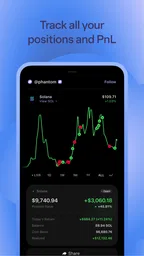
- Includes tools to track portfolio activity
- Offers a built-in browser for decentralized apps
- Provides clear transaction details before approval
What could be better
- Some features may require network fees
- Token availability can vary by blockchain
- Swaps may include provider fees or price slippage
- Recovery depends on securely storing the secret phrase
- Sending assets to the wrong network can cause loss





