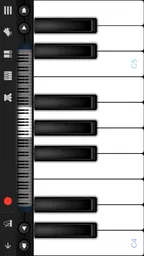
Perfect Piano review
 Analysis by Appsdrops
I find Perfect Piano most useful when I want to turn a spare moment into a small music-making session. It puts a keyboard on a phone or tablet, so I can try out a melody without carrying an instrument or setting up a full music workstation. That makes it approachable for beginners, but it also gives more experienced players a handy way to sketch an idea away from a piano.
This is a music and audio app from Revontulet Soft. It is free to install, rated for Everyone, and has reached over 100 million installs. Its average rating is 4.2 from around a million ratings, which suggests a broad audience rather than a tool aimed only at trained musicians. The current version is 8.0.0, and the app runs on Android 7.0 or later. Optional in-app purchases range from $0.99 to $5.99 per item.
From a quick idea to a playable starting point
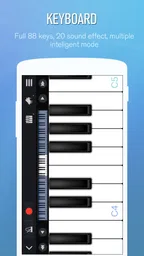
The first appeal is immediacy: open the app and you have a piano keyboard ready to play. I can tap out a tune, test whether two notes sound right together, or practice a familiar passage without needing to find a physical keyboard. For a beginner, that low barrier matters. There is no need to understand recording software before making a first sound.
Perfect Piano is best thought of as a portable practice and sketching space, not a complete production studio. That distinction helps set expectations. It can support the earliest stage of a creative idea—finding a melody, working out a chord shape, or getting comfortable with note placement—but a virtual keyboard is not the same as a weighted instrument, and a phone screen has obvious limits for detailed playing.
In practical terms, I would use it when a musical thought arrives on a bus, during a break, or while waiting at home for something else to finish. I can check the contour of a melody before it slips away, then return to a proper instrument later if I want to develop it. That is a real strength: it reduces the distance between having an idea and hearing a rough version of it.
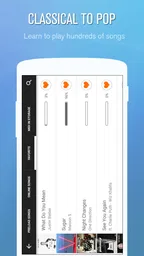
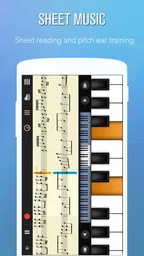
The app’s stated scope reaches from classical music to pop, so it is not framed as a niche instrument for one style. That breadth suits casual exploration and basic practice. If you are learning by ear, you can experiment with short phrases and compare how different note choices feel. If you already read music, the keyboard can still be useful for checking a passage, though it should not replace a full-size keyboard when hand position and touch are part of what you need to learn.
Who will get the most from the on-screen keyboard
I would recommend it first to curious beginners, casual players, and songwriters who want a quick piano reference close at hand. It is also a reasonable option for someone who wants to explore melodies before deciding whether to invest in a physical keyboard. The free entry point makes that trial feel low-risk, while the Everyone age rating makes the app accessible to a wide range of users.
There is a useful trade-off here: a phone keyboard is always available, but its small playing surface encourages short ideas rather than expressive, two-handed performance. A tablet may make tapping easier, yet it still does not provide the physical feedback of piano keys. If your goal is to build reliable finger technique, a real keyboard is the better teacher. If your goal is simply to hear a tune and keep moving, the screen can be enough.
Making music without turning the session into setup
For a quick creative session, I would start with one narrow task instead of trying to compose a whole piece on a touchscreen. Pick a short melody, tap it slowly, and repeat it until the note sequence feels clear. Then try changing one note at a time. This keeps the app useful as a thinking tool rather than making the small keyboard feel like a substitute for a full arrangement environment.
One non-obvious advantage of a virtual piano is that it can help separate musical decisions from performance mechanics. When I am unsure whether a phrase works, I can focus on the sequence of notes rather than worrying about finding the right instrument or setting up a recording chain. That is especially useful for a songwriter who already has lyrics or a rhythm in mind and needs a simple pitch reference.
The reverse is also true: a touchscreen can make timing and repeated passages feel less natural than pressing physical keys. Finger placement may cover nearby notes, and rapid or delicate playing is harder to control on glass. I would use it for phrase sketches, basic warm-ups, and casual experiments, but not judge a player’s technique by how comfortable they feel on this interface.
Because the app is a piano-focused tool, it is also a more direct starting point than a broad audio editor when the question is simply, “What notes should this be?” A general-purpose music workstation is better once you need to layer parts, shape a finished recording, or manage a larger project. Perfect Piano makes more sense earlier in the process, when speed and access matter more than production depth.
Iteration: useful for trying variations, not a full editing desk
Creative work rarely lands perfectly on the first attempt. A practical way to use the app is to treat each pass as a small experiment: play the phrase, alter its ending, and listen for whether the change resolves the idea. I find that kind of focused repetition more valuable than trying to build an elaborate piece before I know whether the central melody works.
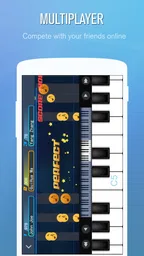
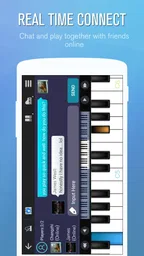
The store summary highlights a real-time multiplayer connection, which points to a social side beyond solitary practice. That can make the app more appealing when the fun is in playing with another person rather than polishing a private sketch. A shared musical moment can help a beginner stay engaged, or let friends trade ideas without turning the session into formal rehearsal.
Still, multiplayer and solo practice serve different needs. If I am trying to refine a delicate passage, interruptions or the unpredictability of playing with someone else may not help. If I want a low-pressure musical exchange, the connection is more relevant. I would choose the mode based on the purpose of the session rather than assuming that collaboration automatically improves a composition.
A useful workflow is to keep the idea deliberately small: test a hook, identify the notes that feel uncertain, and use repeated playing to make a decision. If the concept grows into a complete song, move the next stage to a tool designed for arranging and recording. This avoids expecting a phone piano to handle every step from inspiration through final production.
That boundary is important for anyone comparing music apps. A digital audio workstation is usually the stronger choice for editing multiple tracks and preparing a finished release. A piano-learning product may be a better fit if structured lessons and feedback are the main goal. Perfect Piano sits between those alternatives as a readily available keyboard for playing, practice, and early ideas, rather than an all-purpose creator suite.
Moving an idea beyond the app
For handoff, I would treat the app as a place to work out what I want to play, then carry the musical idea into whatever instrument or recording setup I use next. If I am collaborating, I can describe the note pattern, demonstrate it, or use a shared playing session as a starting point. The important habit is to capture the idea in a form I can remember before moving on, especially if it is only a short phrase.
This approach suits a sketching tool better than expecting a finished deliverable from every session. When a melody is still changing, a quick phone performance can be enough to test its shape. When the arrangement needs layers, precise editing, or a polished recording, I would switch to software built for those jobs. That is not a knock on Perfect Piano; it is a sensible division of labor between a convenient keyboard and a production workspace.
If you want a single app to compose, edit, mix, and prepare a track for release, this is not the one I would choose. If you want an instrument-like starting point that is easy to reach, it is a more fitting option. The distinction also helps answer whether it can replace a keyboard: it can replace the need to have a piano beside you for a quick musical check, but not the feel, range, or practice value of physical keys.
Costs, expectations, and choosing the right alternative
Since the app is free to install and offers optional purchases, I would begin with the free experience and decide whether any paid items matter to my own routine. The listed purchase range is modest, but it is still worth checking what an item offers before spending. A free download is not a promise that every optional element is included, so I would avoid buying anything until I know it addresses a specific need.
The app’s scale is notable without being a reason on its own to install it: it has passed 100 million installs and has about 25,000 written reviews. Those figures indicate that many people have tried it, but the right choice still depends on how you intend to play. A popular app can be a useful first step; it cannot make a small touchscreen behave like a piano action.
For someone deciding between this and a physical keyboard, I would ask what the next month of use will look like. If you mainly want occasional access to notes, informal practice, or a way to test song ideas, the app is convenient. If you plan regular technique work, need comfortable two-handed playing, or want to perform with expressive control, a real keyboard is a better investment. If your main task is producing a finished track, choose a dedicated recording and editing tool instead.
My verdict for everyday creative use
I see Perfect Piano as a practical pocket instrument: easy to approach, useful for quick musical checks, and more engaging when playing with another person is part of the appeal. Its best role is at the beginning of a creative process, when an idea needs to be heard before it can be developed elsewhere. That makes it particularly helpful for beginners and casual songwriters who value immediate access over a deep production workflow.
I would not recommend it as a replacement for lessons, a full-size keyboard, or a music workstation. The touch surface limits expressive playing, and people who need structured instruction or polished output will be better served by tools designed specifically for those goals. But if you want to explore a melody, practice informally, or share a spontaneous musical moment without setting up equipment, it is a sensible free app to try. My advice is to use it for the small, fast decisions it handles well, then move to a more suitable instrument or editor when the idea asks for more.
What we like
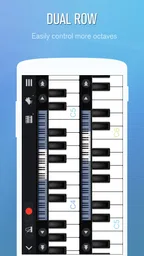
- Customizable keyboard layouts suit different screen sizes.
- Recording tools make it easy to review practice sessions.
- MIDI support connects the app with compatible instruments.
- Song tutorials help beginners learn at their own pace.
- Multiplayer options add a social element to practice.
What could be better
- A touchscreen may not provide the feel of real piano keys.
- Some songs and features may require in-app purchases.
- Small keys can make accurate playing difficult on phones.
- Ads may interrupt the experience in the free version.
- Advanced lessons may not satisfy experienced pianists.





