





PEOPLE: Pop Culture & Puzzles review
 Analysis by Appsdrops
I’m wary of apps that promise both a news fix and a quick game: the combination can feel like two unrelated products squeezed together. PEOPLE: Pop Culture & Puzzles makes more sense if you think of it as a casual reading stop for celebrity and true-crime coverage, with puzzles as an optional change of pace. Its appeal is less about deep customization and more about having a few different ways to spend a short break.
Reading and finding your way around
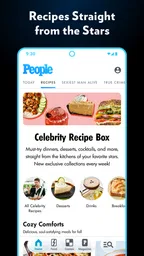
The app sits in the news and magazine space, but its focus is narrower and more entertainment-led than a general news reader. I’d look here for celebrity stories, true-crime coverage, and light diversions rather than a balanced briefing on politics, business, science, or local events. That distinction matters: it can complement a broader news habit, but it is unlikely to replace one.
The name is straightforward, and the publisher is PEOPLE INC. GROUP. What matters for day-to-day use is the mix of topics: readers who already follow pop culture may find the subject matter familiar, while true-crime coverage gives the feed a different mood. Switching between those interests can make a spare few minutes feel less repetitive, though readers who want one tightly focused subject may prefer a dedicated source.
On a phone, news reading often means scanning headlines first and opening only a few stories. That is a useful way to approach this app, especially if you have limited time. I’d treat the home feed as a starting point rather than assume every item deserves a full read. If a story catches your attention, settle in; if you only want a quick check-in, browsing headlines and leaving is a perfectly reasonable use.
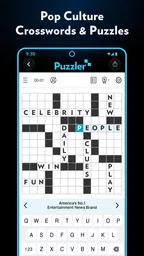
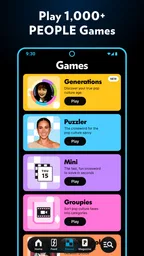
One practical advantage of its combination of articles and daily games is that it gives a reader a choice between consuming a story and doing something more interactive. That can suit a short wait in a queue or a quiet break when you don’t want to commit to a long article. The trade-off is that people looking for a clean, distraction-free reading environment may find the game element unnecessary, even if they can simply ignore it.
The app is free, and the store summary emphasizes access without a paywall. That is useful for someone deciding whether it is worth trying, but free access does not automatically make every visit frictionless: the experience still depends on whether the stories match your interests and whether the surrounding interface feels comfortable to you. I would judge it by a few ordinary sessions, not by the promise of free reading alone.
What the mix means for different readers
For someone who likes celebrity updates but also wants a lighter pastime, the combination may be a better fit than keeping a separate entertainment-news app and puzzle app for occasional use. If you mainly want investigative reporting, a comprehensive newspaper, or a customizable feed across many subjects, I’d choose a more specialized alternative. PEOPLE’s strongest reason to stay on your phone is its particular blend, not breadth across every kind of news.
The app has a 4.4 average from around 1,800 ratings, with roughly 366 written reviews, and has passed 100,000 installs. Those figures suggest it has found an audience, but they can’t tell you whether its story mix suits your taste or whether its interface works for your needs. I’d use them as context, not as a substitute for checking the app yourself.
Motor and sensory considerations
For people who find repeated tapping tiring, a useful approach is to keep each visit purposeful: open the app when you want to read a particular kind of story, browse a small number of items, then close it. This avoids turning a quick check into a long chain of gestures. The daily games may offer a different kind of activity from reading, but I would not assume they are easier for every person; puzzles can demand sustained attention and precise interaction, depending on the individual and the game.
Reading comfort can change with the situation. A long article may be pleasant in a quiet room and harder to follow on a moving bus or in a noisy waiting area. If text-heavy content is tiring, use the app in short sessions and pause when your attention fades rather than pushing through. If visual reading is not a comfortable option for you, check whether your device’s own reading and display tools help with the way articles appear; those system-level options are separate from any claim about the app itself.
Sound is another consideration for a mixed-use app. A news reader is often used in public, where silent browsing is preferable, while games may encourage a more active interaction. I’d start with the phone muted if you need a quiet experience and see whether that suits your use. That small habit is especially useful in shared spaces, but it does not resolve every sensory need: people who are sensitive to busy screens or frequent content changes should test the interface in a calm setting before making it part of a daily routine.
There is also a difference between motor effort and mental effort. A puzzle can be a welcome break from reading, but it is not necessarily a rest from concentration. Someone recovering from fatigue may prefer one short article or no app at all, while another reader may find a game more engaging than scrolling through headlines. The useful point is that the app offers distinct kinds of activity; which one feels accessible depends on the person and the moment.
Using it in real-life situations
Imagine waiting for a friend who is running late. You could skim a celebrity story, switch to a true-crime piece if you have time to concentrate, or try a daily game if you would rather do than read. That flexibility is the app’s most practical strength. It lets you match the activity to the length and mood of a break without requiring you to plan a full reading session.
For a commute, I’d be more selective. If you are standing, changing trains, or dealing with poor reception, a long story may be a frustrating choice; a short visit to browse can be more realistic. When you do have a settled seat and enough attention, articles are the better fit. The app can serve both moments, but it cannot make a distracting environment quiet or ensure that every visit suits a brief window.
It can also fit a household where people want different kinds of casual content from the same device, though I would not treat it as a children’s app. Its content rating is Teen, so it is aimed at an older audience than young children. Adults choosing it for a shared device should keep that rating in mind and decide whether its entertainment and crime-related coverage is appropriate for the people who may encounter it.
If you are trying to reduce screen time, the combination is a mixed blessing. Having a game ready can make a short break more enjoyable, but it may also give you another reason to stay in the app. A practical boundary is to decide before opening it whether you are there to read one story or play, rather than moving between both automatically. That simple choice helps keep the app useful without letting its variety dictate how long you browse.
Where it may still feel limiting
The biggest limitation is subject scope. PEOPLE is built around pop culture and true crime, so it is not the right place to depend on for urgent public information, broad current affairs, or specialist reporting. A general news app is a better choice when you need a wider range of topics; a dedicated entertainment publication may be better if you want more depth in one area. This app works best as a supplement for readers who genuinely enjoy its subjects.
Its accessibility also has to be judged in practice rather than assumed from its purpose. The existence of articles and games does not tell you whether every screen is comfortable to read, easy to operate, or suitable for a particular sensory or motor need. If you rely on specific display settings, assistive controls, or a predictable interface, try the tasks you care about first: locating a story, reading several paragraphs, and reaching a game. Those are more informative tests than simply opening the home screen.
Another trade-off is the shift in attention between reading and playing. If you came only for a serious article, seeing game content nearby may feel like clutter; if you came for a puzzle, news headlines may be an unwelcome distraction. I’d recommend it to people who like having both options available, not to readers who want every part of an app to serve one narrow purpose.
The current version is 3.1.0, released on June 25, 2025, and the minimum operating system is 11. That makes device compatibility worth checking before installing, particularly if you use an older phone. The app is free to download, but the practical question is not just whether it costs anything: it is whether its editorial focus and interaction style fit the way you actually use your phone.
Who I would recommend it to
I’d suggest giving it a try if you regularly follow celebrity news, enjoy true-crime stories, and like the idea of a daily game as an alternative to another round of scrolling. It is also a reasonable option for someone who wants a casual entertainment read rather than a comprehensive news service. The combination gives you an easy choice for different kinds of short breaks, as long as both sides of the app interest you.
I would steer away from it if your priority is highly specialized accessibility control, a broad and balanced news diet, or a quiet reading tool with no extra activity. That is not a judgment on whether the app works for everyone; it is a reminder that an entertainment-focused package has a specific purpose. People with different needs should test it with their own device settings and everyday routines before relying on it.
For an inclusive verdict, I see PEOPLE: Pop Culture & Puzzles as a potentially convenient option, not a universal one. Its mix of reading and games can accommodate different moods and short stretches of time, while its Teen audience and focused subject matter make it easier to place than a general-purpose news feed. I’d keep it for enjoyable, low-pressure browsing if its topics suit you, and pair it with a broader or more specialized source whenever your needs call for something it is not designed to provide.
What we like
- Daily puzzles offer a quick way to test pop culture knowledge.
- A mix of puzzle formats helps keep play varied.
- The familiar PEOPLE brand may appeal to magazine readers.
- Short rounds make it easy to play in brief sessions.
- The topic spans celebrities and entertainment across generations.
What could be better
- Some clues may feel dated if you do not follow celebrity news.
- Niche pop culture references can make puzzles difficult for newcomers.
- Players may encounter repeated topics over time.
- The focus on U.S. entertainment may limit its wider appeal.
- Puzzle enjoyment depends heavily on personal interest in pop culture.





