PDF Pro : Reader&Editor review
 Analysis by Appsdrops
I found PDF Pro most useful as a practical reader for the moment when a document arrives on a phone and I need to check it without opening a laptop. It is a productivity app from FENGMAIJI, aimed at reading common office files as well as PDFs. That broad remit makes it a plausible fit for a shared household device, where one person might receive a form and another needs to look over a presentation or spreadsheet. My main reservation is that a wide file list does not, by itself, make an app a dependable editing or collaboration tool.
One phone, several people, different documents
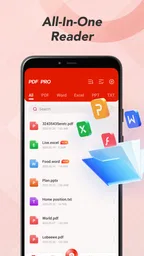
The appeal of PDF Pro: Reader&Editor is straightforward: it is positioned as a single place to open PDFs, Word documents, spreadsheets, presentations, and text files. For everyday household use, that can reduce the scramble to find a suitable reader when someone sends a school notice, a work attachment, or a document that needs a quick look before an appointment. It is best understood as a convenient access point, not as a shared filing system.
Picture a family member receiving a PDF form while another person is using the same phone to review a spreadsheet. A general document reader can make those short, one-off tasks easier than installing separate viewers for every format. I would still treat the phone as belonging to whoever is signed in and holding it: the app’s broad document role does not establish separate household profiles, user accounts, or private spaces.
That distinction matters more than it may seem. A shared device is not automatically a shared workspace. Before handing over a phone, I would close documents containing personal or work information and avoid leaving sensitive files visible in recent-app screens or open folders. Those are sensible device habits rather than special protections I would attribute to this app.
Useful for quick checks, not every document job
PDF Pro is a free productivity app, and its stated focus on PDF and office-format viewing puts it in the same practical lane as built-in file viewers and dedicated office suites. If all I need is to confirm a date, read a notice, or inspect a document while away from a computer, a single reader can be less fuss than switching between apps. The trade-off is that specialized tools may be better when a file needs careful formatting, extensive editing, or a team’s established workflow.
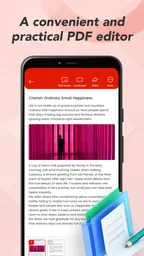
I would not assume that the word “Editor” means every kind of editing is available or equally comfortable across every format. Reading a document and changing it reliably are different jobs. For a quick correction, an app that supports the particular file and task may be enough; for a polished report, a complex spreadsheet, or a presentation that must look identical on another device, I would use the office software responsible for creating it and check the result there.
Keeping personal and work use separate
On a household phone, the most useful boundary is often a simple routine: open only the file needed, finish the task, then return to the file manager and close the document. I would also avoid sharing a device unlocked when a personal attachment is on screen. These steps help prevent accidental exposure, but they are not a substitute for app-level account separation or a managed work profile.
That makes the app a more comfortable choice for casual, low-sensitivity reading than for a device passed frequently among people who need strict privacy from one another. If a document contains financial, medical, or employment details, I would be especially careful about where it is stored and who can access the phone. The app’s document-reading purpose alone does not answer those privacy questions, so I would rely on the device’s own user and lock settings where available.
There is also a practical coordination issue: when several people use one device, it can be hard to tell which copy of a file is current or who has changed it. I would keep important originals in the household’s agreed storage location and use the phone reader for viewing or short tasks, rather than letting multiple people create loosely named copies. That simple rule avoids the familiar “final,” “final-new,” and “final-revised” confusion without depending on undocumented app features.
How I would coordinate around documents
For a shared appointment, I might open a PDF schedule, check the relevant time, and tell the others what it says. For a form that one person must complete, I would decide in advance who is responsible for the final copy and where it should go. A reader can make a document accessible, but it does not replace an agreed handoff, version naming, or a shared folder that everyone already trusts.
One useful habit is to distinguish “read on the phone” from “approved as final.” A document may look readable on a small screen while details such as table columns, page breaks, or slide layouts are difficult to judge. If the file affects a payment, submission, or work decision, I would verify the complete version on the device or software used for the final task. That is a sensible limit for any mobile viewer, and especially important when several people are relying on one person’s quick glance.
The app may suit a household that wants a straightforward way to open different document types without asking everyone to learn a full office suite. It is less compelling if the household needs simultaneous editing, clear ownership of revisions, or centralized control over who sees which files. In those cases, a dedicated office platform or a properly configured shared-storage setup is a better foundation; a general reader can still be useful alongside it.
Age context and trust on a shared device
The app is rated for Everyone, so its content classification is suitable for a broad audience. That does not mean every document opened in it is appropriate for every person using the phone. A child could encounter an adult’s work attachment simply because it is in the device’s files, so I would treat access to documents as a household-device question rather than assume the age rating provides a filter.
I would also make the difference between reading and handling a file clear to younger users. They can be shown how to open a school handout or locate a permitted document, while an adult remains responsible for sensitive forms and important submissions. This is ordinary supervision, not a claim that the app offers child accounts, parental controls, or household permissions.
Trust is also about choosing the right tool for the document’s importance. For a casual notice, a lightweight reader is convenient. For confidential paperwork, I would first consider who can unlock the device and where the file is kept. For a document that must be edited accurately, I would use the application or service that owns the original rather than assume a general-purpose viewer will preserve every detail.
What the rating and availability suggest
PDF Pro has a 3.3 average from around 1,200 ratings, with 54 written reviews, and it has passed one million installs. Those figures suggest that many people have tried it, but they do not tell me whether it will handle a particular document smoothly. I would approach it as a useful option to test with ordinary files, rather than making it the only tool for time-critical work.
It is free, carries an Everyone age rating, and its current release is version 1.0.4. It was released on June 15, 2026, and requires Android 8.0 or later. That makes the Android requirement relevant before installing it on an older household phone; it does not tell me how well a specific device will perform, so I would try a representative file before relying on it for an important task.
Where it fits beside familiar alternatives
Compared with a phone’s built-in document preview, a dedicated multi-format reader can be appealing when the default viewer does not handle a file conveniently. Compared with a full office suite, though, a general reader is a more modest choice for people who routinely create and revise documents. I would choose based on the job: quick access and reading favor convenience, while complex changes and predictable formatting favor the software designed for that file type.
A practical test is to open one harmless example of each format the household actually receives: a PDF notice, a Word document, a spreadsheet, a presentation, or a plain text file. Check whether the text is legible on the phone, whether the important layout is intact, and whether the intended task is comfortable. This small trial is more useful than assuming that a list of supported formats guarantees an equally good experience for every file.
I would also keep a backup route for anything that matters. If a spreadsheet is hard to inspect on the phone, use the spreadsheet app already trusted by the person responsible for it. If a presentation’s layout is crucial, review it on a larger screen. That does not make PDF Pro redundant; it gives it a sensible role as the quick reader rather than the final authority for every document.
My household verdict
I would recommend PDF Pro to someone who wants a free, convenient way to open several kinds of documents on an Android phone, especially when the main need is quick reading across everyday tasks. Its range makes sense for a household device that handles occasional school, personal, and work files, provided people respect the phone’s shared-access limits and keep important originals organized elsewhere.
I would skip it as the household’s central document system if separate identities, controlled access, reliable collaboration, or advanced editing are essential. Those needs call for tools built around accounts, permissions, and document ownership, rather than a reader alone. For a simpler use case, the key is to test the formats you actually receive, protect sensitive files through device habits, and avoid treating a quick mobile preview as approval of a final document.
In short, I see it as a practical convenience rather than a complete office setup. If your household mainly needs to open attachments and check information on the go, it is worth trying. If several people must edit, track, and securely share the same files, choose a more specialized system and use this kind of reader only where it genuinely saves time.
What we like
- Supports annotations for marking up documents.
- Includes tools for filling out PDF forms.
- Lets users organize pages within a document.
- Offers a built-in search for finding text.
- Can handle large documents with multiple pages.
What could be better
- Some editing tools may require a paid upgrade.
- Advanced features can take time to learn.
- Scanned PDFs may not support text editing.
- Complex layouts may shift during conversion.
- Sharing options can vary by device and app version.





