PDF Jumper & Document Reader review
 Analysis by Appsdrops
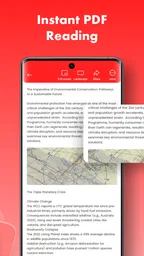
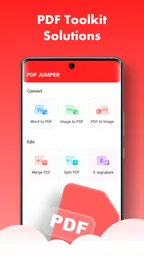
If you need a straightforward way to open everyday office files on your phone, PDF Jumper & Document Reader is aimed at exactly that sort of task. It’s a productivity app from Vialle, described as a clean, compact viewer for PDF, Excel and DOCX files. I like the appeal of keeping common document types within reach in one small app, especially when the goal is simply to read a file rather than work inside a full desktop-style office suite.
A compact document viewer for everyday use
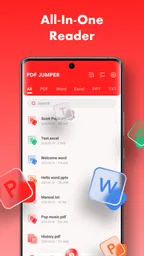
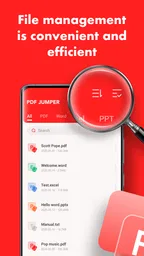
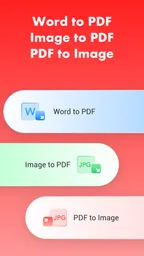
PDF Jumper focuses on viewing documents, with support for PDFs, Excel files and DOCX documents. That gives it a practical role for people who receive different kinds of files and want a single place on their Android device to open them. The emphasis on a compact viewer sets expectations sensibly: this is about access and reading, not a promise of advanced editing or collaboration.
That distinction matters. A document app can become frustrating when its purpose is unclear, particularly if you only need to check a report, read a form or look over a spreadsheet while away from a computer. A viewer-first approach is easy to understand, and the three named formats cover several common situations. For me, the strongest part of the concept is its simplicity: one app, familiar file types, and a clear everyday use case.
The current release is version 1.1.3. The app is free, has an Everyone content rating and requires Android 8.0 or later. Those basics make it approachable for a broad range of Android users, while the minimum OS requirement gives a useful indication of device compatibility. It has reached over one million installs, suggesting that document viewing is a need many people want to solve with a dedicated mobile tool.
What using a viewer-first app means
When I choose a mobile document viewer, I’m looking for a few straightforward things: the file should open without needless fuss, the page or sheet should be readable on a small screen, and moving between documents should feel manageable. Those are reasonable expectations for this category, but they are also areas where the experience depends on how the app handles real files. A brief description can establish the supported formats; the day-to-day feel comes from opening the documents you actually use.
PDFs tend to be shared for reading and reference, while Excel and DOCX files often contain information laid out for a larger screen. Bringing these formats together can save the hassle of switching between separate viewers. I see that as the practical promise behind PDF Jumper: it aims to make a phone a convenient place to consult documents, whether you are checking something quickly or keeping a file handy for later.
How it fits into a productivity routine
A compact viewer can be useful in small moments throughout the day. You might need to consult a PDF while travelling, review a Word document before a meeting or glance at spreadsheet information away from your desk. In those situations, opening the file is often more important than having a long list of specialist tools. A focused app can keep the task simple, provided it presents the content clearly and handles the formats you depend on.
It’s worth matching the app to your own habits. If your work mainly involves reading and checking documents, a viewer may be enough. If you regularly revise text, build spreadsheets or need to share changes with colleagues, you’ll want to consider whether a viewer meets those needs before relying on it as your main office app. I would treat it as a convenient document-reading option first, rather than assume it replaces a full productivity suite.
Release facts and product evolution
The release date shown for the app is July 20, 2026, and version 1.1.3 is the current version. These details place the product at a specific point in its release history, but they do not by themselves explain what changed between versions. I wouldn’t infer new tools, performance improvements or interface changes from a version number alone. The reliable takeaway is simply that the app has a defined current release and is presented as a viewer for PDF, Excel and DOCX files.
For existing users, a newer version can matter when it improves reliability or makes routine tasks smoother. Still, it is sensible to separate that general expectation from what is actually established here. The release information confirms the version in circulation; it doesn’t identify a particular feature addition. If you already use the app, checking the version available through your app store is a practical way to stay current, while the best test remains whether your usual documents open and display as you need them to.
What the audience response suggests
The app holds an average rating of 3.8 from around 3,300 ratings, alongside 54 written reviews. I read that as a mixed but established response: there is enough audience activity to show that people have tried it, yet the average also suggests that experiences are not universally glowing. Ratings can help set expectations, but they don’t tell me whether a particular file type or workflow will suit an individual user.
When browsing user feedback, I’d focus less on a single score and more on comments that match your own needs. Someone who mainly opens PDFs may judge the app differently from someone who depends on spreadsheets every day. Look for recurring observations about document readability, ease of opening files and general stability, then compare those points with the way you plan to use the app. That approach is more useful than assuming every rating reflects the same task.
Where it may suit users best
The clearest audience is someone who wants a dedicated document viewer on Android and regularly encounters PDFs, Excel files or DOCX documents. Students may want a simple way to consult class materials; professionals may need to check a file while away from their desk; and casual users may simply want an app for documents received through ordinary daily channels. In each case, convenience is the selling point, not an elaborate claim about office work.
It may also appeal to people who prefer not to install a large suite when their needs are limited to reading. A lighter, more focused tool can feel less complicated, and the store summary specifically describes the experience as clean and compact. That description captures the intended character, though your own impression will depend on how the app behaves on your device and with your files. I’d try it with a few typical documents before making it part of an important workflow.
Points to keep in mind
The main limitation to consider is the boundary between viewing and editing. The app is presented as a viewer, so anyone expecting comprehensive creation, formatting or revision tools should be cautious about treating it as a replacement for office software. That isn’t a criticism of a viewer doing its intended job; it’s simply a reminder to choose an app according to the task you need to complete.
File compatibility is another practical consideration. PDF, Excel and DOCX support gives the app a useful starting range, but documents can vary considerably in layout and complexity. A simple text file and a heavily formatted document may not be equally comfortable to read on a phone. If a particular file is important, open it in advance and make sure it is legible before you need it in a time-sensitive situation.
Screen size also shapes the experience. A phone is handy for checking information on the move, but a wide spreadsheet or a densely formatted page can be easier to inspect on a tablet or computer. That trade-off applies to mobile document viewing generally. I would see the app as a way to bring documents along, not as a guarantee that every page or sheet will be as comfortable on a small display as it is on a larger one.
What existing users can expect
If you already have the app installed, the current version gives you a clear reference point for what you’re running. The confirmed format focus remains PDF, Excel and DOCX viewing, so the central use case is easy to understand. Beyond that, it’s best to judge the app by your own routine: can you locate and open your documents conveniently, and can you read them comfortably enough to get the information you need?
For newcomers, the free price makes it easy to consider without a purchase decision, while the Everyone rating keeps its audience broad. Android 8.0 is the minimum operating-system requirement, so checking your device version before installing is a sensible first step. These straightforward details help you decide whether it is a fit before you rely on it for work, study or personal records.
What I’d watch in future releases
The most meaningful signs of progress would be clear, documented improvements that help people open and read their files more reliably. I’d pay attention to release notes for specific changes, especially if they address compatibility, readability or everyday navigation. Those are useful areas to watch for any document viewer, but they should be treated as possibilities to look for in future updates, not features already established for this release.
I’d also look for clear communication about the app’s intended scope. If future versions remain focused on viewing, that can be a perfectly valid direction; users simply benefit from knowing where the tool starts and stops. If the product evolves in another direction, concrete release notes can explain that evolution. Until then, the sensible expectation is a compact viewer built around the formats it already names.
My overall take
PDF Jumper & Document Reader has a clear, practical identity: a free Android app for viewing PDF, Excel and DOCX documents. I appreciate that focused purpose because it makes the choice easy to evaluate. If you want a compact way to consult common files on your phone, it is worth considering; if you need serious editing or a complete office workflow, you should look for a tool designed for those jobs.
Its 3.8 average rating and established install base make it a recognizable option, while the version and release details give users a current reference point. I’d approach it as a handy companion for reading files, test it with the documents that matter to me, and keep an eye on future release notes for specific improvements. For straightforward mobile document access, PDF Jumper offers a simple proposition without needing to pretend it is more than a viewer.
What we like
- Quickly jumps to a chosen page in long PDF files
- Supports common document formats beyond PDF
- Bookmarks make it easier to return to important pages
- Text search helps locate specific terms in documents
- Simple controls are easy for new users to understand
What could be better
- Advanced editing tools are limited
- Large files may take longer to open
- Scanned PDFs may not support text search
- Some features may require an in-app purchase
- Ads can interrupt the reading experience





