

Paycom review
 Analysis by Appsdrops
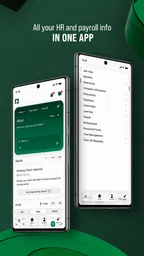
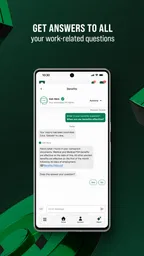
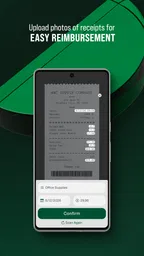
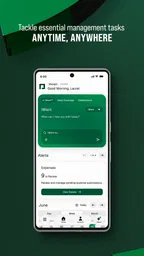
I see Paycom as a workday utility rather than an app you open for fun: its value is in making routine payroll and HR tasks easier to handle when you are away from a computer. If your employer uses Paycom, having a phone-based place to check and manage your own work information can save a trip to a desktop and make small tasks less likely to slip your mind. The app is free, but its usefulness depends on your workplace’s use of Paycom and the access your employer provides.
A practical routine for payroll and HR
Paycom is a tools app from Paycom Software, Inc., built around employees managing their own payroll and HR data. That focus matters. It is not a general-purpose paycheck calculator or a job-search app, and it is not a replacement for your employer’s HR team. Think of it as a mobile route into work-related information and tasks that your organization handles through Paycom.
In an ordinary week, I would use an employee app like this in short bursts: check something relevant to an upcoming pay period, handle a work record while it is fresh in my mind, then close the app. That is a more realistic fit than treating it as a daily dashboard. The best reason to install it is that your workplace already uses Paycom and you want a convenient way to keep up with your own records.
One useful habit is to pair a task with the moment it comes to mind. If I remember a question about payroll while commuting, I can make a note to check it when I have a safe moment, rather than trusting myself to remember later. Similarly, if I need to review a work detail before speaking with a manager, checking the app beforehand can make that conversation more specific. The app’s role is to give you access to your own work information; it does not remove the need to contact HR when a record needs correction or explanation.
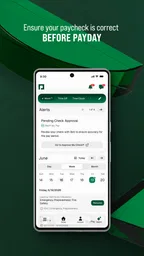
A realistic scenario is an employee preparing for a conversation about a pay discrepancy. I would first review the relevant information in Paycom, note exactly what looks unexpected, and then ask payroll or HR about that specific item. That is more useful than relying on memory or assuming the app can resolve a workplace issue by itself. For anything involving a policy decision, an adjustment, or a missing record, the employer remains the point of contact.
Make the first setup count
Before relying on the app for a time-sensitive task, I would make sure I can sign in and reach the information I expect to use. This is particularly important if you are installing it just before a deadline or a conversation with your manager. Try it when you have a few quiet minutes, rather than discovering a login or access problem in the middle of a busy shift.
Access to employee records is tied to the workplace’s Paycom setup, so the experience may not be identical for every user. If a section you expect to see is unavailable, I would check with your employer instead of repeatedly searching through the app. That distinction helps set reasonable expectations: the app is the mobile interface, while the employer’s configuration and processes shape what you can do with it.
Settings and small checks that prevent hassle
For an app connected to payroll and HR, I would treat account access and phone privacy as part of the setup, not as an afterthought. Use the sign-in method your employer has established, and avoid leaving work information visible when lending your phone to someone else. If your phone offers a lock screen preview setting, consider whether work-related notifications should appear there. This is a practical privacy choice, not a claim that the app exposes particular information in notifications.
I would also check that the app is up to date before depending on it for a work task. The current version is 8.0.14, and the minimum operating system is 10. Those details are worth considering if you use an older phone: an app that cannot be installed or maintained on your device is not a dependable part of a payroll routine. On a supported device, keeping the app current is a simple way to avoid preventable compatibility trouble.
Paycom is rated for Everyone, but that label should not be mistaken for a reason to share access casually. Payroll and HR information is personal even when an app’s age rating is broad. I would keep the account on my own device, sign out or secure the phone when appropriate, and use a private connection when handling sensitive work matters. These are sensible habits for any employee-facing HR tool.
Faster patterns for repeat tasks
The biggest speed improvement is often a repeatable routine, not a hidden shortcut. I would decide what I actually need from Paycom—perhaps a periodic check of work information or handling a specific HR task—and make that the reason I open it. A clear goal keeps a short visit short. It also reduces the temptation to tap around without knowing whether the employer has enabled a particular function.
For a recurring task, tie it to an existing event in your week. For example, you might review relevant work information at a regular point in your pay cycle, or check a detail before a scheduled conversation with a supervisor. The point is not to assume that Paycom has a particular reminder or automation; it is to use your own calendar or routine so that you remember to check. If your workplace has a formal process or deadline, follow that process rather than relying on an informal habit alone.
Another useful pattern is to separate looking up information from asking for action. First, use the app to understand what is recorded. Then, if something is unclear or appears wrong, contact the appropriate person with a concise question. That two-step approach can make HR conversations more productive and avoids treating a mobile screen as the final authority on an issue that may need explanation.
If you use Paycom only occasionally, a little preparation helps more than frequent checking. Know your sign-in details, keep your phone system compatible, and test access before you need it. For people who manage several work responsibilities, that modest preparation can prevent a routine app task from becoming a last-minute interruption.
Where it differs from familiar alternatives
Compared with a paper pay stub, email exchanges, or a shared office computer, a mobile employee app can put work information closer at hand. That convenience is most meaningful when the employer already runs its payroll and HR processes through Paycom. In that setting, the app can fit naturally into an employee’s existing workflow instead of asking them to maintain a separate personal record of every work detail.
It is a different proposition from a personal budgeting app. A budgeting tool helps you plan how to use income; Paycom is oriented toward your employer-related payroll and HR information. You may use both for different reasons, but one should not be treated as a substitute for the other. Likewise, an independent payroll calculator may help estimate take-home pay, but it does not provide the same connection to your own workplace records.
The trade-off is dependence on the employer’s system. If your organization does not use Paycom, the app is unlikely to solve a problem for you simply because you want a mobile HR portal. And if you prefer to handle sensitive work matters face to face, or your employer directs employees to another system, that established route may be the better choice. The app is most useful when it matches the way your workplace already operates.
Limits to keep in mind
Paycom cannot make an employer’s process clearer just by putting it on a phone. A confusing policy remains confusing, and an incorrect record may still require help from payroll or HR. I would not assume that every possible employee task is available to every account, nor would I plan around a feature unless I can see it in my own workplace’s setup. That is a limitation of employer-specific tools: access and available actions can depend on the organization.
There is also a difference between convenient access and a complete support channel. A mobile app may help you review information, but a complicated dispute or a question about how a policy applies to you is often better handled directly with a person. If a task has a deadline, do not assume that opening the app or viewing a screen counts as completing it; check that the action itself has been submitted or confirmed through the process your employer uses.
Some employees may simply prefer a desktop for careful review, especially when they need to compare several records or discuss details with HR. A phone is convenient for quick checks, but a smaller screen can make dense information less comfortable to examine. For an important decision, I would take the time to review the relevant details carefully and use whichever channel makes them easiest to understand.
Who should install it, and who can skip it
I would recommend Paycom to someone whose employer uses it and who wants a straightforward mobile way to keep track of their own payroll and HR matters. It is especially sensible for employees who do not always have access to a work computer, or who would rather check a work detail privately than wait until they are back at a desk. Its average rating is 4.5 from around 118,000 ratings, and it has more than 5 million installs, suggesting that many people use it as part of their work routine.
I would skip it if your employer does not use Paycom, if your workplace has told you to use another employee system, or if you are looking for a personal finance app rather than an employer-connected tool. It may also be unnecessary if you are comfortable using your organization’s existing desktop or HR process and have no need for mobile access. Installing it without a workplace reason is unlikely to add much value.
The app is free, and it has been available since May 30, 2017, so it is an established option rather than a newly launched experiment. Still, what matters most is not its age or popularity but whether it fits your employer’s workflow and your own habits. I would judge it by whether it makes a specific recurring task easier, not by how often I can open it.
A grounded verdict for everyday use
My view is that Paycom works best as a focused companion to your employer’s HR process. Set up access before you urgently need it, keep your device and account secure, and use a repeatable routine for the checks that matter to you. When something looks wrong, use the app to identify the issue and then follow up through the appropriate workplace channel.
That approach keeps expectations realistic. Paycom is not a universal answer to payroll questions, and it cannot replace your employer’s decisions or support. But when your workplace uses it, having your own employee information available on a phone can make routine administration less awkward. I would recommend giving it a try if that convenience solves a real problem in your workday; otherwise, your employer’s existing method may be all you need.
What we like
- Employees can review pay stubs and tax documents in one place.
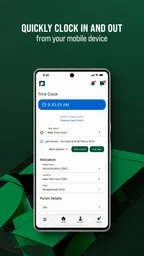
- The app supports clocking in and out from a mobile device.
- Benefit and retirement information is available through the app.
- Push notifications can alert users to important account updates.
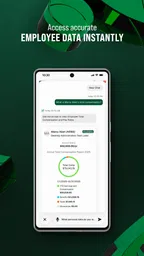
- Employees can update personal details without contacting HR.
What could be better
- Available features depend on the employer's Paycom setup.
- Some tasks may require employer approval before changes take effect.
- A stable internet connection is needed for most account features.
- New users may need time to learn the many menus and options.
- Login problems can make pay or scheduling details temporarily inaccessible.





