




PAX Nav review
 Analysis by Appsdrops
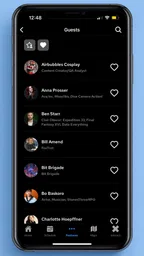
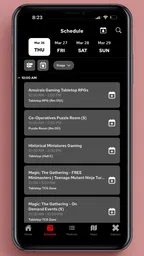
When I head to a large fan event, I want a phone app that helps me make decisions on the move, not another place to browse announcements. PAX Nav is built for that event-going context: it is an events app from ReedPop Mobile, intended to help attendees navigate PAX. Its focus is useful precisely because a convention day can involve competing plans, unfamiliar spaces, and quick changes of mind. I would treat it as a practical companion rather than a reason to plan every hour around a screen.
Useful when the day gets busy
The first question I would ask is whether a dedicated event app is worth installing when a calendar, map, and group chat already live on my phone. For PAX, the advantage is having event-related information gathered in one place rather than piecing together separate notes and searches. That can make a difference when a friend asks where to meet or when I need to reconsider a plan between activities. The trade-off is that an app focused on one event has less value outside that setting than a general-purpose calendar or map.
I see the strongest case for it in the middle of a crowded day, not during weeks of advance planning. Imagine arriving with two friends, splitting up for a while, and wanting to regroup without turning the conversation into a chain of vague directions. A purpose-built event companion gives the group a shared starting point for navigating the event. I would still agree on a clear meeting place in advance, though: no phone app can compensate for a group that has not settled on a practical way to reconnect.
That distinction is important. PAX Nav is most appealing to people who expect to spend time at PAX and want event-specific help close at hand. If I were only deciding whether to attend, I would use the event’s official information and my own notes first. If I were already on site, I would be more likely to keep the app available for quick reference. It is not a universal travel planner, and I would not expect it to replace the tools I use for transport, messaging, or general navigation.
Trust starts with keeping expectations narrow
Because an event app can sit beside plans, schedules, and personal choices, I think it is sensible to ask what role it actually needs to play on my phone. The clearest basis for trusting this one is its narrow purpose: it is presented as the official PAX navigation app, rather than as a broad social network or an all-purpose lifestyle service. That focus makes the decision easier to frame, but it does not by itself answer questions about permissions or data handling.
I would not treat a familiar event name or an official label as proof of a particular privacy practice. Before installing, I would check the app store’s current permission prompts and privacy information, then decide whether each request makes sense for the way I plan to use it. If a prompt appears that I do not understand, I would pause instead of granting access automatically. That is a useful habit for any event app, especially one I might only need for a short period.
The app is free, which lowers the barrier to trying it, but “free” does not answer every question about how an app works or what information it handles. My practical approach is to install it when I have a clear use for it, review the choices presented on my device, and remove it later if I no longer need it. That keeps the decision in my hands without assuming either a problem or a guarantee that has not been established.
Check controls at the moments that matter
Permission decisions are easier when they are tied to a real task. If I am using PAX Nav to orient myself, I would consider whether the app asks for access that is relevant to that task and whether the phone offers a way to grant access only while using it. I would make that choice from the system prompt rather than guessing that a permission is required. If I can use the app without granting an optional permission, I would prefer to start with the narrower setting and expand it only if I encounter a clear need.
There is also a useful difference between information I choose to enter and access I grant from the phone. A saved plan or a typed note, where an app offers such an option, is a deliberate action; access to a device feature is a separate choice. I would avoid putting sensitive personal details into any event tool unless doing so clearly helps me. For an ordinary meetup, a simple public landmark is usually enough, and it is less revealing than sharing private contact or location details unnecessarily.
I would also review device-level controls after the event. A permission can often be changed in the phone’s settings, and notifications can be adjusted there as well. I would not assume that switching off a permission erases information already shared; those are different questions. If I want to understand what happens to account or app data, I would consult the current privacy and account information presented in the app store or by the developer, rather than infer an answer from the app’s purpose.
Keep plans flexible instead of letting the app run the day
My most useful workflow would be to make a rough plan before arriving, use the app as a reference while moving around, and leave room for spontaneous discoveries. At a convention, a rigid timetable can become a source of stress: one delay can make the rest of the day feel ruined. I would choose a few priorities, identify a simple regrouping point with friends, and use the event app to support those decisions rather than treating every item as a commitment.
For a group, I would agree on the communication method separately from the navigation tool. An event app can help with event context, while a messaging app is usually the straightforward choice for direct coordination. This division also limits confusion: if one person is not using PAX Nav, the whole group does not have to rebuild its plan around it. Before splitting up, I would make sure everyone knows the meeting point and a time window, then use messages for changes that need an immediate response.
Another sensible choice is to prepare for a low-battery or poor-connectivity moment without assuming that the app will solve either problem. I would keep essential details I personally need somewhere accessible and avoid relying on a single screen for every decision. That is not a criticism unique to PAX Nav; it is a practical convention habit. A dedicated tool can reduce friction, but it should not become the only way I know where to go or how to find my friends.
How it compares with general event-planning tools
Compared with a generic calendar, PAX Nav has a more specific reason to exist: it is oriented toward PAX rather than asking me to build an event guide from scratch. A calendar remains better for reminders that need to follow me into the rest of the week. A maps app is better for broader journeys beyond the event. A group chat is better for conversations. I would use those tools alongside the event app when each has a clear job, not expect one specialist app to replace them all.
That division of labor also helps answer who should skip it. If I already have a reliable way to find the information I need, attend only briefly, or prefer not to install event-specific apps, I may get little value from adding another icon. Someone who expects to navigate PAX actively is more likely to appreciate having an official companion ready. The decision is less about whether a dedicated app is inherently better and more about whether its event-specific convenience outweighs the extra install and the time needed to review its controls.
The app has a 3.8 average from around a hundred ratings, with roughly forty-five written reviews, and more than fifty thousand installs. I read that as evidence that people do use it, not as a guarantee that it will suit every attendee or every phone. A rating can flag that opinions vary, but it cannot tell me whether someone’s particular issue applies to my use case. I would make my decision based on whether I need PAX-focused navigation and whether the permissions and choices shown on my own device feel appropriate.
A measured recommendation for PAX attendees
PAX Nav is free, rated for Everyone, and currently at version 6.1.2; it first appeared on February 13, 2023, and requires Android 10 or later. Those details make it straightforward to assess basic fit before installing, especially if I am checking an older device. ReedPop Mobile is the developer, and the app belongs in the events category. I would still confirm compatibility and review the current app-store information on the device I plan to bring.
My recommendation is conditional but positive: if I am attending PAX and want an event-specific companion, I would try it, check the choices it presents, and keep my plans flexible. I would not install it expecting a privacy guarantee, a replacement for messaging, or a complete answer to every logistics question. If I only need general directions or a shared calendar, the tools already on my phone may be the better fit. For an attendee who values a focused event reference and is willing to make deliberate permission choices, it is a reasonable addition to the day.
What we like
- Provides turn-by-turn navigation for PAX device users.
- Can help locate nearby PAX services and destinations.
- Offers a focused interface for navigation tasks.
- Useful for planning routes while traveling.
- Designed to complement the PAX ecosystem.
What could be better
- Its usefulness depends on owning or using a compatible PAX device.
- Coverage and features may vary by location.
- Navigation requires location access.
- Route guidance can depend on a reliable internet connection.
- It may offer limited value to users outside the PAX ecosystem.





