

Pathways.org Baby Milestones review
 Analysis by Appsdrops
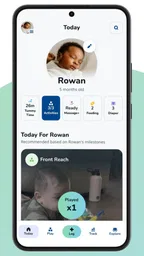
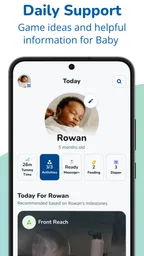
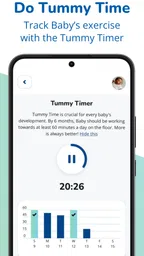
When I’m trying to make tummy time happen between naps, feeds, and the ordinary bustle of a day with a baby, a simple way to keep it in view is more useful than another elaborate parenting dashboard. Pathways.org Baby Milestones puts tummy time tracking alongside developmental play ideas, giving parents a practical prompt to notice what their baby is doing and make room for short, purposeful interactions.
Why tummy time tracking is the useful center
The app’s clearest value is the link between an everyday activity and a broader interest in development. Rather than treating tummy time as something to remember in passing, it gives it a place in a parenting app focused on baby milestones. I like that emphasis: it can help turn an intention into a small routine without making the parent’s day feel like a test to pass.
That distinction matters. A tracker can support consistency, but it cannot tell you what your baby needs in the moment or replace advice from a health professional. I’d use it as a gentle organizer and a source of play inspiration, not as a verdict on whether development is “on schedule.” The most helpful attitude is curious and responsive: observe, try an activity, and adapt when your baby is tired or unsettled.
Pathways.org is a free parenting app from Pathways.org, and its focus is more specific than a general family organizer. It is aimed at parents who want developmental ideas and a way to keep tummy time on their radar, rather than people looking primarily for shared calendars, feeding logs, or household task lists. That narrower purpose is also its strength: it makes the app easier to judge by whether it helps you engage with your baby.
Turning an intention into a repeatable routine
In practical use, a tracker is most helpful when I connect it to something that already happens. For example, I might think about tummy time after a diaper change or during a calm stretch of awake time, rather than waiting for a long, perfectly planned session. The app’s presence can serve as a reminder to offer the opportunity and notice how the baby responds. That small change in routine is more realistic than expecting a new parent to add a complicated schedule.
A useful habit is to record the activity soon after it happens, instead of relying on memory at the end of a tiring day. I’d also treat the record as a rough personal aid, not a measure of performance. A baby may have an easy day and a fussy day; the point is to make opportunities for movement and interaction, not to chase a flawless streak or compare one day with another.
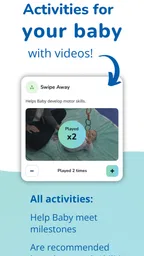
The companion play ideas give the tracking a purpose beyond keeping a note. When a parent is wondering what to do during a short awake window, an activity suggestion can make it easier to start engaging instead of reaching for a screen or feeling stuck. I find that especially useful when the adult is tired and wants a simple idea, not a lecture on development or a long list of things to prepare.
What it feels like in an ordinary day
Picture a parent at home with a baby who has just woken up and is content for a few minutes. There may not be time to plan a full activity, but there is an opportunity to get down on the floor, offer a little interaction, and see how the baby responds. A tummy time tracker makes that moment easier to remember as part of the day. If the baby becomes uncomfortable, the parent can stop and try again at another suitable time; the app should not turn a short, interrupted attempt into a reason to push through distress.
This is where the app’s approach seems most useful: it can help turn developmental support into ordinary play rather than a separate project. I’d keep the phone nearby only long enough to check or record what I need, then put it aside and give the baby attention. The baby is the focus, not the app’s screen. That simple boundary also avoids letting tracking interrupt the face-to-face interaction that makes play meaningful.
For a second practical use, a parent can glance back at their own notes when trying to remember whether tummy time has naturally appeared in the day’s routine. That is more useful than guessing from a vague impression, particularly when sleep and feeds blur together. Still, I would not expect a tracker to resolve every uncertainty about progress. If a parent has a specific developmental concern, a conversation with a pediatric professional is a better next step than trying to interpret an app entry.
How it compares with familiar alternatives
Compared with a paper note or a reminder in a general phone app, a dedicated parenting tool has the advantage of keeping tummy time and developmental play in the same context. A paper log can be more flexible and never asks you to switch screens, while a basic reminder may be enough for someone who only wants a nudge. The case for Pathways.org is stronger when the parent also wants ideas for engaging with the baby, not just a tick box.
It is also different from a broad baby-tracking app whose main purpose is to organize feeding, sleep, or diaper changes. Those tools may suit a family that wants a single place for several kinds of routine records. This app is a more focused choice for developmental play and tummy time. I would not choose it expecting it to replace an all-purpose baby log, and I would not add it simply because every new parent seems to have an app for everything.
That focus creates a useful trade-off. A narrow tool can feel more approachable when you have one clear goal, but it may not become the central record-keeping hub for your family. If you already have a reliable routine and only need to log multiple daily care details, your existing system may be more convenient. If you want to make play and developmental observation a more deliberate part of the day, the app’s emphasis is more relevant.
Where a gentle tool needs clear boundaries
The main limitation is not a flaw unique to this app so much as a risk of using any developmental tracker too literally. Records can create a sense of progress, but they cannot capture the full context of a baby’s mood, comfort, or circumstances. I’d resist treating a missed entry as a failure, or interpreting a quiet day as evidence that something is wrong. A tracker should reduce mental load; if it adds pressure, it is being used in the wrong way.
There is also a practical question of attention. Looking at a phone during play can pull a parent away from the interaction, so I’d check an idea beforehand or record an activity afterward when possible. The most useful workflow is brief: choose a suitable moment, focus on the baby, and use the app only to support the routine. Parents who prefer to keep phones out of caregiving moments may do better with a simple paper reminder or a mental cue tied to an existing part of the day.
Expectations matter, too. This is a supportive parenting app, not a substitute for individualized medical guidance. If a baby has particular needs or a clinician has suggested a specific plan, that advice should take priority over a general activity suggestion. I see the app as a way to encourage attentive play, not to diagnose, prescribe, or settle questions that call for professional judgment.
Who is most likely to benefit
I’d recommend it most to a new or busy parent who wants a low-pressure prompt to make tummy time and developmental play easier to remember. It can also suit caregivers who share baby care and would like a common reference point for activities, provided they treat the tracker as a practical aid rather than a scorecard. The best fit is someone who wants ideas and gentle structure, but is happy to adapt them to the baby in front of them.
Parents who already have a routine they enjoy may not gain much from adding another app. Nor is this the right pick for someone primarily seeking a comprehensive feeding-and-sleep journal, a medical assessment, or a strict schedule. In those cases, a dedicated tracker, clinician’s guidance, or a simple family system may serve the need better. Choosing not to use a developmental app is perfectly reasonable if it makes caregiving feel more complicated.
The app is rated for Everyone and has a 4.7 average from around 945 ratings, with over 100,000 installs. Those figures suggest it has reached a sizeable audience, but they would not decide the matter for me: fit depends on whether its focused approach matches the way you care for your baby. It is free, which makes it easy to try without committing money, though I’d still judge it by whether it actually reduces friction in your routine.
A useful companion, not another parenting test
Pathways.org Baby Milestones works best when its tummy time tracking is treated as a nudge toward real interaction, not as an obligation to fill in every day. I appreciate the connection between tracking and play ideas, because it gives a parent something constructive to do with the reminder. The app’s focused scope means it will not be everyone’s all-in-one baby tool, and that is worth understanding before installing it.
For me, the practical recommendation is straightforward: if you often mean to make time for tummy time but lose track amid daily care, this app is worth trying as a lightweight support. Use it to build a flexible rhythm, follow your baby’s cues, and put the phone away when play begins. If it helps you remember to pause, get down on the floor, and engage, it is doing its job; if it starts making you anxious about logs or milestones, step back and rely on a simpler routine.
Pathways.org lists version 2.21.1, with Android 8.0 or later required. The app was released on July 26, 2022, and has 74 reviews. Those details help identify the current app, while the more important question for a parent remains whether a focused developmental companion makes daily care feel easier. My answer is yes for families looking for a gentle reminder and play inspiration, and no for anyone expecting a complete care-management system.
What we like
- Offers free milestone checklists for parents.
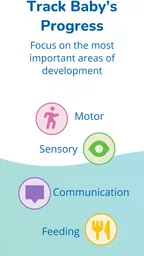
- Covers motor and communication development.
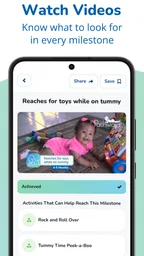
- Includes videos demonstrating activities and skills.
- Lets parents track progress by age.
- Provides guidance on when to consult a professional.
What could be better
- Milestone information is not a substitute for medical advice.
- Some activities may require an adult to supervise closely.
- The app may not reflect every child's individual development.
- Parents may need to enter observations regularly to track progress.
- Availability and features may vary by device or region.





