






Parental Control App- FamiSafe review
 Analysis by Appsdrops
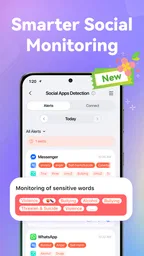
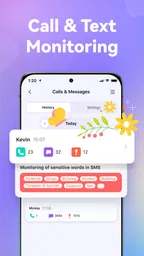
Keeping up with a child’s online life can feel like a full-time job. Social platforms change quickly, and it is not always easy for parents to know when a conversation or piece of content deserves attention. FamiSafe is a parental-control app that puts social media detection at the center of its approach to helping families stay safer online. I see its main appeal in that clear focus: rather than treating online safety as an afterthought, it is the reason to take a closer look at the app.
A parental-control app focused on online safety
Made by Shenzhen Wondershare Software Co., Ltd., FamiSafe sits in the parenting app space and is intended for families who want an additional way to engage with children’s digital lives. The app is free to install, is rated for everyone, and has reached more than five million installs. Its audience response is also substantial, with an average rating of 4.3 from around sixteen thousand ratings. Those figures suggest that many families have considered it, though popularity alone cannot tell you whether its approach will suit your household.
The central promise is straightforward: FamiSafe has upgraded its social media detection to help families stay safer online. That makes it especially relevant to parents whose concerns are less about limiting every screen activity and more about understanding potential risks around social media. I appreciate that the app’s stated focus is easy to grasp. When choosing parental controls, a clear purpose is more useful than a long list of vague promises.
What the social media emphasis means for families
Social platforms can be a complicated part of growing up. Children may use them to communicate, find communities, and follow interests, while parents may worry about harmful interactions or content. A tool centered on social media detection speaks directly to that tension. It offers a reason to have a more informed conversation at home, rather than making online safety only about rules or restrictions.
Still, an app should be treated as one part of a family’s approach, not a substitute for talking with a child. I would view FamiSafe as a potential support for parental awareness, while keeping expectations grounded in its stated purpose. The summary points to detection and safer online experiences; it does not, by itself, tell us how every situation is handled or what a parent will see in practice. That distinction matters when deciding whether the app fits a family’s needs.
A product with a clear history
FamiSafe was released on July 13, 2018, and its current version is 9.1.7.1023. The move from an earlier release history to a current version gives the product room to evolve, and the stated social media detection upgrade is a meaningful signal of where that evolution is being directed. It indicates a current emphasis on online safety concerns that families are likely to recognize, without implying that every part of the app has changed in the same way.
For existing users, an upgrade focused on social media detection may make the app feel more aligned with the challenges they are trying to manage today. The practical effect will depend on how the app behaves in a household and whether the updated approach addresses the parent’s specific concerns. I would not assume that an update automatically changes a family’s routine; it is worth reviewing the app’s current controls and discussing expectations with children before relying on it.
Getting started and weighing the cost
The app is available for devices running Android 6.0 or later, giving it a defined minimum operating-system requirement. It is free to download, with in-app purchases ranging from $8.99 to $109.99 per item. That range is worth keeping in mind before committing to a paid option. Families can begin by exploring the free app, then decide whether any paid offerings are relevant to their use, rather than assuming that every useful capability comes at no cost.
I recommend checking the purchase choices carefully and considering them in the context of your family’s budget. A broad price range can represent different items or options, so it is sensible to read each in-app purchase description before confirming anything. The free starting point lowers the barrier to trying the app, while the optional spending means that the overall value depends on what a household actually chooses to use.
Fit, expectations, and open questions
One of FamiSafe’s strengths is its recognizable purpose. Parents looking specifically for a parental control app with an emphasis on social media detection have a clear reason to investigate it. Its age rating is everyone, and the app has accumulated around twelve hundred written reviews alongside its larger pool of ratings. Those reviews can help prospective users understand other families’ experiences, although individual opinions may vary, and no single review should determine whether a tool is right for your child.
The main consideration is to match the app’s promise to the need you actually have. If your priority is social media safety, the stated focus is relevant. If you are searching for a very particular control or monitoring function, take time to check the app’s current description and settings before making a decision. That is not a criticism of the concept; it is simply a practical way to avoid expecting a tool to solve a problem it does not address in the way you need.
It is also helpful to think about how parental controls affect trust. Children are more likely to understand digital boundaries when parents explain what they are concerned about and why a tool is being used. I would pair any monitoring approach with an open conversation about privacy, respectful communication, and what a child should do when something online feels uncomfortable. In that role, an app can support a broader family plan rather than become the whole plan.
What to keep an eye on next
For families already using FamiSafe, the most useful thing to watch is how its social media detection develops in future versions and whether those changes remain easy to understand in everyday use. A product can evolve technically while still needing clear explanations for parents and children. Future updates will matter most when they translate the safety focus into practical, understandable support, rather than simply adding complexity.
Prospective users should also keep an eye on the current app version, device compatibility, and the details of any paid items before installing or purchasing. The version listed now is 9.1.7.1023, and Android support starts at 6.0. These concrete points help with basic planning, while the app’s real value will ultimately come down to whether its approach suits a household’s routines, expectations, and conversations about online life.
Overall, I see FamiSafe as a focused option for parents who want to explore social media detection as part of a wider online-safety strategy. Its established presence, free installation, and clear emphasis make it worth considering, while the in-app purchase range and the need to check specific capabilities call for a little care before relying on it. Used thoughtfully and paired with honest family conversations, it may be a useful addition to a parent’s toolkit—not a replacement for guidance, trust, or ongoing attention.
What we like
- Location tracking helps parents check where children are.
- Geofencing can alert parents when a child enters or leaves a chosen area.
- Screen time limits help encourage healthier device habits.
- App blocking lets parents restrict access to selected apps.
- Activity reports provide a view of children's device use.
What could be better
- Some features require a paid subscription.
- Children may find monitoring intrusive and resist using the app.
- Reliable location tracking depends on the child's device connection.
- Setup requires access to the child's device and permissions.
- Features and availability can vary between Android and iOS.





