


Pampers Rewards review
 Analysis by Appsdrops
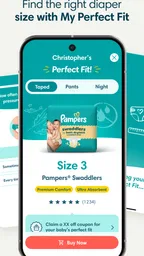
When diapers are a regular household purchase, a rewards app can be useful—but only if it fits the way the adults who shop actually manage those purchases. I see Pampers Rewards as a focused companion to buying Pampers, not a general parenting planner or a shared family organizer. Its appeal is straightforward: keep the reward process in mind while handling an expense that already comes around often. The practical question is whether that small extra step works for your household’s routines.
One diaper run, more than one adult
Picture a familiar handoff: one adult notices the diaper supply is running low, while another is already heading to the store. In that situation, a rewards app can make the purchase feel less like an isolated errand and more like part of an ongoing routine. The key is deciding who will handle the reward-related steps, rather than assuming everyone will automatically see the same information or act on it.
I would treat the person who usually buys the diapers as the main account holder. If another caregiver sometimes shops, agree on a simple arrangement before the next trip: who checks the app, who keeps track of the purchase, and who handles any reward activity. That modest bit of coordination can prevent the awkward situation where both adults assume the other has taken care of it.
This is where Pampers Rewards is most appealing: it is attached to a product category many families already buy repeatedly. It does not have to become another app everyone checks every day. A quick look during a diaper restock is a more realistic habit than expecting a busy household to remember it at unrelated moments.
The trade-off is that a brand-focused rewards app is naturally narrower than a household shopping list or a general budgeting tool. It can support your Pampers routine, but I would not use it as the place to coordinate every baby purchase. Keep shared lists, reminders, and expense tracking in whichever tools your household already uses, and let this app serve its more specific purpose.
Set expectations before sharing a device
If a phone or tablet is used by several adults, decide whether the app belongs to one person’s account or whether a particular caregiver will be responsible for it. A shared device does not automatically mean that each adult has a separate account, separate progress, or a shared view of activity. I would avoid making assumptions about account arrangements and simply keep the login and reward decisions with the person who has agreed to manage them.
That boundary matters in households where grandparents, babysitters, or co-parents occasionally pick up supplies. Someone can be trusted to buy the right size without needing access to the account. If a helper is shopping, a short note about the product and size may be more useful than passing around account details. The app is most convenient when its use is deliberate, not when access becomes another thing to negotiate during a rushed errand.
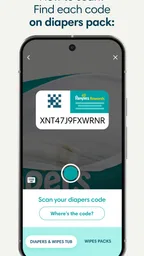
For the main shopper, I would build a small routine around restocking: check the diaper supply, open the app when planning the purchase, and deal with any relevant reward steps while the receipt or purchase details are still easy to find. This is a practical workflow rather than a feature claim. It reduces the chance that a rewards task gets postponed until the details are harder to remember.
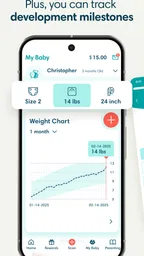
One useful household distinction is between tracking the baby’s needs and tracking the shopper’s rewards activity. Those are related, but not identical. A caregiver may need to know which diaper size to buy, while the account holder may be the person who handles reward activity. Keeping those jobs separate avoids treating the app as a substitute for communicating the child’s current needs.
Coordination that works around real shopping habits
My advice is to connect app use to the purchase decision, not to the moment you run out. When the household is already planning a diaper run, the main shopper can check the app and make a note of anything that needs attention. This is less stressful than trying to remember rewards while standing in an aisle with a tired child and a half-finished shopping list.
There is also a useful distinction between a household that buys Pampers consistently and one that switches brands according to availability, promotions, or a child’s changing needs. The first household is more likely to find a dedicated rewards app worth keeping in its routine. For the second, it may be better to choose the diaper that suits the child and the budget first, then treat any rewards as a secondary consideration rather than a reason to stay with a product that is not working.
For co-parents who shop separately, the best approach is to agree on one account-handling routine rather than having both people improvise. One person can take responsibility for checking the app, while the other shares the relevant purchase information in whatever way they already communicate. That keeps coordination lightweight. I would not assume the app itself provides shared household controls or a common family dashboard.
It is also worth thinking about receipts and purchase records as ordinary household paperwork. If a purchase may matter for reward activity, make a habit of keeping the information accessible until the relevant app step is complete. This is a small but concrete improvement: it avoids relying on memory after several errands have blurred together. The app is more useful when the shopper pairs it with a consistent record-keeping habit.
Age context and sensible trust
The app is listed for Everyone, but the people who will get practical value from it are adults managing diaper purchases. That distinction is important in a household with older children who use a shared device: an age label is not a reason to hand over account responsibilities or assume a child should manage purchases and rewards. I would keep those decisions with a parent or caregiver.
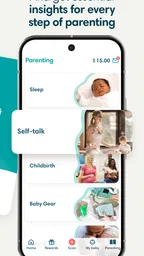
As a parenting app, it has a specific role rather than an all-purpose one. The developer is Pampers by P&G-Diapers, Baby products & Reward, which makes the brand connection clear. I would think of it as a place for Pampers-related rewards activity, not an independent source of broad parenting advice or a neutral guide to choosing among diaper brands.
That focus is a benefit if your household already buys the brand and wants a dedicated way to engage with its rewards. It is a limitation if you prefer one app to cover many brands, or if you want a tool built around shared calendars, feeding logs, or general baby-care records. In those cases, a broader parenting or shopping app is likely a better fit, while this one may be unnecessary.
I also would not confuse a free download with a guarantee that every household will save money. The app costs nothing to install, but the value depends on whether its rewards are useful to you and whether they fit purchases you would make anyway. My sensible rule is to buy what works for the child and household budget, and let rewards add value only when they do not push you toward unnecessary spending.
What the audience numbers suggest—and what they do not
Pampers Rewards has an average rating of 3.9 from around 58,000 ratings, with about 20,000 written reviews and over one million installs. Those figures suggest that many people have tried it, while the rating leaves room for mixed experiences. I would take that as a reason to approach it with practical expectations: a rewards app can be handy, but it still has to fit your shopping habits to feel worthwhile.
The app was released on June 17, 2017, and its current version is 3.2634.0. It is available for devices running iOS 9 or later. For a household using an older device, checking compatibility before building a routine around it is a sensible first step. The age of the app also makes it useful to judge your own experience by whether the current version works smoothly on your device, rather than expecting a rewards app to transform diaper shopping.
Since the app is free and rated for Everyone, trying it is a relatively low-commitment decision for an adult who already buys Pampers. Still, downloading it is not the same as deciding that every caregiver should use it. I would start with the person who makes most of the diaper purchases, then keep it only if the rewards process is clear enough to justify the extra attention.
Who should choose it, and who should skip it
I would recommend it to a regular Pampers buyer who is comfortable using a brand-specific app and can attach its use to an existing shopping habit. It is especially suited to the household’s main diaper shopper: one adult can manage the app while other caregivers coordinate product needs through their normal communication. That arrangement makes the tool useful without turning it into a family-wide obligation.
I would skip it if you rarely buy Pampers, strongly prefer not to maintain brand accounts, or already find shopping apps distracting. I would also look elsewhere if your main need is a shared household system for lists, budgets, and childcare tasks. A general-purpose tool is better for those jobs; Pampers Rewards is best judged on whether it adds value to Pampers purchases specifically.
Compared with ordinary diaper shopping, the app adds a rewards layer that can make repeat purchases feel more worthwhile. Compared with broad parenting apps, it is much more focused and should not be expected to organize the rest of family life. That narrowness is not a flaw by itself. It is simply the reason I would install it for a particular purpose, rather than treating it as an essential app for every new parent.
A practical household verdict
My overall view is that Pampers Rewards makes the most sense as a small, optional part of a regular Pampers shopping routine. Pick one adult to manage the account, agree how occasional shoppers will share purchase information, and check the app when planning a restock rather than leaving everything until after the errand. Those choices make it easier to keep the app useful without creating confusion over who is responsible.
My recommendation is to try it if Pampers is already your household’s usual choice, but keep the app’s role modest. It is not a replacement for a shared shopping list, a child-care organizer, or a conversation between caregivers. Used with clear account boundaries and a simple restocking habit, it can be a reasonable way to engage with rewards on purchases you were already planning to make.
What we like
- Rewards can make routine diaper purchases feel more worthwhile.
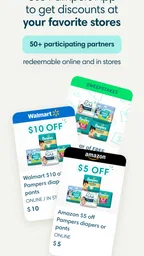
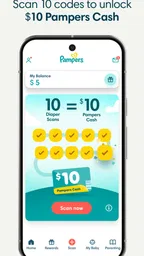
- The app gives families one place to manage Pampers rewards activity.
- A digital account can reduce the need to keep paper receipts.
- Reward offers may help users discover Pampers products.
- Parents can check their rewards progress when it suits them.
What could be better
- Rewards value may depend on eligible Pampers purchases.
- Some offers may not be available to every user.
- Account access requires an internet connection.
- Reward terms and redemption rules can take time to understand.
- The app may be less useful for families who buy other brands.





